

Design how inbound calls move from your business number through menus, IVR, queues, groups, users, overflow and fallback — before you compare VoIP providers.
Use simple routing when callers only choose a destination. Use IVR when information must influence the next step.
Choose based on whether callers need to wait, how calls should be distributed and what reporting the team requires.
Every queue, group and transfer route needs a timeout, no-answer or alternative destination.
On this page
1. Fast Answer: Build the Call Journey Before You Compare Providers
Business call routing is the set of rules that decides what happens to an inbound call from the moment it reaches your business number until it reaches a person, team, queue, voicemail or fallback destination.
A good routing design does more than answer calls. It gives every common call type a clear path, defines what happens when the preferred destination is busy or unavailable, and makes sure the business still has an acceptable route during out-of-hours periods or service disruption.
The most useful way to think about routing is:
Number → Greeting → Menu or Interaction → Team → Distribution → User → Overflow → Fallback
That journey can use several different building blocks:
- Auto attendant — greets callers and routes them using menus, schedules or directory options.
- IVR — collects caller input and can use that information to make more complex routing or self-service decisions.
- Call queue — holds callers until an appropriate agent becomes available.
- Ring group — rings several people or devices together or in a defined sequence.
- Hunt group — distributes calls across a defined group using a hunting pattern; terminology varies by platform.
- Time-based routing — changes behaviour by business hours, weekends, holidays or scheduled events.
- Forwarding and simultaneous ring — redirects or presents calls to alternative endpoints.
- Transfer — moves an answered call to another person, team or destination.
- Overflow and no-answer rules — define what happens when the preferred route cannot handle the call.
- Voicemail and message handling — provide a controlled end point when live handling is not available.
The objective is not to switch on every feature. It is to create the simplest routing model that gets callers to the right outcome with a clear fallback when the ideal route fails.
If you are still defining the wider phone-system requirement, start with the VoIP Buyer’s Guide. This page goes deeper into the call-handling layer.
The Call-Routing Design Rule
Use one question at every step:
What should happen next if the preferred route works — and what should happen if it does not?
That turns routing from a list of features into an operational design.
A useful high-level flow is:
Main Number → Auto Attendant / IVR → Department → Queue / Ring Group → User → Overflow → Voicemail / Fallback
The exact combination will differ by business, but every stage should have a purpose.
What This Guide Helps You Produce
By the end of this guide you should be able to document:
- your important inbound numbers;
- first-answer behaviour;
- menu or IVR requirements;
- business-hours and out-of-hours rules;
- queues, ring groups or hunt groups;
- team membership;
- overflow and timeout rules;
- transfer behaviour;
- voicemail destinations;
- external fallback routes;
- CRM or workflow integration points;
- reporting and recording requirements;
- failure paths;
- the routing scenarios a shortlisted provider must demonstrate before you buy.
That becomes part of the provider-ready specification created in the VoIP Buyer’s Guide.
2. Map the Complete Inbound Call Journey
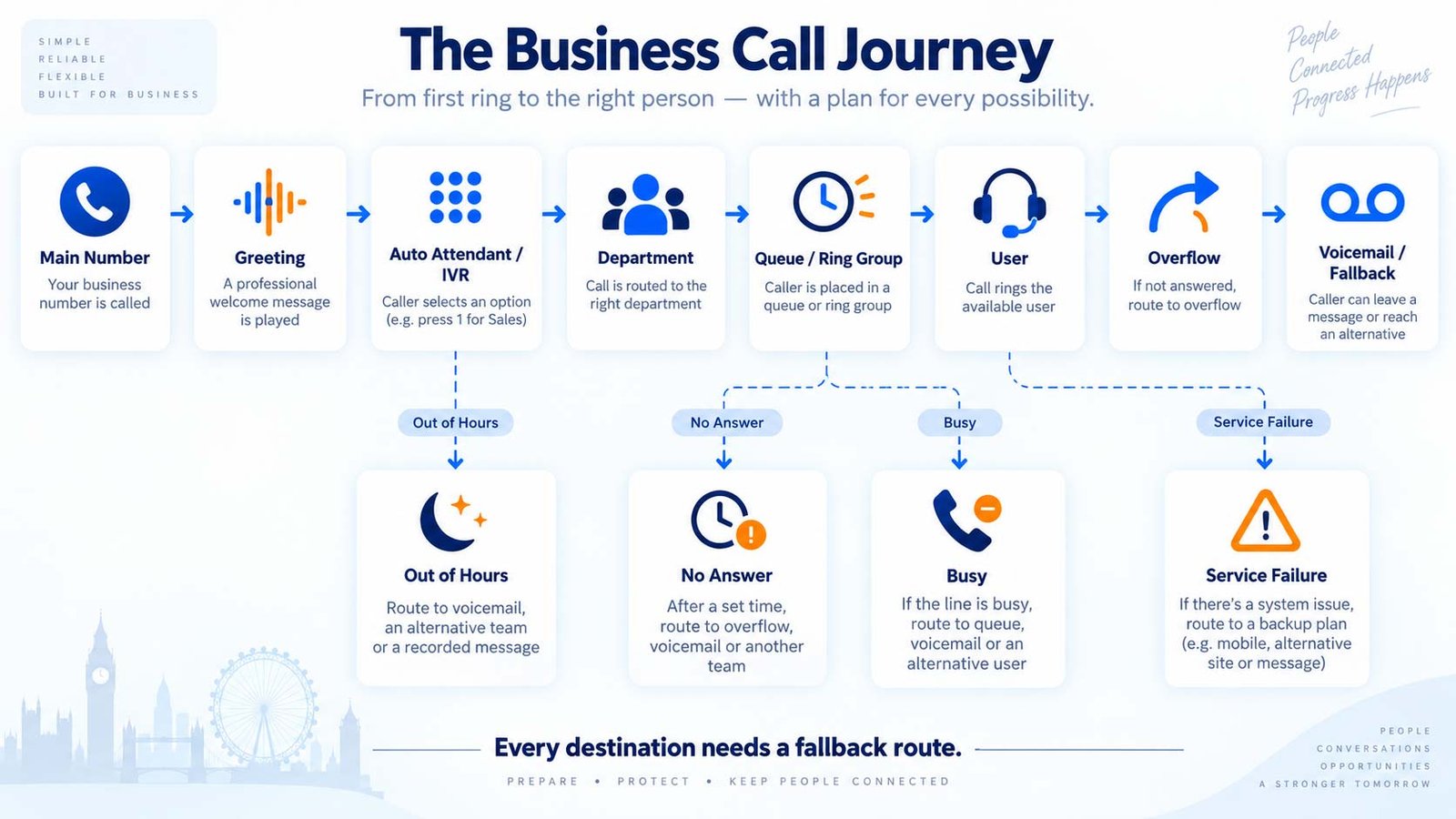
Before choosing routing features, map the call journey from the caller’s point of view.
Do not start with your organisation chart. Start with the reasons customers actually call.
Start With the Number the Caller Dials
Every important inbound number should have a defined role.
Examples include:
- main company number;
- Sales number;
- Support number;
- Accounts number;
- branch or location number;
- campaign number;
- published direct-dial number;
- customer-service number.
For each number, decide whether it should:
- go directly to a person or team;
- enter an auto attendant;
- enter an IVR;
- reach a queue;
- route differently by time;
- use a dedicated overflow or fallback path.
A published Sales number may not need the same front-door menu as the main company number. A direct Support number may enter the Support queue immediately during business hours but follow a different route at night.
Define the First Answer
The first answer is what the caller experiences immediately after the call connects.
That may be:
- a recorded greeting;
- an auto-attendant menu;
- an IVR prompt;
- a live receptionist;
- direct queue entry;
- direct ringing to a team.
The first answer should tell the caller enough to understand what is happening without creating unnecessary delay.
For example:
“Welcome to Example Ltd. For Sales press 1, for Support press 2, for Accounts press 3, or stay on the line for Reception.”
That is a routing function.
By contrast:
“Please enter your customer reference, then choose the service you need.”
is an interactive workflow that starts moving toward IVR.
Route by Customer Need, Not Internal Department Names
Customers do not always understand internal team structures.
A caller may understand:
- New enquiry
- Existing order
- Technical support
- Billing
- Appointment
- Delivery
- Emergency support
better than:
- Commercial
- Operations
- Customer Success
- Finance Operations
- Tier 2
Use wording that reflects the caller’s intent.
The business can still map those public-facing choices to the appropriate internal teams.
Define the Destination
Every menu choice or routing rule needs a destination.
Common destinations include:
- individual user;
- call queue;
- ring group;
- hunt group;
- another auto attendant;
- voicemail;
- external phone number;
- remote team;
- branch;
- specialist support line.
Do not leave a route defined as “Support” without deciding what Support actually means operationally.
Does the caller:
- wait in a queue;
- ring everyone in Support;
- ring one person then another;
- go to a supervisor if nobody answers;
- leave voicemail after a timeout;
- divert to an external answering service?
Those are different designs.
Document the Failure Path at the Same Time
For every destination, add a second line:
If this destination cannot answer, then…
Examples:
Sales Queue → 90-second timeout → Reception → Sales voicemail
Support Ring Group → no answer → Support Queue → out-of-hours service
Reception → no answer → backup receptionist → shared voicemail
This prevents the common mistake of designing only the happy path.
Keep the Journey Understandable
A call flow that is difficult to explain is usually difficult to administer and frustrating to callers.
When the business needs several layers, draw them.
Microsoft’s current Teams voice-planning guidance explicitly recommends mapping call routing in a diagram before configuration so the required auto attendants, queues and related resources are clear.
A routing diagram also makes provider comparison easier because every supplier can be asked to reproduce the same flow.
3. Auto Attendant vs IVR: Choose the Right Front Door
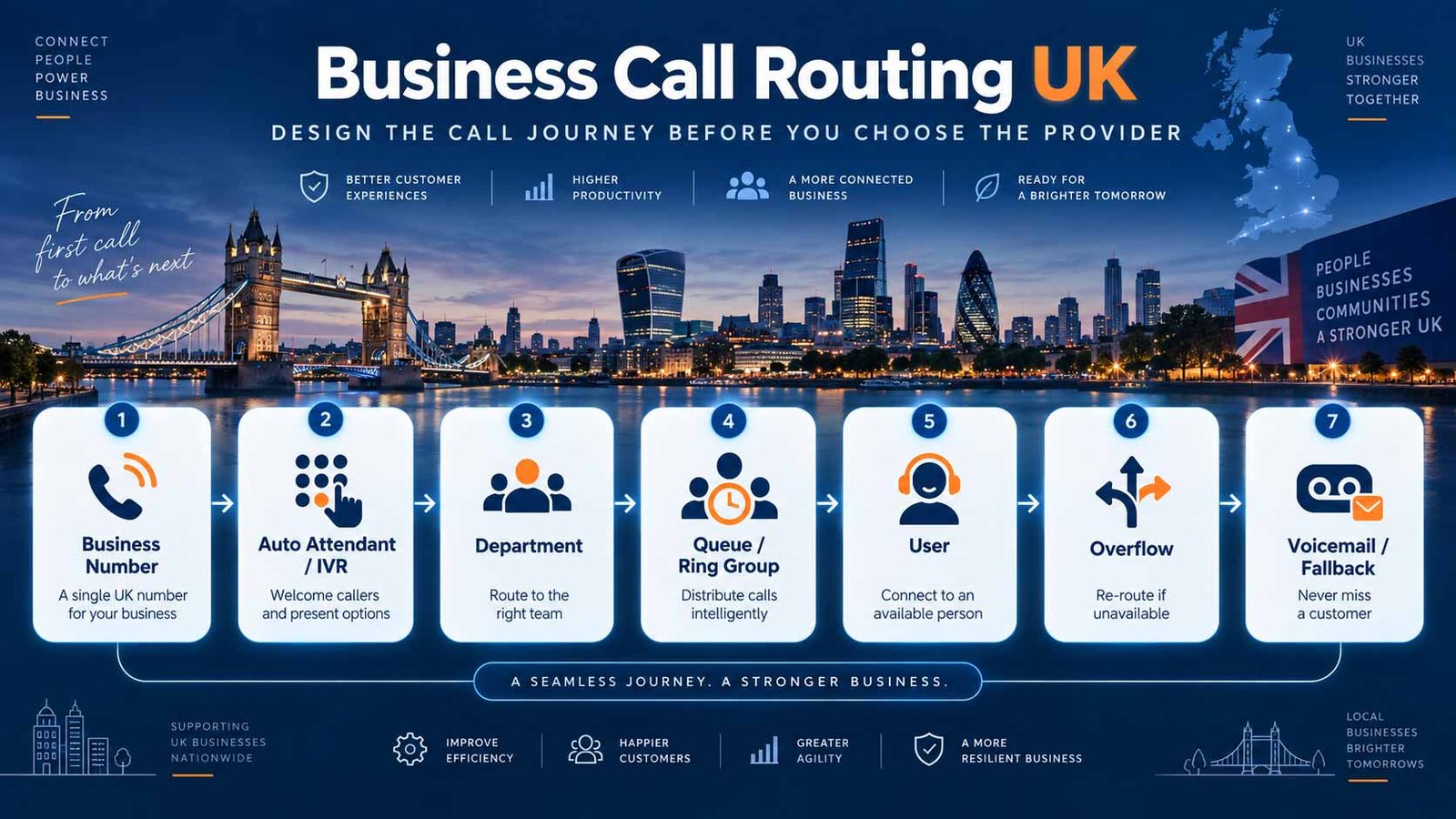
Use it for clear destination selection, schedules and straightforward front-door routing.
Use it when caller input, business rules or application data should change the next step.
Auto attendants and IVR are often grouped together, but they solve different levels of call-handling complexity.
Provider terminology can overlap, so focus on what the system does, not only what the product page calls it.
What an Auto Attendant Does
An auto attendant is mainly a virtual reception and routing layer.
It can:
- answer the main number;
- play a greeting;
- present menu options;
- route by keypad choice;
- route by simple predefined voice choice on some platforms;
- use business-hours or holiday schedules;
- provide directory or extension options;
- send callers to people, groups, queues or voicemail.
The key question is:
Where should this call go?
A typical flow is:
Main Number → “Press 1 for Sales” → Sales Team
The caller’s choice determines the destination.
What IVR Adds
IVR becomes more relevant when the system needs to interact with the caller before deciding what happens next.
An IVR may:
- collect a reference number;
- ask several structured questions;
- use keypad or speech input;
- identify the reason for contact;
- pass information to another system;
- look up business data;
- apply routing rules;
- provide simple self-service;
- pass context to an agent.
The question becomes:
What does this caller need, what information should we collect, and what should happen because of that information?
A simplified IVR journey might be:
Support → Enter Customer Reference → Identify Service → Apply Rule → Specialist Queue
Twilio’s current IVR documentation describes IVR as gathering keypad or spoken input to automate menus, look up information and route inbound callers.
Auto Attendant vs IVR at a Glance
| Area | Auto Attendant | IVR |
|---|---|---|
| Primary purpose | Route callers | Interact, collect information and route or self-serve |
| Typical input | Simple menu choice | Keypad, speech, structured questions |
| Business data | Usually limited | Can be used with CRM, database or workflow data |
| Logic | Menu, schedule, directory | Input, validation, rules and conditional routing |
| Administration | Usually simpler | Usually more complex |
| Best fit | Clear departmental routing | More complex service or support journeys |
The distinction is not simply keypad versus voice. A simple voice-enabled menu may still behave like an auto attendant. An IVR becomes more meaningful when information is collected and used to change the journey.
When an Auto Attendant Is Usually Enough
Start simple when:
- callers mainly need a department or person;
- there are only a few common reasons for calling;
- the system does not need account information before routing;
- self-service is not required;
- human teams handle the real work;
- administrators need an easy-to-maintain flow.
Example:
Main Number → Sales / Support / Accounts → Team
When IVR Becomes Useful
Consider IVR when:
- caller information affects routing;
- the business needs a reference before handoff;
- different customer types follow different paths;
- a CRM, booking system or database must be checked;
- a simple task can be completed without an agent;
- context needs to reach the agent with the call.
Example:
Support → Customer Reference → Service Type → Priority Rule → Specialist Queue
Use Both When Only Part of the Journey Needs Depth
The business does not need to force every caller through an IVR.
A cleaner design may be:
Main Number
→ Sales → Sales Team
→ Support → IVR → Specialist Queue
→ Accounts → Accounts Team
Use deeper interaction only where it improves the outcome.
4. Call Queues vs Ring Groups vs Hunt Groups
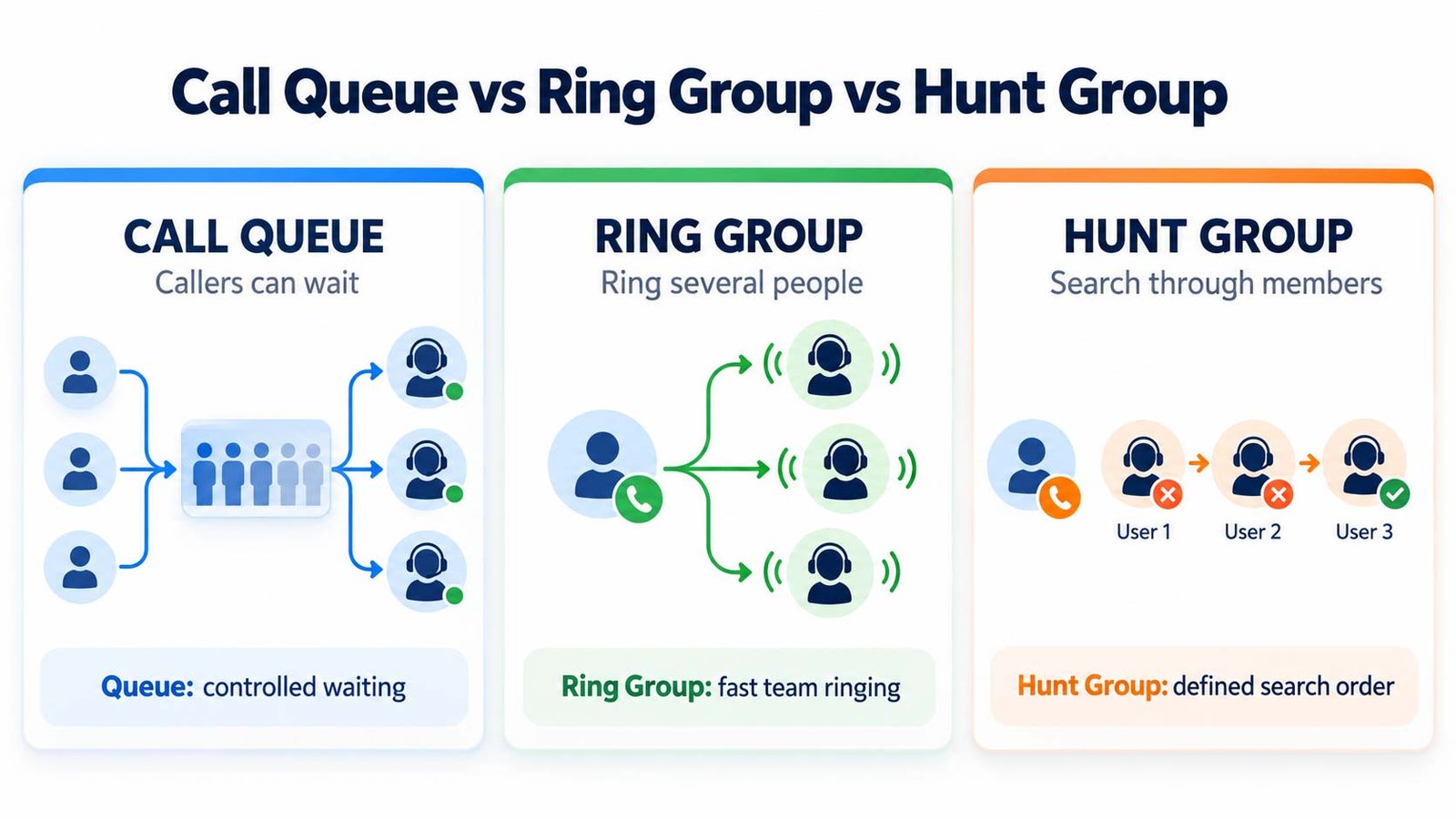
Use when teams need controlled distribution, waiting logic, timeout and overflow.
Use when a smaller team simply needs calls presented concurrently or sequentially.
Use when calls should follow a defined hunting order without a full waiting queue.
After the front door decides where the call should go, the next question is how the destination team should receive it.
This is where queues, ring groups and hunt groups matter.
What Is a Call Queue?
A call queue is designed for situations where callers may need to wait because no suitable agent is immediately available.
The queue typically:
- places callers in a waiting state;
- presents calls to available agents;
- can use defined distribution rules;
- can play hold audio or announcements;
- can track waiting calls;
- can apply overflow rules;
- can apply timeout rules;
- can define what happens when no agents are available.
Microsoft describes a call queue as a waiting-room model where callers wait while calls are routed to available representatives. Its current call-flow guidance also distinguishes overflow, timeout and no-agent handling as separate queue outcomes.
A typical flow is:
Support Number → Support Queue → Available Agent
Use a queue when callers are expected to wait and the business needs controlled distribution.
What Is a Ring Group?
A ring group sends the call to several users or endpoints as a team.
Depending on the system, members may ring:
- simultaneously;
- in a fixed sequence;
- in a prioritised order.
3CX’s current documentation distinguishes ring groups from queues by describing ring groups as routing calls concurrently or sequentially to multiple extensions, while queues keep callers waiting until an agent becomes available.
A ring group is often useful when:
- call volumes are modest;
- the team is small;
- callers should reach whoever can answer first;
- formal waiting and queue metrics are unnecessary.
Example:
Reception Number → Reception Ring Group → Receptionist A + Receptionist B
What Is a Hunt Group?
A hunt group is another method of distributing calls among a defined set of people or devices.
Depending on the platform, the hunt strategy might be:
- fixed sequence;
- circular;
- longest idle;
- ordered priority;
- simultaneous.
Some platforms use “ring group” and “hunt group” differently; others use one label to cover several distribution patterns.
The important buying question is not the label. It is:
How are calls presented to the group, what happens when nobody answers, and can the business control the distribution rule?
Queue vs Ring Group vs Hunt Group
| Requirement | Call Queue | Ring Group | Hunt Group |
|---|---|---|---|
| Caller can wait | Yes, typically | Usually no formal waiting | Usually limited/no formal queue |
| Agent distribution | Queue logic | Concurrent or sequential group ringing | Hunting pattern across members |
| Overflow/timeout | Usually explicit | Often simpler no-answer handling | Depends on platform |
| Queue reporting | Often available | Usually limited | Usually limited |
| Best fit | Higher-volume team handling | Small/team ringing | Structured distribution without full queueing |
How to Choose
Use a queue when waiting is acceptable and you need controlled distribution.
Use a ring group when the objective is simply to reach an available team member quickly.
Use a hunt group when the system needs a defined search order across a team.
Do not choose based on the provider’s terminology alone. Ask for a demonstration of the exact behaviour.
Questions to Ask About Team Distribution
- What happens if every member is busy?
- Can members log in and out?
- Is presence or availability considered?
- Can calls overflow after a time limit?
- Can overflow go to another queue, group, external number or voicemail?
- Can supervisors see waiting calls?
- Are missed calls reported?
- Are abandoned calls reported?
- Can one user belong to several groups or queues?
- Can routing change by business hours?
- Can different teams have different rules?
Those answers often matter more than the feature label.
5. Business Hours, Out-of-Hours, Forwarding and Transfers
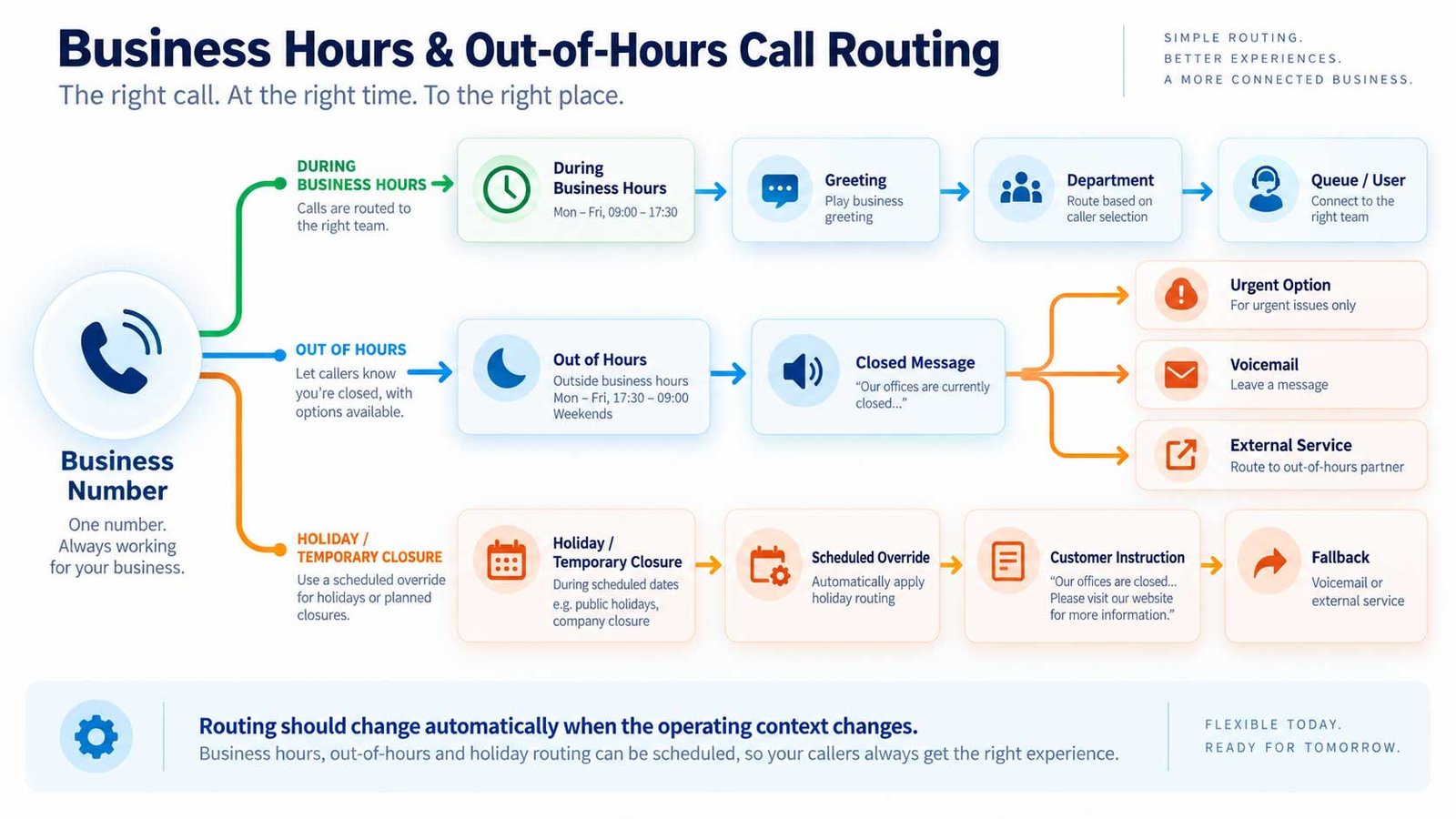
Routing should change when the operating context changes.
A system that works perfectly at 11:00 on Tuesday can still fail customers at 18:15, on a bank holiday or when the office is unexpectedly closed.
Design Business-Hours Routing
For each main number, define:
- opening time;
- closing time;
- weekday differences;
- weekend behaviour;
- public-holiday behaviour;
- special closure behaviour;
- emergency or priority routes where relevant.
A standard flow might be:
During Hours → Main Menu → Department → Team
Out of Hours → Closed Message → Emergency Option / Voicemail / External Service
The exact design depends on the business.
Keep Schedules Centralised Where Possible
If several call flows depend on the same opening hours, confirm how schedules are managed.
Ask whether:
- hours can be reused across routes;
- holiday calendars can be prepared in advance;
- managers can make temporary changes;
- authorised users can update schedules without a support ticket;
- schedule changes are logged.
Microsoft’s current Teams guidance supports business-hours and after-hours management for auto attendants and queues, including delegated management by authorised users.
The operational question is:
Can the people responsible for the business change routing quickly when opening hours change?
Call Forwarding vs Simultaneous Ring
These are related but different behaviours.
Call forwarding sends the call to another destination based on a rule.
Examples:
- forward all calls;
- forward when busy;
- forward when unanswered;
- forward when unavailable;
- forward after a delay.
Simultaneous ring presents the same incoming call to several endpoints at the same time.
Example:
Sales DDI → desk phone + desktop app + mobile app
This can improve reachability, but it must be used carefully so calls do not ring inappropriate devices or create confusing voicemail races.
Transfer Is Different From Forwarding
A transfer happens after a call has already reached a person or system and is then moved elsewhere.
Common transfer types include:
- blind transfer;
- attended/consultative transfer;
- transfer to queue;
- transfer to voicemail;
- transfer to external number.
The user experience matters.
If a receptionist transfers a customer to Support, decide what should happen if Support cannot answer.
Should the caller:
- return to Reception;
- enter a Support queue;
- leave Support voicemail;
- reach another team?
A transfer without a fallback is an incomplete call flow.
Out-of-Hours Design Examples
Professional services
Main Number → Closed Message → Leave Voicemail → Message to Shared Team Inbox
Managed support
Support Number → Out-of-Hours Message → Priority Support Option → On-Call Destination
Multi-site retail
Main Number → Select Location → Closed Location → Central Customer Service
Appointment business
Main Number → Closed Message → Booking Information → Voicemail / Online Booking Direction
The message should explain the next useful action rather than simply saying the office is closed.
6. Overflow, Timeout, No-Answer, Voicemail and Continuity
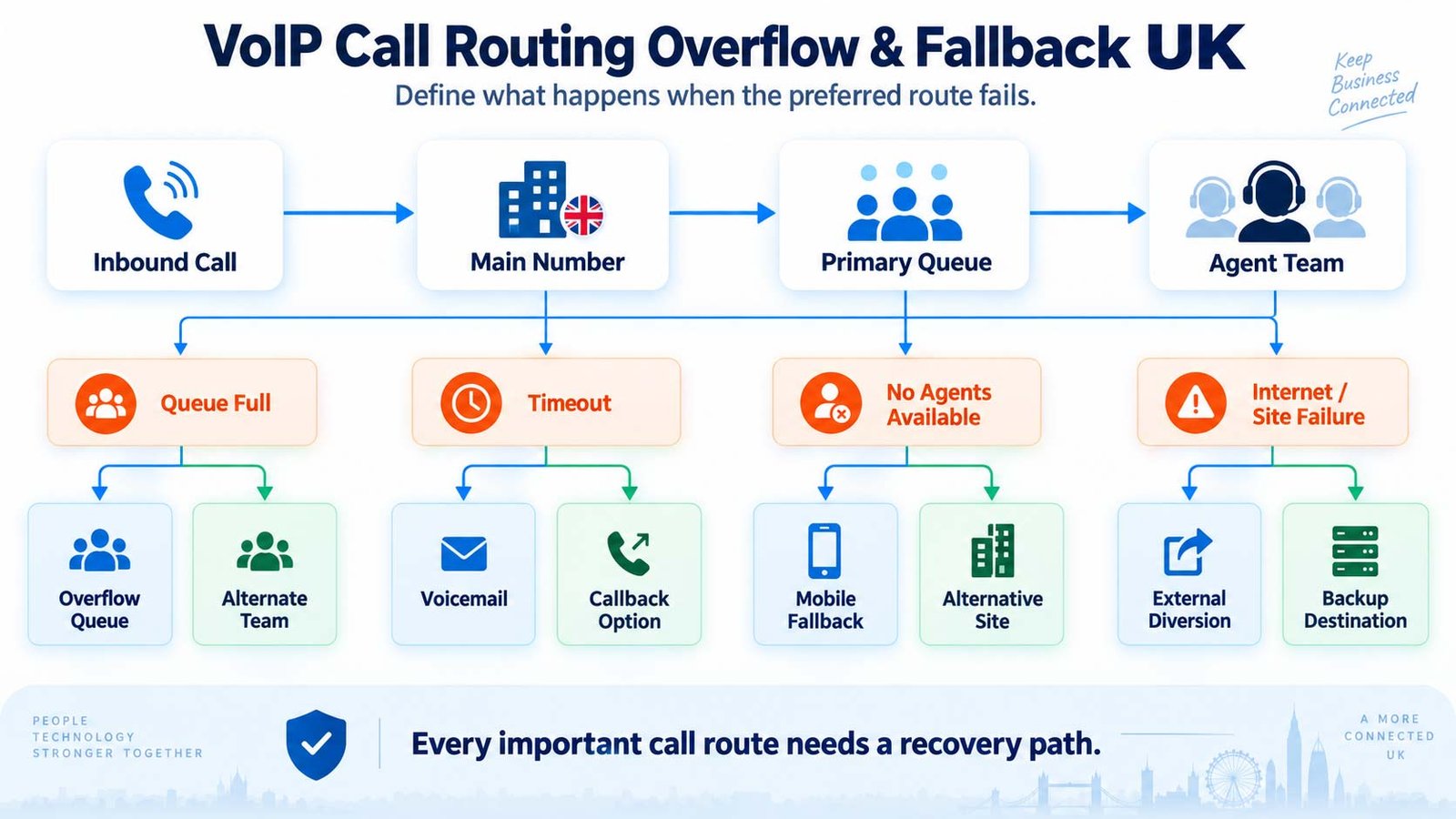
The quality of a routing design is often revealed by what happens when normal handling fails.
Overflow
Overflow occurs when the preferred destination cannot accept more calls or reaches a defined threshold.
A queue might overflow because:
- too many callers are waiting;
- the configured queue limit is reached;
- the team is temporarily unavailable.
Possible overflow destinations include:
- another queue;
- supervisor team;
- reception;
- external answering service;
- another site;
- voicemail;
- announcement and callback instruction.
The correct route depends on the value and urgency of the call.
Timeout
A timeout controls what happens when a caller has waited too long.
A useful design asks:
- how long is it reasonable for this caller to wait?
- should the system offer another option?
- should the call move to another team?
- should voicemail be offered?
- should the business capture a callback request through another workflow?
Do not create an endless wait state.
No-Agent and No-Answer Handling
“No agents available” and “nobody answered” are not always the same scenario.
A queue may know that nobody is logged in.
A ring group may simply reach the end of its ringing cycle without an answer.
Define both.
Example:
Support Queue → no agents logged in → Reception
Support Ring Group → 25 seconds no answer → Support Voicemail
Voicemail Is a Route, Not a Failure
Voicemail is useful when it is designed properly.
Define:
- which mailbox receives the message;
- who is responsible for checking it;
- whether multiple people can access it;
- whether audio is emailed;
- whether transcription is available;
- expected response process;
- retention requirements;
- what happens if the mailbox owner leaves the business.
A voicemail that nobody owns is not a fallback.
Voicemail-to-Email
Voicemail-to-email can make messages easier to discover and distribute.
The buyer should check:
- whether the message arrives as an attachment or link;
- whether transcription is included;
- which mailbox receives it;
- whether forwarding changes access or retention;
- whether messages are still retained in the phone platform.
It is a delivery mechanism, not a substitute for a clear ownership process.
External Fallback
Some businesses need calls to route outside the primary phone platform during specific conditions.
Examples:
- external answering service;
- emergency mobile;
- another site;
- outsourced support line.
Check:
- who pays for the forwarded leg;
- whether the original caller ID is preserved where possible;
- whether reporting still captures the call;
- whether recording requirements change;
- whether the external destination can route the call back cleanly.
Failure-Path Design
Plan at least these scenarios:
Internet failure
Can staff continue on mobile data, another site or an external diversion?
Power failure
Which network devices and phones stop working?
Office unavailable
Can users continue elsewhere with the same business identity?
Platform incident
What continuity route exists if normal call handling is unavailable?
Integration failure
Can the call still reach a person if the CRM or lookup workflow fails?
Queue unavailable
Where does the call go if no agents are logged in?
Call routing is partly continuity design.
7. CRM Integration, Recording, Analytics and Governance
Routing does not exist in isolation. The call journey may depend on CRM data, produce recordings, create reports or expose customer information to administrators and agents.
Decide What the CRM Integration Must Do
Do not accept “CRM integration” as a complete answer.
Define the required outcome.
Examples:
- recognise the caller;
- open the customer record;
- log the call;
- attach call metadata;
- add notes;
- pass IVR information to the agent;
- create a task;
- trigger a workflow;
- store the call outcome.
The integration route may be:
- native;
- marketplace connector;
- third-party integration;
- API/custom workflow.
The implementation effort and reliability can differ significantly.
Use the VoIP CRM integrations guide to define the integration layer before you compare providers.
Pass Context Forward
If an IVR asks the caller for a reference or reason for contact, use that information.
The caller should not be forced to repeat the same information immediately unless there is a valid reason.
A stronger workflow is:
Caller → Reference Entered → Record Identified → Queue → Agent Receives Context
rather than:
Caller → Reference Entered → Queue → Agent Asks for Reference Again
The second flow adds friction without operational value.
Decide Where Recording Applies
If the business records calls, define the routing scope.
Questions include:
- all calls or selected teams?
- inbound, outbound or both?
- queue calls only?
- recording starts before or after transfer?
- what happens when a call moves between teams?
- who can listen?
- who can download?
- how long are recordings retained?
The VoIP security guide covers the wider access and governance layer.
Decide What Reporting Is Needed
Useful routing reports may include:
- inbound call volume;
- answered calls;
- missed calls;
- abandoned calls;
- queue waiting time;
- queue timeout;
- agent answer activity;
- call destination;
- transfer activity;
- voicemail volume;
- calls by hour or day;
- calls by number;
- calls by team.
Do not buy advanced reporting without knowing what decision it will support.
A reporting requirement should answer a business question.
For example:
Which Support calls abandon before an agent answers, and at what waiting time?
is a useful operational requirement.
Control Administrative Access
Routing changes can materially affect customers.
Define who can:
- edit business hours;
- change menu prompts;
- add or remove queue members;
- change overflow destinations;
- alter external forwarding;
- access recordings;
- change caller ID;
- alter integrations.
For larger organisations, role separation and change visibility can be important.
The buying question is:
Can the right people make routine changes without giving them more administrative access than they need?
8. Practical Business Call-Flow Examples
The easiest way to evaluate routing is to build realistic flows and ask shortlisted providers to reproduce them.
Example 1: Small Professional Services Business
Requirement:
- one main number;
- 15 employees;
- Sales, Client Services and Accounts;
- live reception during office hours;
- shared voicemail outside hours.
Flow:
Main Number → Reception / Menu → Sales | Client Services | Accounts → Team → No Answer → Shared Voicemail
This may only need an auto attendant plus simple groups.
The business probably does not need a complex IVR unless information must be collected before handoff.
Example 2: Sales Team With Queue Overflow
Requirement:
- dedicated Sales number;
- several salespeople;
- caller should wait briefly;
- Reception should take overflow.
Flow:
Sales Number → Sales Queue → Available Sales User → 60-Second Timeout → Reception → Sales Voicemail
Questions to test:
- Can the timeout be configured?
- Can Reception see the call came from the Sales queue?
- Can Sales managers change queue membership?
- Are missed/abandoned Sales calls reportable?
Example 3: Customer Support With IVR
Requirement:
- identify account or service type before routing;
- different support teams handle different products;
- agent should receive context.
Flow:
Support Number → IVR → Customer Reference → Product Choice → Specialist Queue → Agent
Fallback:
Lookup Failure → General Support Queue
This is more than a simple menu because caller information affects routing.
Example 4: Multi-Site Business
Requirement:
- central company number;
- three sites;
- local teams;
- central backup if a site cannot answer.
Flow:
Main Number → Choose Site → Site Reception Ring Group → No Answer → Central Reception
Out-of-hours:
Main Number → Closed Message → Urgent Option / Shared Voicemail
This design needs consistent schedules and clear ownership across locations.
Example 5: Hybrid Sales Team
Requirement:
- office and remote sales staff;
- callers should not know where staff are working;
- users need desktop and mobile calling.
Flow:
Sales Number → Sales Queue → Available User on Desk / Desktop / Mobile → Timeout → Sales Manager
The route is team-based rather than location-based.
Example 6: Reception With Department Routing
Requirement:
- Reception answers most calls;
- callers can still choose Support directly;
- overflow must not disappear into individual voicemail.
Flow:
Main Number → Greeting → Support Option → Support Queue
or
Stay on Line → Reception Ring Group → Backup Reception → Shared Voicemail
This can reduce unnecessary reception transfers while preserving a human front door.
Example 7: Out-of-Hours Managed Support
Requirement:
- normal Support team during business hours;
- critical callers need an on-call path overnight;
- routine callers should leave a message.
Flow:
Support Number → Time Rule
During Hours → Support Queue
Out of Hours → Urgent Support Option → On-Call Destination
Routine → Voicemail / Message Workflow
The routing design should define who is authorised to use the urgent route and how the business manages that service operationally.
Example 8: Accounts and Billing
Requirement:
- callers often choose Accounts when they really need order support;
- billing enquiries should go to a small group;
- no formal waiting queue required.
Flow:
Main Number → “Billing or invoice query” → Accounts Ring Group → No Answer → Shared Accounts Voicemail
This is a good example of using caller-friendly wording instead of internal team names.
9. How to Specify Call Routing Before Comparing Providers
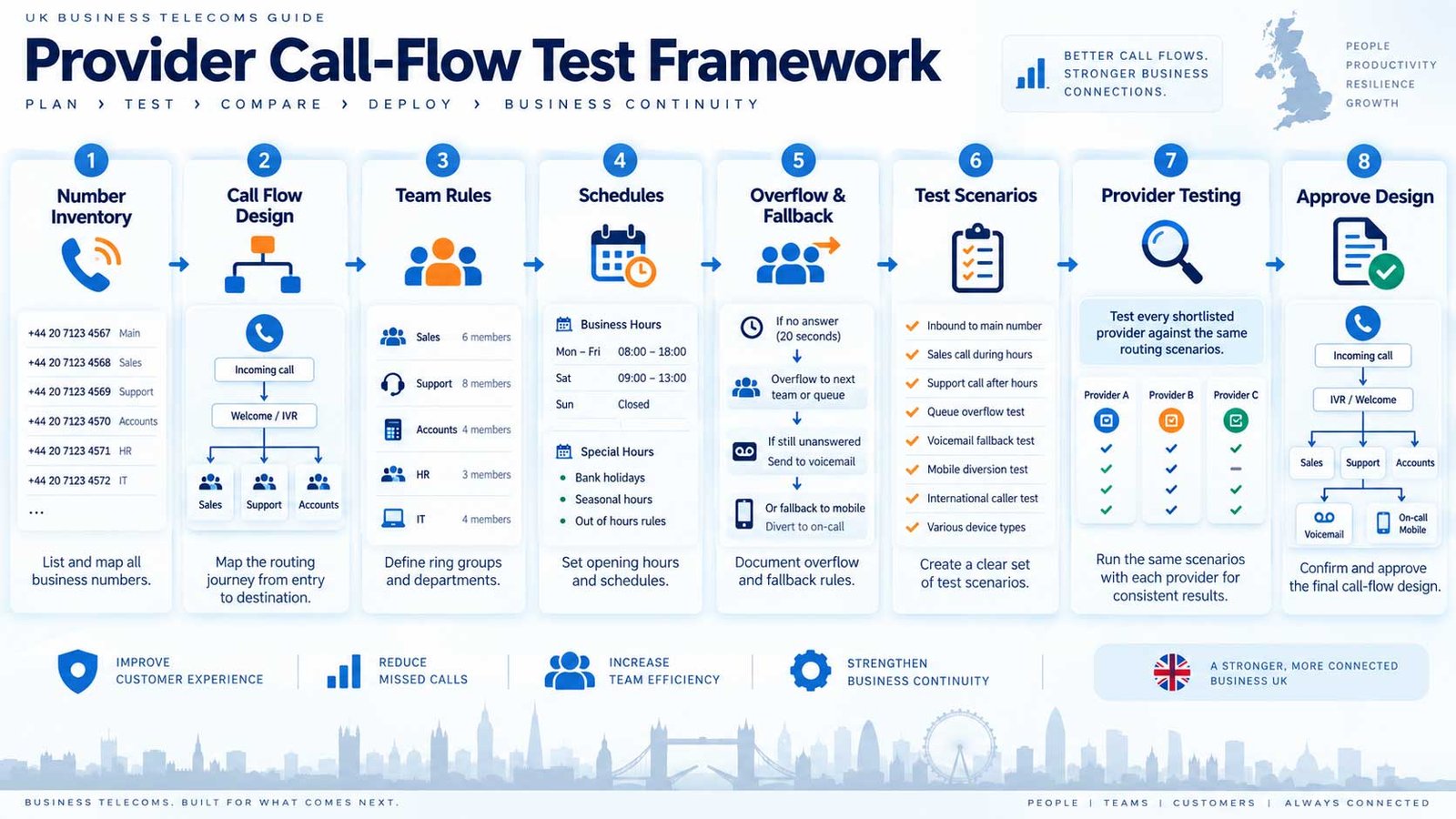
Do not compare providers with a vague requirement such as:
“We need IVR, queues and call forwarding.”
Turn the call journey into a testable specification.
Step 1: List Inbound Numbers
For every number record:
- purpose;
- business owner;
- first-answer behaviour;
- opening-hours rule;
- primary destination;
- overflow route;
- out-of-hours route;
- voicemail/fallback destination.
Step 2: Draw the Main Call Flows
Use a simple diagram.
For example:
Main Number → Auto Attendant → Sales → Sales Queue → Overflow Reception → Voicemail
Create one flow for each materially different journey.
Step 3: Define Team Distribution
For every team decide:
- queue, ring group or hunt group;
- members;
- distribution method;
- login/logout behaviour;
- wait time;
- overflow;
- no-agent route;
- reporting.
Step 4: Define Schedules
Document:
- normal hours;
- lunch/partial hours where relevant;
- weekend hours;
- holidays;
- temporary closure process;
- emergency changes.
Step 5: Define Transfers
Ask:
- blind or consultative transfer?
- can users transfer to queues?
- what happens on failed transfer?
- can transferred calls return?
- can mobile users transfer as easily as desk users?
Step 6: Define Integration and Context
If CRM or IVR data matters, specify:
- what is collected;
- where it is looked up;
- what reaches the agent;
- what is logged;
- what happens if the integration is unavailable.
Step 7: Define Continuity
Write the alternative route for:
- no answer;
- full queue;
- timeout;
- no agents;
- office internet failure;
- office power failure;
- site closure;
- integration failure;
- platform incident.
Step 8: Define Administration
Identify who needs to change:
- opening hours;
- greetings;
- menu choices;
- queue membership;
- external diversion;
- voicemail;
- holiday schedules.
Then ask the provider to demonstrate those changes.
Step 9: Define Evidence
Ask shortlisted providers for:
- a live demonstration using your flow;
- relevant product documentation;
- queue and routing configuration detail;
- support responsibilities;
- admin-control evidence;
- reporting examples;
- continuity/fallback explanation;
- commercial detail for features that require higher tiers or add-ons.
Step 10: Test the Real Journey
Do not stop at the administration screen.
Run test calls for:
- each menu option;
- invalid input;
- no input;
- full queue;
- timeout;
- no agents;
- out-of-hours;
- holiday;
- transfer;
- voicemail;
- external fallback;
- mobile user;
- CRM failure if relevant.
Record what actually happened.
Provider Demonstration Script
Give every shortlisted provider the same scenarios.
| Scenario | What the provider should demonstrate |
|---|---|
| Main number | Greeting, menu and correct department routing |
| Support queue | Waiting behaviour, agent distribution and overflow |
| No agents | Automatic alternative route |
| Out of hours | Schedule-based route |
| Transfer | Reception to Support with defined failed-transfer behaviour |
| Mobile user | Business call presented to approved mobile endpoint |
| CRM | Required context or call logging |
| Voicemail | Shared mailbox/message handling |
| Admin change | Update hours or queue membership without vendor intervention where expected |
| Failure path | Explain what happens during connectivity or platform disruption |
A provider should not need to guess what you mean by “advanced call routing”.
The specification makes the requirement explicit.
10. Common Call-Routing Mistakes
Reproducing the Organisation Chart
Customers think in outcomes, not internal structures.
Use “Existing Order” if that is clearer than the internal department name.
Too Many Menu Levels
Every extra layer increases caller effort.
If a flow has many nested choices, ask whether the business can simplify it.
Sending Every Call to a Queue
Not every team needs a formal queue.
A small Accounts team may be better served by a ring group and shared voicemail.
No Human or General Fallback
Menus and IVR cannot predict every caller need.
Create a route for callers who do not fit the available choices.
Collecting Data That Is Not Used
If an IVR asks for information that does not affect routing, self-service or agent context, remove it.
No Overflow Owner
An overflow route must have someone responsible for answering it.
“Overflow to Reception” is only useful if Reception understands what those calls are and what to do next.
Individual Voicemail as the Default Safety Net
If calls belong to a team, individual voicemail can create ownership gaps.
Consider whether a shared mailbox or team process is more appropriate.
Ignoring Out-of-Hours Changes
A routing design is incomplete until closed-hours behaviour is documented.
Forwarding Without Reporting Consideration
External forwarding can change how calls appear in reporting, recording or caller-ID workflows.
Test it.
No Failure-Path Testing
Do not wait for the first outage to discover that fallback routing was never configured.
Giving Too Many People Full Admin Rights
Routine queue or schedule changes should not automatically require unrestricted administrative access.
Check delegation and role controls.
Comparing Feature Names Instead of Behaviour
“Queue”, “hunt group”, “smart routing” and “IVR” can mean different things across platforms.
Use the real call flow as the comparison standard.
11. Business Call-Routing Buyer Checklist
Before you approve a phone-system design or shortlist a provider, confirm the following.
- Every important inbound number has a documented purpose.
- The first-answer behaviour is defined for each main number.
- Public menu wording reflects caller needs rather than internal team names.
- Auto attendant and IVR requirements are separated clearly.
- We know which caller data, if any, needs to be collected before routing.
- Every menu option has a defined destination.
- Every destination has a defined failure path.
- We know which teams need a queue.
- We know which teams only need a ring or hunt group.
- Queue membership and distribution rules are documented.
- Queue overflow is defined.
- Queue timeout is defined.
- No-agent handling is defined.
- Business-hours routing is documented.
- Out-of-hours routing is documented.
- Holiday and temporary-closure routing is documented.
- Call-forwarding requirements are documented.
- Simultaneous-ring requirements are documented.
- Transfer behaviour and failed-transfer handling are documented.
- Voicemail ownership is clear.
- Voicemail-to-email or transcription requirements are documented.
- External fallback routes are documented where required.
- CRM or workflow integration outcomes are documented.
- Recording scope and access requirements are documented.
- Routing reports needed by managers are documented.
- Administrative roles are defined.
- The business has a route for internet, site or integration failure.
- Every shortlisted provider is asked to demonstrate the same call flows.
- We have tested invalid input, no input, no answer, timeout and out-of-hours scenarios.
- Required routing features are confirmed at the correct commercial plan or add-on level.
- The final call-flow diagram is included in the implementation handover.
If several items are unresolved, the routing design is not ready for procurement.
Where to Go Next
Once the call flow is defined:
- use the VoIP Buyer’s Guide to complete the wider requirement;
- use the VoIP recommendation quiz if you want a guided shortlist;
- use Best VoIP providers in the UK when you are ready to build a structured shortlist;
- validate shortlisted suppliers through the provider reviews;
- use the provider comparison hub for final head-to-head trade-offs.
Use this guide to define the call-routing requirement. When the design is clear, use the provider shortlist for market options, individual reviews for deeper supplier checks, and head-to-head comparisons for the final decision.
12. Frequently Asked Questions
What is business call routing?
Business call routing is the set of rules that determines where inbound calls go and what happens at each stage. It can include greetings, auto attendants, IVR, queues, ring groups, schedules, forwarding, transfers, overflow, voicemail and fallback destinations.
What is the difference between an auto attendant and IVR?
An auto attendant mainly routes callers to a person, team, queue or other destination using simple menu choices, schedules or directories. IVR can collect more structured caller input, apply rules, interact with other systems and support more complex routing or self-service.
Is “press 1 for Sales” an IVR?
Some providers may describe it that way, but a simple menu that maps one choice to one destination behaves more like an auto attendant. The IVR distinction becomes more useful when the system collects or validates information and uses that information to decide what happens next.
What is the difference between a call queue and a ring group?
A queue allows callers to wait while calls are distributed to available agents. A ring group presents calls to several users or devices together or in a sequence, usually without a formal waiting queue. Exact behaviour varies by platform.
What is the difference between a ring group and a hunt group?
Both distribute calls across a group. “Hunt group” often describes a defined search or hunting pattern, while “ring group” may describe simultaneous or sequential ringing. Provider terminology varies, so compare the actual distribution behaviour and fallback rules.
Should a small business use a call queue?
Only if the workflow needs one. A small team with modest call volume may be better served by a ring group. A queue becomes more useful when callers may need to wait, agents need controlled distribution, or managers need queue-specific reporting and overflow rules.
What happens when a call queue is full?
That depends on the platform and configuration. A well-designed queue has an overflow route so new callers can be sent to another queue, team, external destination, voicemail or another defined outcome rather than being trapped in an unusable wait state.
What is call overflow?
Overflow is the route used when the preferred destination reaches a limit or cannot continue handling the call as intended. For a queue, that could be a maximum number of waiting callers. For another flow, it could be a timeout or no-answer condition.
Is call forwarding the same as call transfer?
No. Forwarding applies a rule that redirects a call to another destination, often before a person answers. Transfer moves a call that has already been answered or is already inside the call flow to another person, queue or destination.
What is simultaneous ring?
Simultaneous ring presents the same inbound call to several approved endpoints at once, such as a desk phone, desktop client and mobile application, or several team members. It should be configured carefully so voicemail and reporting behaviour remain predictable.
Should every call have a voicemail fallback?
Not necessarily, but every route should have a defined outcome. That might be voicemail, another team, an external service, a recorded message or another workflow. The important point is that the call should not reach an unmanaged dead end.
Can call routing connect to a CRM?
Yes, depending on the phone platform, CRM and integration method. A workflow can potentially identify callers, open records, log calls, pass IVR context or trigger follow-up activity. Define the exact outcome you need and verify how the integration is delivered.
Can business hours change call routing automatically?
Yes on many business phone platforms. Schedules can commonly change greetings and destinations for business hours, after-hours periods, weekends and holidays. Verify who can administer those schedules and how temporary changes are handled.
How should I compare providers for call routing?
Create your call-flow diagram first, then give every shortlisted provider the same scenarios. Ask each provider to demonstrate menus, queues, time rules, overflow, transfer, voicemail, administration, reporting and failure-path behaviour. Compare what the system actually does rather than the feature names.
How many menu options should an auto attendant have?
There is no universal number that fits every business. Keep the first level short enough to understand easily, put common reasons for calling first, use caller-friendly wording and avoid unnecessary nesting.
Do I need IVR if I already have a call queue?
Not necessarily. IVR decides what should happen based on caller interaction or data. A queue manages waiting and distribution once the call has reached a team. A simple auto attendant can route callers directly into a queue without IVR.
Can routing send calls to external mobile numbers?
Many platforms support external forwarding or routing, but the details vary. Check caller-ID behaviour, reporting, recording, call charges, transfer experience and what happens if the external number does not answer.
What should be tested before go-live?
Test every important route, including menu choices, invalid input, no input, queue wait, queue overflow, timeout, no agents, transfers, voicemail, out-of-hours schedules, holidays, mobile endpoints, external fallback and any CRM-dependent workflow.
13. Sources & Research Method
This guide is a call-routing design and procurement resource. It does not rank providers.
The functional distinctions and design principles are grounded in current official product documentation and then translated into provider-neutral buying questions.
Primary technical references:
- Microsoft Teams — Design call flows for voice applications — current guidance on auto attendants, call queues, overflow, timeout, no-agent handling and call-flow diagrams.
- Microsoft Teams — Overview of voice applications — current definitions and planning context for auto attendants and call queues.
- Microsoft Teams — Manage call queue and auto attendant settings — current administration, business-hours and delegated-management context.
- Twilio — Interactive Voice Response — current IVR documentation covering keypad/speech input, automated menus, information lookup and inbound routing.
- 3CX — Call Queues & Ring Groups — current distinction between ring-group distribution and queue-based waiting.
Product terminology and feature boundaries vary between suppliers. For this reason, CompareVoIPService evaluates the behaviour of the call flow rather than assuming terms such as “IVR”, “queue”, “ring group” or “hunt group” mean exactly the same thing on every platform.
For the wider provider-evaluation framework, see our review methodology.

Use the call flow inside your provider requirement
Once the routing journey is documented, add it to the wider VoIP requirement so every shortlisted provider is tested against the same operational workflow.