


Measure whether a VoIP service can stay clear and usable under real business load — not just whether a speed test looks healthy. Use latency, jitter, packet loss, QoS, failure-path testing and provider evidence to find where voice quality can actually break.
Fast answer: Good VoIP depends less on headline broadband speed than on a stable end-to-end path. The buyer should separate call quality from service reliability: latency, jitter and packet loss affect what a connected call sounds like, while power, LAN/Wi-Fi, internet access, the voice platform and fallback design determine whether the phone service remains usable when something fails. Test both before deployment.
Jump to a section
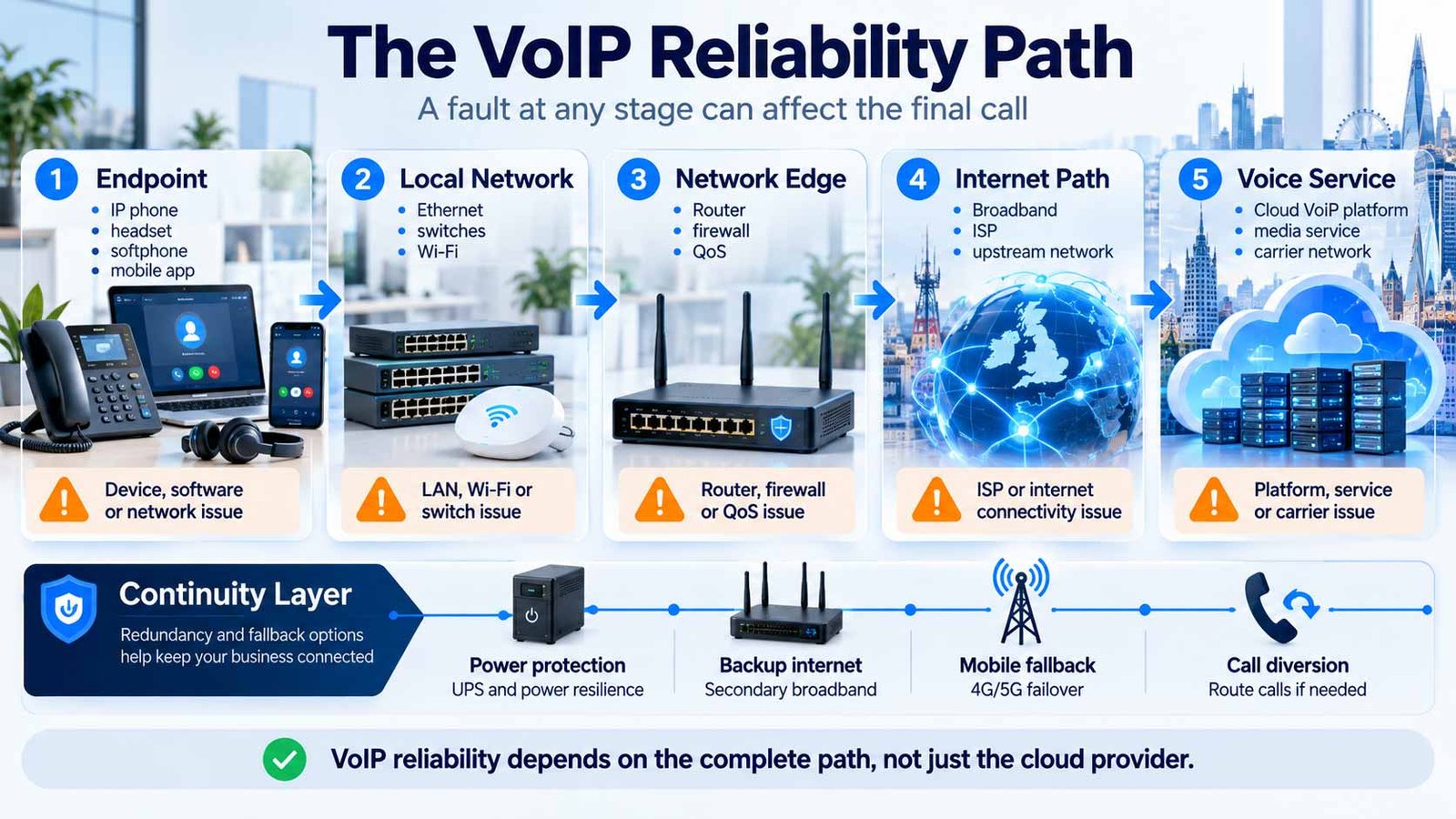
Clear calls depend on the complete voice path. Even when a hosted platform performs well, an office can experience poor calls because of Wi-Fi, the router, the internet path, power or an untested fallback route. The key buyer question goes beyond platform availability. It is:
Can we prove where quality is measured, who owns each failure domain, and what users can still do when one layer fails?
VoIP Call Quality and VoIP Reliability Are Not the Same Thing
Businesses often use “reliability” to describe every voice problem, but two different questions are being mixed together.
Call quality: what does a connected call sound and feel like?
Call quality is the user experience while media is flowing. High delay can make people talk over each other. Jitter can make speech sound uneven or robotic. Packet loss can remove words or syllables. Audio-device problems can add echo, clipping or background noise even when the network metrics look healthy.
These problems can be measured, but the measurements must be interpreted in context. A single “good” speed-test result does not prove that the real voice path is healthy during the working day.
Reliability: can the service remain usable when a dependency fails?
Reliability includes more than the hosted phone platform. A business call can depend on the handset or app, local switching and Wi-Fi, the router or firewall, internet access, DNS and network reachability, the VoIP platform, carrier interconnects and power. If any critical layer fails without an alternative path, the phone service can become unavailable even while the provider’s core platform remains online.
A platform uptime figure tells you about the scope covered by that provider’s service commitment. It does not automatically prove that your office, Wi-Fi, router, broadband connection, power supply and endpoints will remain available. Ask what the SLA covers — and what it does not.
To assess the wider telephony architecture, use the business phone systems comparison or the cloud phone systems comparison. Use the quality and continuity tests below to define your network and reliability requirements.
The VoIP Reliability Path Test: Find the Layer That Can Actually Fail
Instead of treating “VoIP” as one service, trace the call through the layers that must work together. This creates a practical failure map for procurement, testing and troubleshooting.
Why this is useful before you buy
When suppliers are compared only on feature lists, buyers can miss the operational boundary between the phone platform and the network carrying the calls. The Reliability Path Test turns that boundary into explicit questions:
- Which endpoint types are supported and monitored?
- What network conditions does the provider expect at each site?
- Can the platform expose per-call quality data?
- Who investigates the LAN if the phone provider does not manage it?
- Who owns the broadband fault?
- What happens when the primary internet path is unavailable?
- Can inbound calls be redirected if the site is unreachable?
The result is not a score. It is an ownership map. That is more useful during an outage than a marketing claim that a service is “carrier grade”.
Latency, Jitter, Packet Loss and MOS: What the Numbers Actually Tell You
The core network measurements are simple, but a buyer should avoid treating one threshold as universal across every codec, endpoint and platform. Use platform-specific guidance where available and compare trends under real load.
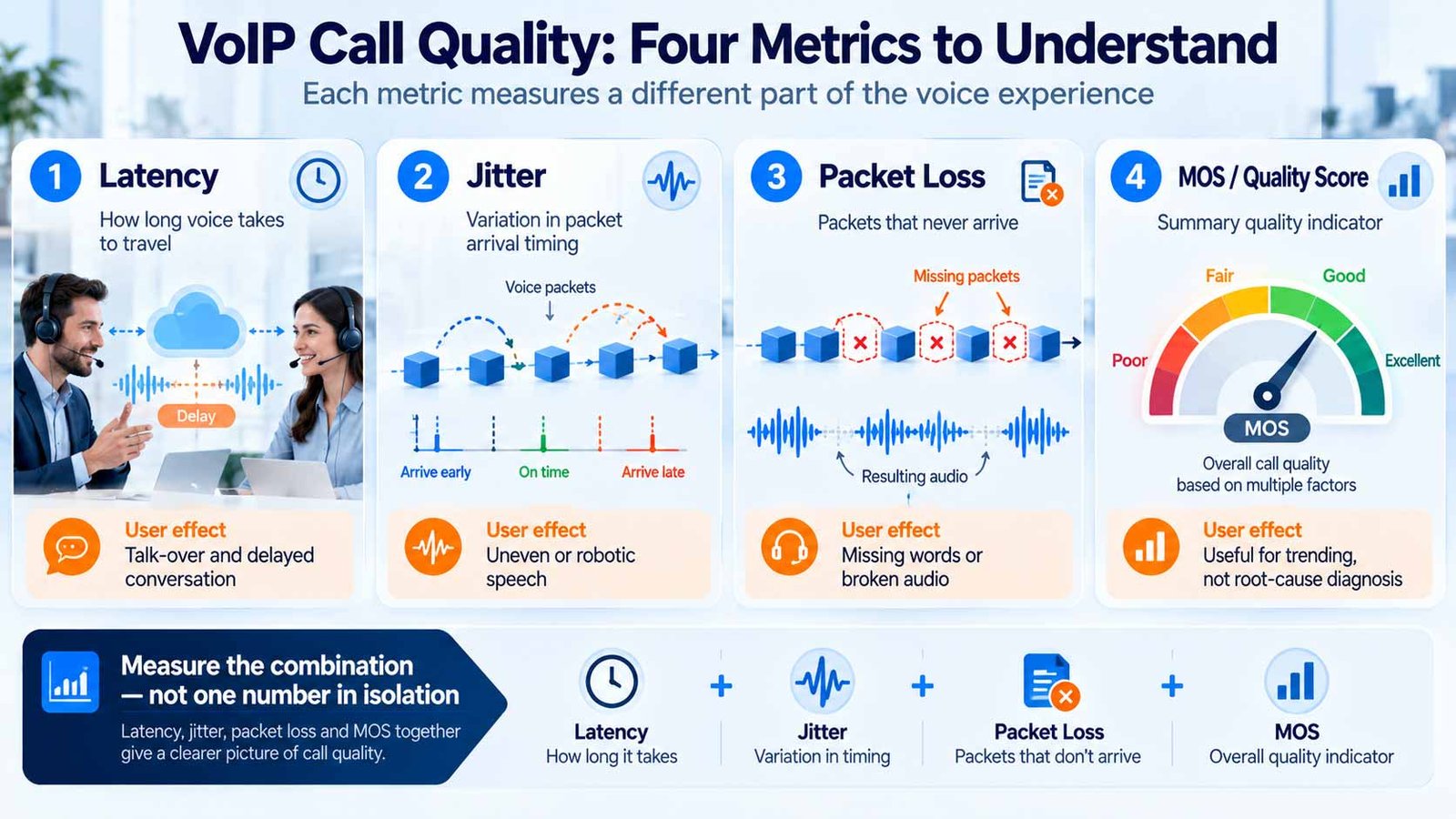
| Metric | What it measures | What users may notice | Practical reference |
|---|---|---|---|
| Latency / delay | How long media takes to travel between endpoints or between the endpoint and service. | Talk-over, unnatural pauses, “walkie-talkie” feel. | Context matters ITU-T G.114 describes 0–150 ms one-way delay as acceptable for most user applications. Microsoft Teams call-health guidance lists <200 ms round-trip time as a typical value. One-way and round-trip measurements are not directly interchangeable. |
| Jitter | Variation in packet arrival timing. | Robotic or uneven audio, missing fragments when buffering cannot absorb the variation. | <30 ms reference Microsoft lists received jitter below 30 ms as a typical Teams call-health value. |
| Packet loss | Voice packets that do not reach the receiving endpoint. | Missing syllables, short drop-outs, choppy audio. | Lower is better Microsoft lists received packet loss below 2% as a typical Teams call-health value. Other platforms may use different warning thresholds. |
| MOS / quality score | A summary quality measure or estimate. Implementations may use different models and inputs. | A single quality indicator can help trend calls, but it does not explain the root cause by itself. | Do not use alone Use MOS with latency, jitter, loss and the actual user report. ITU-T G.107 defines the E-model used in transmission planning and quality estimation. |
Codec resilience, packet-loss concealment, jitter buffers, media routing and endpoint behaviour can change what a user hears. A supplier should be able to explain which metrics its own platform exposes and what it considers normal, warning and poor conditions.
Why raw broadband speed is not enough
Voice uses relatively modest bandwidth, but it is time-sensitive. A connection can have plenty of headline capacity and still produce poor calls if the upload becomes saturated, packets queue unpredictably, Wi-Fi retries rise or the route to the voice service is unstable.
Capacity planning still matters because the network must support peak simultaneous calls alongside the rest of the business traffic. Keep the calculation separate from quality diagnosis: bandwidth answers how much traffic the link must carry; jitter, latency and loss describe how consistently the voice traffic is delivered.
The Business Load Test: Test VoIP When the Network Is Busy, Not Only When It Is Quiet
A common pre-deployment mistake is to run one speed test on a quiet network, see a high download figure and declare the site “VoIP ready”. That tests internet capacity at one moment. It does not reproduce the conditions under which the phone system must operate.
A more useful acceptance test deliberately checks the real user path and repeats it under normal business pressure.
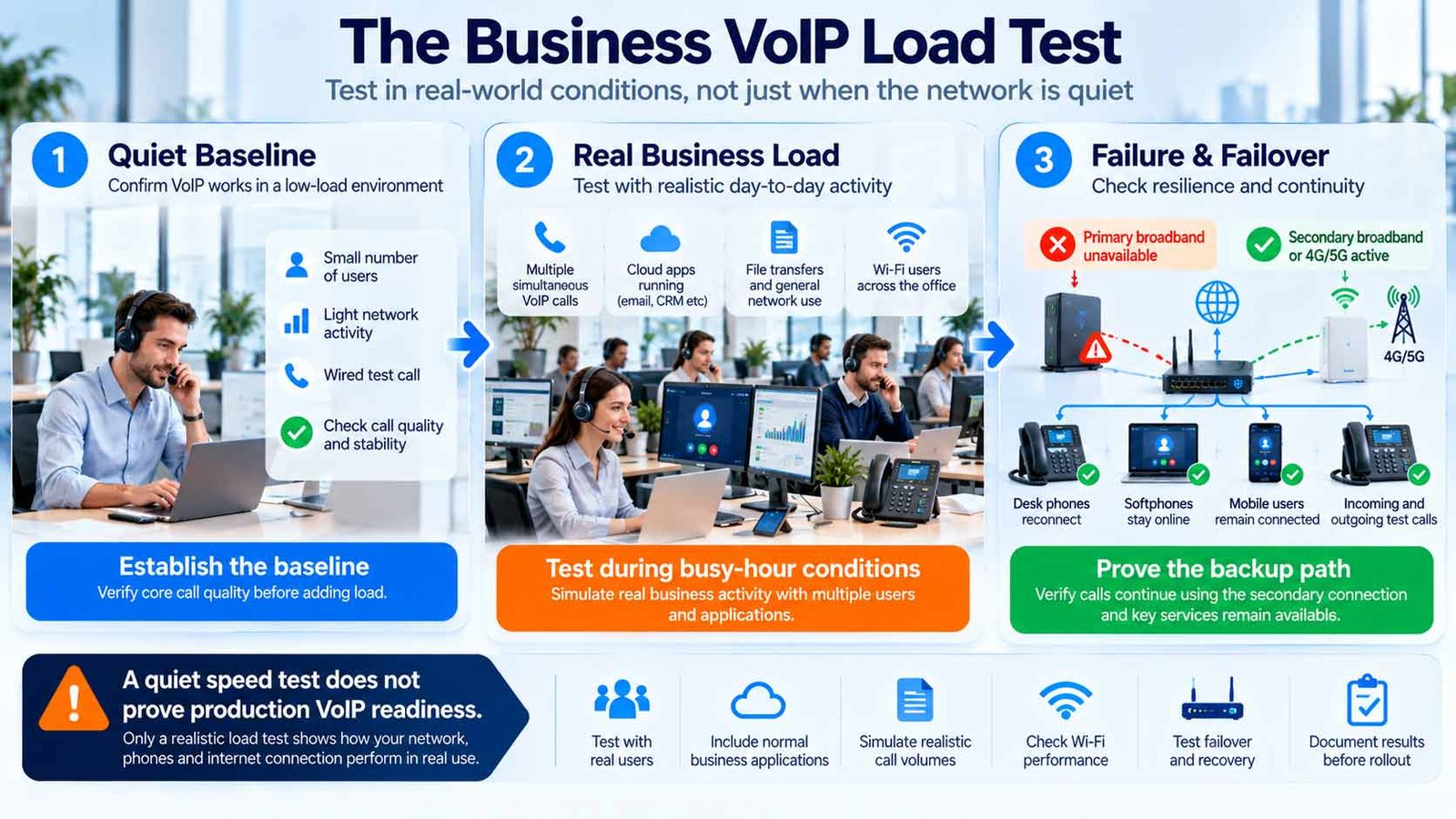
Create a wired baseline
Use a supported wired endpoint on the production LAN. Record latency, jitter, packet loss and the user’s listening experience.
Repeat at a busy time
Test when cloud applications, uploads, backups and normal user traffic are active. A quiet-time result can hide contention.
Test the real endpoint mix
If staff will use Wi-Fi laptops, mobiles, headsets or softphones, test those paths too. A wired handset result does not prove Wi-Fi calling quality.
Add simultaneous calls
Test the expected busy-hour concurrency rather than one call. Watch whether quality changes as the site approaches realistic load.
Exercise the backup path
Move voice onto the intended secondary connection or 4G/5G failover. Confirm registration, inbound calling, outbound calling and call quality — not merely internet access.
Keep evidence
Record timestamps, site, user, device, network path and quality metrics. Evidence makes escalation much faster if the issue returns later.
What should count as “ready”?
Readiness should be based on repeatable results rather than one perfect test. The acceptance criteria should reflect the platform being deployed, the business’s busy-hour conditions and the consequences of degraded voice. A three-user office can tolerate a different risk profile from a customer-service team that depends on inbound calls all day.
Do not accept “your broadband is fast enough” as the entire readiness assessment. Ask for the expected simultaneous call load, supported network conditions, monitored quality metrics, failover behaviour and escalation owner to be documented before go-live.
Map the Symptom to the Failure Path Before Changing Settings
The same audible problem can have several causes. Use the symptom to choose the first evidence to collect, then work outward through the Reliability Path rather than applying random fixes.
| What the user reports | Possible failure domains | Evidence to collect first |
|---|---|---|
| Robotic or broken speech | Wi-Fi retries, congestion, jitter, packet loss, overloaded edge device. | Per-call jitter/loss, wired-vs-Wi-Fi comparison, interface errors, busy-hour traffic. |
| Noticeable conversational delay | Long network path, high RTT, VPN hairpinning, media routing, overloaded WAN. | RTT/one-way delay where available, route used by media, VPN state, site/provider region. |
| One-way audio | Firewall/NAT/media path, endpoint issue, asymmetric routing. | Which direction is missing, affected users/sites, provider call record, firewall/NAT logs. |
| Calls degrade only during uploads or backups | WAN contention, bufferbloat, missing/ineffective QoS. | Upload utilisation, queue behaviour, QoS counters, call metrics during the upload. |
| Only Wi-Fi users are affected | Coverage, interference, roaming, channel congestion, client power-saving behaviour. | Wired comparison, AP/client health, signal and retry information, roaming event timing. |
| Whole site loses calling | Power, router/firewall, access circuit, DNS/reachability, provider registration path. | Internet reachability, router status, provider status, registration state, backup-path state. |
| Calls stay registered but inbound callers cannot reach the team | Routing configuration, number/carrier path, queue/user state, provider incident. | Test inbound number, call trace, routing state, user availability, carrier/provider ticket. |
Inbound call-flow behaviour belongs to the routing layer rather than the quality layer. If the problem is where a call goes after it reaches the service, use the business call routing guide to document queues, overflow and fallback separately.
QoS, Wi-Fi and the LAN: What Buyers Should Ask Before Blaming the Provider
QoS can prioritise voice where you control the network
Quality of Service can identify and prioritise real-time media so a large file transfer or backup does not compete equally with an active voice call. Microsoft’s Teams guidance uses DSCP markings and port-based policies to classify real-time traffic and recommends considering QoS when network delays affect users.
But QoS should not be sold as an end-to-end guarantee across the public internet. Your LAN and managed WAN may respect traffic markings while an external network handles them differently. The buyer question is therefore:
Where is voice prioritised, which devices enforce the policy, and how do we verify that the policy is actually working?
Wi-Fi can work well, but it is a different failure domain
Softphones and mobile clients make wireless calling normal, especially for hybrid workers. The trade-off is that Wi-Fi adds radio conditions that a wired Ethernet path does not have: interference, retransmissions, roaming between access points and variable contention.
If Wi-Fi will be part of the production voice design, test it as a production voice path. Do not use a wired handset test as proof that wireless calling is ready.
Avoid blanket router “fixes”
Generic troubleshooting articles often recommend changing firewall, NAT or SIP-related settings without knowing the provider architecture. That can solve one implementation and break another. Use the platform’s deployment documentation and the provider’s supported configuration before changing edge behaviour.
Do not weaken firewall or access controls simply to make calls work. If voice requires a port, protocol or trusted service path, document it and apply the provider’s supported configuration. Broader controls belong in the VoIP security design.
Failover Is Not Proven Until Voice Has Run Over the Backup Path
A secondary broadband circuit or 4G/5G router can improve resilience, but having backup internet does not automatically mean the phone service will behave correctly after a failover.
The backup path may have different latency, NAT behaviour, public addressing, bandwidth, DNS handling and traffic-prioritisation capability. Some endpoints may re-register quickly; others may take longer. Existing calls may drop while new calls recover. Inbound routing may need a separate fallback rule.
Test four different continuity outcomes
- Existing call: does an active call survive the WAN change, or is a new call required?
- New outbound call: can a user place a call after failover?
- New inbound call: can external callers still reach the intended number and destination?
- Alternate user path: can staff continue through a mobile app, another site or controlled diversion if the local network remains unavailable?
Power is part of the reliability design
A cloud-hosted phone platform may remain online during a local power cut while the office router, switch, access points and desk phones turn off. If local continuity matters, identify which network components need protected power and how long the business expects them to operate.
Failover routing should be designed deliberately rather than improvised during the first incident. The business call routing guide covers overflow, out-of-hours treatment and alternate destinations in more depth. Where several offices share calling responsibilities, use the multi-site business phone systems guide to plan branch isolation and alternate-site coverage.
Troubleshoot VoIP in the Cheapest, Most Observable Order
When a user says “the phones are bad”, start with a narrow incident description and move outward through the path. Avoid changing several settings at once; if the problem disappears, you will not know which change actually fixed it.
| Order | Check | What you are trying to prove |
|---|---|---|
| 1 | Scope the incident | One user, one device, one site, one network, one destination, or everyone? |
| 2 | Capture the affected call | Time, caller/callee, user, site, endpoint and provider call ID where available. |
| 3 | Check endpoint/audio path | Headset, microphone, speaker, firmware/app and wired-vs-wireless behaviour. |
| 4 | Check local network | Loss, Wi-Fi retries, switch errors, saturation, VLAN or local path issues. |
| 5 | Check edge/WAN | Router load, firewall/NAT, QoS behaviour, upload contention and circuit health. |
| 6 | Check platform telemetry | Jitter, loss, RTT, media path, registration and provider incident signals. |
| 7 | Compare another path | Another device, wired connection, mobile network, second site or backup circuit. |
| 8 | Escalate with evidence | Give the responsible supplier timestamps, call IDs and metrics instead of “calls sounded bad”. |
If the problem is discovered during deployment rather than day-to-day operation, use the VoIP setup guide for the wider implementation sequence.
The Buyer Evidence Test: What a Provider Should Be Able to Show Before You Commit
A supplier may describe its service as “reliable”, but that claim needs supporting evidence. Ask every supplier to demonstrate the quality, resilience, monitoring and support capabilities relevant to your business.
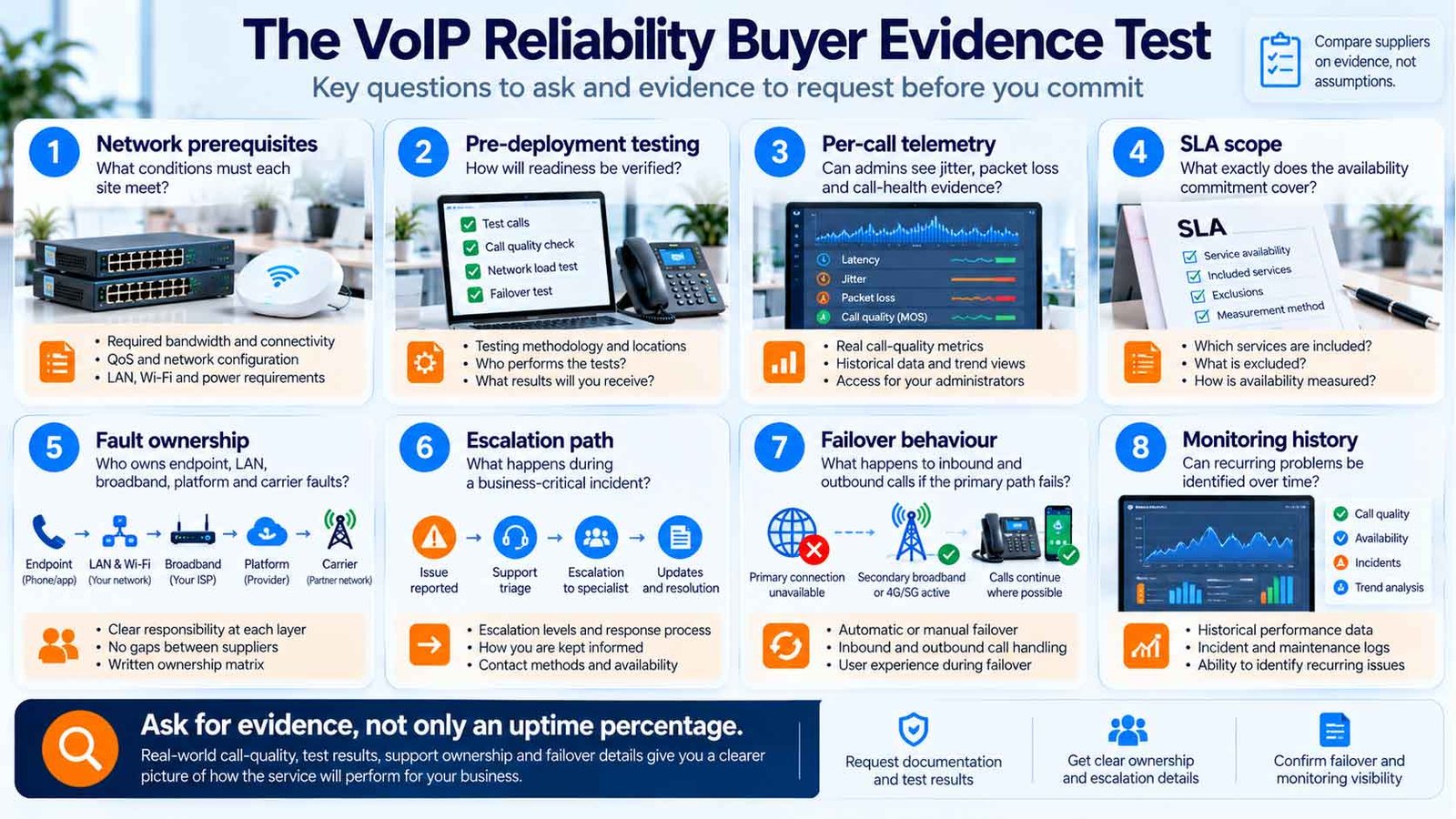
Why this is a better provider test than an uptime number
An uptime commitment can be useful, but procurement decisions improve when the supplier can also show how an incident is isolated and owned. Two providers can advertise similar availability while offering very different visibility, support boundaries and failover behaviour.
Once your reliability requirements are documented, explore the VoIP guides library for related planning topics. Ask every shortlisted supplier to demonstrate the same quality, continuity, monitoring and support requirements.
VoIP Call Quality & Reliability Buyer Checklist
Before approving a business VoIP design or migration, confirm the following:
- We know the expected busy-hour simultaneous call volume.
- We know which users will be wired, on Wi-Fi, mobile or remote.
- Each important site has been tested using the actual or representative voice path.
- Testing has been repeated during normal busy periods.
- We have recorded latency, jitter and packet-loss evidence rather than relying only on broadband speed.
- The provider has supplied its supported quality guidance for the deployed platform.
- We know where per-call quality telemetry can be found after go-live.
- QoS requirements are documented, including where prioritisation is enforced.
- Wi-Fi voice use has been tested separately from wired voice.
- Firewall/NAT requirements follow the platform’s supported configuration rather than generic internet advice.
- We know who owns faults in the endpoint, LAN, WAN, provider platform and carrier path.
- The provider SLA scope and exclusions are understood.
- A primary-internet outage has a documented continuity response.
- The backup internet path has carried real test calls successfully.
- Inbound calls have been tested during failover, not only outbound calls.
- Power dependencies for routers, switches, access points and desk phones are documented.
- Mobile or alternate-site calling has been tested where it forms part of continuity.
- The escalation path includes support hours, incident priority and evidence requirements.
- We can capture timestamps and call IDs for future troubleshooting.
- Reliability requirements are included in the written supplier specification.
If the business cannot explain what happens when the primary broadband circuit fails — and cannot identify who owns a poor-quality call that spans several suppliers — the reliability design is not finished.
VoIP Call Quality & Reliability FAQs
What causes poor VoIP call quality?
Common causes include excessive delay, jitter, packet loss, Wi-Fi interference, WAN congestion, overloaded network equipment, endpoint/audio problems and faults elsewhere in the media path. The fastest diagnosis starts by identifying who is affected and collecting per-call evidence before changing settings.
Is VoIP reliable enough for a UK business?
VoIP can be used for business-critical calling, but reliability depends on the complete design rather than the hosted platform alone. A stable local network, suitable internet path, documented fault ownership and tested fallback route are what turn platform availability into a usable business service.
What latency is acceptable for VoIP?
Do not mix one-way delay with round-trip measurements. ITU-T G.114 describes 0–150 ms one-way delay as acceptable for most user applications, while Microsoft Teams call-health guidance lists under 200 ms round-trip time as a typical value. Use the measurement and guidance supplied for the platform you are operating.
What jitter is acceptable for VoIP?
Lower is better. Microsoft Teams currently lists received jitter below 30 ms as a typical call-health value. A different provider may use a different warning model, so use that value as a practical reference rather than a universal guarantee.
How much packet loss is acceptable?
Packet loss should be kept as low as practical. Microsoft Teams lists received packet loss below 2% as a typical call-health value, but the audible impact depends on how loss occurs, codec behaviour and packet-loss concealment. Short bursts can be more disruptive than the same average loss spread over time.
Does QoS guarantee good VoIP quality?
No. QoS can prioritise real-time media on networks that honour the policy, but it does not repair a failing endpoint, poor Wi-Fi, a broken access circuit or every external network path. Treat QoS as one control inside the wider Reliability Path.
Is Wi-Fi suitable for business VoIP?
It can be, especially for softphones and mobile users, but wireless voice should be tested as its own production path. Coverage, interference, retries, roaming and shared-airtime congestion can create quality issues that do not appear on a wired test.
What happens to VoIP if broadband fails?
Without an alternate route, local endpoints usually lose their path to the hosted service. A continuity design can use secondary connectivity, mobile applications, another site or call diversion, but those routes should be tested before an outage rather than assumed to work.
Does a 99.99% platform SLA mean our phones will be available 99.99% of the time?
Not necessarily. The answer depends on what the SLA covers. Local power, LAN/Wi-Fi, broadband and customer equipment may sit outside the provider’s measured service boundary. Read the scope, exclusions and measurement method rather than relying on the headline percentage alone.
How should we test VoIP before switching?
Test the actual endpoint and network path, repeat the test during busy periods, add realistic simultaneous-call load, test Wi-Fi separately where used, and run real calls over the backup path. Keep the metrics and timestamps so they become a baseline for post-migration support.
Sources & Methodology
The Reliability Path Test separates network-quality measurements from service availability and support ownership. Use the findings to document practical performance and continuity requirements, then ask suppliers to show how each requirement is met.
Technical references informing this guide:
- ITU-T G.114 — One-way transmission time for voice-delay planning context.
- ITU-T G.107 — E-model for transmission-planning and quality-estimation context.
- IETF RFC 3550 — RTP for the definition and reporting of interarrival jitter in RTP.
- Microsoft Teams — call health metrics for current typical RTT, jitter and packet-loss values used as practical platform-specific references.
- Microsoft Teams — Quality of Service guidance for DSCP/QoS implementation context.
Important: platform diagnostics and acceptable thresholds vary. The figures on this page are labelled by source and should be used as references, not universal contractual limits. Always validate the deployed provider’s own requirements and telemetry.
Last reviewed: 30 September 2026.
 CompareVoIPService.co.uk
UK-focused VoIP guidance
VoIP Call Quality & Reliability Plan
Compare Phone Systems Beyond the Uptime Claim
Use the same call-quality, network, failover, SLA and support requirements with every shortlisted provider. That makes it easier to compare what each service can actually demonstrate rather than relying on headline availability figures.