

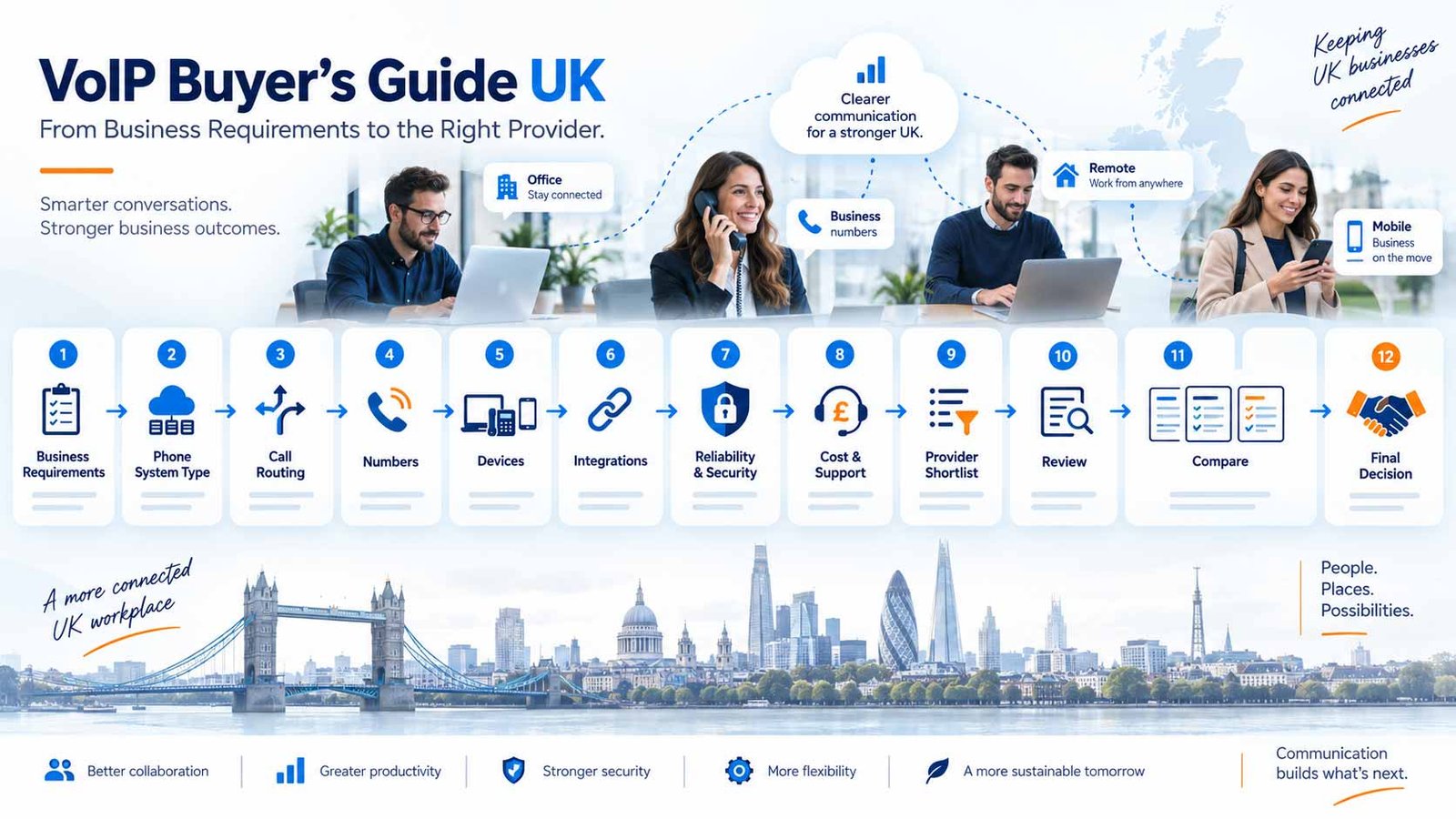
Define the right combination of system type, call handling, numbers, devices, integrations, resilience, support and commercial terms before you compare VoIP providers.
Document users, sites, call flows, numbers, devices, integrations and resilience before reviewing provider plans.
Give every shortlisted supplier the same requirement so their answers, costs and constraints are genuinely comparable.
Include routing, numbers, recording, integrations, onboarding, support, resilience, contract terms and exit portability.
On this page
Buying principle: design the requirement first and compare providers second. This guide turns your business needs into a provider-ready specification without ranking or ordering suppliers.
1. Fast Answer: Choose the Solution Before the Provider
The most reliable way to choose business VoIP is to design the requirement first and compare providers second.
A provider can look strong on a feature list and still be a poor fit if its call routing is too basic, its integrations create extra administration, its support model does not match your team, its resilience assumptions are wrong for your sites, or the working cost changes once numbers, recording, devices and add-ons are included.
A better buying sequence is:
Business requirement → system model → call flow → numbers → users and devices → integrations → recording and reporting → connectivity → resilience → security → migration → support → total cost → contract and exit → provider shortlist → review → comparison → decision
That sequence matters because a VoIP service is not only a monthly licence. It is an operating system for how customers reach the business and how staff make, receive, transfer, record and manage calls.
If you are still at the basic research stage, start with What is VoIP? or VoIP vs landline. This guide starts one stage later: you understand the idea of VoIP and now need to specify what your business should buy.
The VoIP Fit Stack
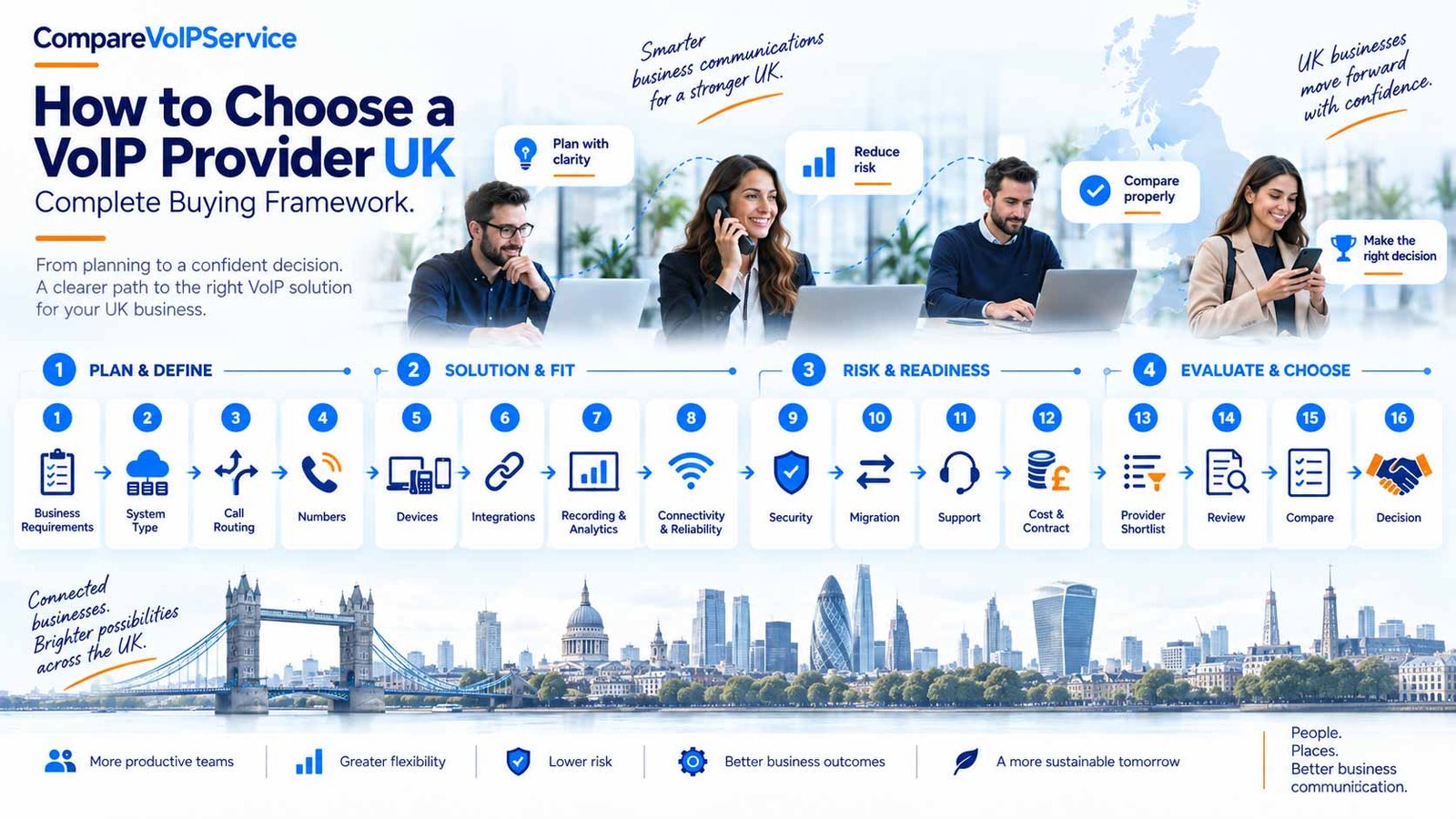
Buyer journey
Use the following layers in order.
| Layer | Decision to make | Output you should have before shortlisting |
|---|---|---|
| Business profile | Who needs the service and where? | Users, sites, teams, working patterns and growth assumptions |
| System model | What type of phone architecture fits? | Hosted/cloud, UCaaS, Teams Phone, SIP/PBX or hybrid route |
| Call handling | How should inbound calls move? | Main call flows, queues, menus, schedules, overflow and fallback |
| Numbers | Which numbers must exist or be retained? | Main number, DDIs, department numbers, caller ID and porting list |
| Users and devices | How will people actually use the service? | Desk phones, softphones, mobile apps, headsets and shared devices |
| Integrations | What other systems must connect? | CRM, helpdesk, Microsoft 365/Teams, APIs and workflow requirements |
| Recording and reporting | What evidence and visibility are required? | Recording, permissions, retention, call logs and reporting needs |
| Connectivity | Can the network support the design? | Site and home-worker network requirements |
| Resilience | What happens when something fails? | Internet, power, device, site and provider failure paths |
| Security | Who can access what? | Admin roles, account protection, audit and data-handling requirements |
| Migration | How will the current service move? | Porting, legacy-device audit, cutover, testing and fallback plan |
| Support | Who owns implementation and faults? | Onboarding responsibilities, support hours and escalation route |
| Commercial fit | What is the real commitment? | Total working cost, contract term, renewal, exit and portability checks |
The purpose of this guide is to help you produce those outputs. Once they are clear, you can use the VoIP recommendation quiz for a faster fit-based shortlist or use Best VoIP providers in the UK to build a structured shortlist with much better context.
What a Good Buying Requirement Looks Like
“We need a modern VoIP system for 25 people.”
Define users, sites, number retention, call routing, devices, integrations, recording, fallback and administration before comparing suppliers.
A useful requirement is specific enough that different providers can answer it consistently.
Weak requirement:
“We need a modern VoIP system for 25 people.”
Stronger requirement:
“We need a 25-user business phone system across one office and 10 hybrid workers. We must keep our main geographic number, give Sales and Support separate inbound routes, queue Support calls, provide mobile and desktop calling, log calls against CRM records, record selected calls with controlled access, provide out-of-hours fallback, and maintain an alternative route if the main office internet connection fails.”
The stronger version lets you compare operational fit, not marketing language.
2. Define the Business Requirement Before Comparing Providers
The first buying mistake is starting with provider websites before documenting how the business actually works.
Before you compare plans, write down the current environment and the future requirement. This becomes your reference point throughout demos, quotes, trials and contract review.
Users, Sites and Working Patterns
Start with people and locations.
Record:
- total number of users;
- expected number of users over the next 12–36 months;
- office-based users;
- hybrid and home workers;
- mobile or field-based workers;
- reception or front-desk users;
- shared phones in warehouses, workshops, retail areas or communal spaces;
- executives or teams that need assistants, delegates or advanced call handling;
- sites, branches and home-working locations;
- seasonal, temporary or shift-based users.
Do not assume every person needs the same licence, device or calling workflow.
A receptionist may need a physical phone, headset, presence view and fast transfer controls. A field worker may only need a mobile application. A hybrid employee may work best with a desktop softphone and headset. A shared reception or warehouse phone may need a different user and device model again.
Your requirement should therefore describe user types, not only a headcount. Where two or more branches share numbers, users or fallback routes, use our multi-site business phone systems guide to document site-specific ownership and central control.
Inbound and Outbound Calling Patterns
Next, map how calls enter and leave the business.
For inbound calls, document:
- the main published business number;
- department or campaign numbers;
- whether callers need a menu;
- whether callers need to provide information before routing;
- teams that need queues or group ringing;
- business-hours and out-of-hours behaviour;
- overflow rules;
- voicemail destinations;
- emergency or priority routes;
- what happens if no one is available.
A simple call-flow sketch is enough:
Main Number → Greeting → Sales / Support / Accounts → Team → Overflow → Voicemail
If the business needs callers to enter or speak information before routing, document that separately:
Main Number → Identify Reason → Collect Information → Route / Self-Service → Team
Do not choose a platform because it advertises “advanced IVR” or “smart routing”. First decide the workflow you need, then confirm whether the platform can reproduce it cleanly.
For outbound calling, check:
- which number should be presented as caller ID;
- whether users need to present different numbers for different teams or sites;
- whether international calling is required;
- whether outbound calls must be logged to another system;
- whether recording applies to outbound calls;
- whether mobile users need to call from the business identity rather than a personal number.
Build a Number Inventory
Phone numbers are business assets. Treat them as part of the migration plan, not an afterthought.
Create a list covering:
- main company number;
- geographic numbers;
- 03 or 0800 numbers;
- direct dial numbers;
- department numbers;
- published marketing numbers;
- fax or legacy-service numbers;
- numbers tied to specific sites;
- numbers used for caller ID;
- numbers that must be retired.
For each number, record:
Current provider → service/account → purpose → published where → must keep? → target destination → porting owner
Number portability is a regulated facility in the UK that allows customers to keep numbers when changing provider. Ofcom sets rules providers must follow when customers request to take landline or mobile numbers with them. For the operational process and common delay points, use the dedicated number porting guide.
The important buying question is not only “Can you port our number?” It is:
Who owns the port, what information is required, what dependencies could delay it, what happens on the port date, and what is the fallback if something does not work as expected?
Separate Must-Haves from Nice-to-Haves
A long feature wish list makes comparison harder.
Create three columns:
| Priority | Meaning | Example |
|---|---|---|
| Must have | Service is unsuitable without it | Keep main number, support queue, mobile app, CRM call logging |
| Should have | Operationally valuable but a workaround may exist | Call transcription, advanced wallboards, custom analytics |
| Nice to have | Useful only if cost/admin impact is low | Extra AI features, specialist workflow automations |
This is particularly useful when a feature exists only on a higher plan or as a paid add-on. A requirement becomes easier to negotiate when you can tell the difference between business-critical and interesting.
Identify Current Pain Before Buying New Features
Document why the existing setup is being changed.
Typical problems include:
- missed calls;
- poor remote-working support;
- no visibility of who answered;
- weak queue handling;
- manual CRM logging;
- inflexible out-of-hours routing;
- expensive or difficult moves and changes;
- poor admin controls;
- limited reporting;
- dependence on one site or one physical line;
- ageing PBX hardware;
- PSTN migration pressure.
For every pain point, write the desired operational outcome.
Instead of:
“We need AI.”
write:
“We need routine inbound enquiries captured and routed without requiring reception to answer every call.”
Instead of:
“We need better analytics.”
write:
“We need to see missed calls, abandoned calls, queue answer times and team call volume by day.”
This prevents technology labels from replacing business requirements.
Audit Legacy and Non-Voice Dependencies
Do not assume every socket or line is “just a phone line”.
Check whether current lines support:
- alarms;
- lift phones;
- door-entry systems;
- payment terminals;
- fax;
- modems;
- telemetry;
- intercoms;
- emergency or safety devices;
- broadband services linked to the same line.
Openreach states that traditional PSTN phone lines are due to go digital on 31 January 2027, and it specifically warns businesses to check equipment connected to old phone lines before the transition. That makes a dependency audit part of VoIP procurement, not a separate clean-up task.
For detailed readiness planning, use the PSTN switch-off guide.
Business Requirement Worksheet
Before speaking to providers, you should be able to complete this table.
| Requirement area | Your answer |
|---|---|
| Users now | |
| Users in 24–36 months | |
| Sites | |
| Hybrid/home users | |
| Mobile/field users | |
| Main numbers | |
| DDIs/department numbers | |
| Numbers to port | |
| Main inbound call flow | |
| Queues/groups required | |
| Out-of-hours route | |
| Desk phones required | |
| Softphone/mobile app users | |
| CRM/helpdesk integrations | |
| Recording requirement | |
| Reporting requirement | |
| Security/admin requirements | |
| Connectivity/failover | |
| PSTN/legacy dependencies | |
| Target migration window | |
| Internal project owner |
If several rows are still unknown, the business is probably not ready to compare providers in detail.
3. Design the VoIP Solution Stack
Once the requirement is clear, turn it into a technical and operational design. You do not need to become a telecoms engineer; you need enough structure to prevent providers from proposing materially different solutions under similar labels.
Choose the System Model
Hosted VoIP / Cloud PBX
Provider-hosted call control with IP phones, desktop clients or mobile apps.
Cloud Phone / UCaaS
Calling combined with broader administration, collaboration, analytics or communications capability.
Microsoft Teams Phone
Business telephony delivered through the Teams working environment and an appropriate PSTN route.
SIP / PBX / Hybrid
Retain compatible call control or phase migration while modernising external connectivity.
Business VoIP can be delivered through several architectures.
The most common routes include:
Hosted VoIP / cloud PBX
The calling platform is hosted by the service provider and users connect through IP phones, desktop software or mobile apps.
Cloud phone system / broader communications platform
Calling is delivered as a cloud service alongside richer administration, collaboration, analytics, integrations or contact-centre capabilities.
UCaaS
Voice is part of a broader unified communications service that may combine calling, meetings, messaging and collaboration.
Microsoft Teams Phone
Calling is brought into the Microsoft Teams environment through an appropriate telephony route.
SIP trunking with an existing PBX
The business retains an existing compatible PBX or call-control environment and replaces legacy external lines with IP-based connectivity.
Hybrid or phased migration
Different sites, teams or services move at different times while parts of the existing estate remain temporarily in place.
The right model depends on what you already operate, who manages it, how much control you need, and how quickly you want to move.
Do not let terminology decide the purchase. Two services both described as “cloud VoIP” can differ materially in administration, call routing, integrations, support ownership and resilience.
For commercial system comparisons, use business phone systems. If cloud control, failure paths and portability are central to the decision, see the cloud phone systems guide.
Design the Call-Handling Layer
Call handling should be specified as a flow rather than a feature list. Use our business call routing guide when mapping IVR, ring groups, queues, overflow, working-hours treatment and fallback.
For each important inbound number, map:
- what answers first;
- what the caller hears;
- whether the caller makes a selection;
- whether the system needs information before routing;
- which team receives the call;
- what happens if everyone is busy;
- what happens if no one answers;
- what happens outside business hours;
- what happens during an outage;
- where voicemail or messages go.
A typical support journey might be:
Main Number → Greeting → Support → Queue → Available Agent → Overflow Team → Voicemail
A more interactive journey might be:
Main Number → Identify Customer Need → Collect Reference → Route to Specialist Team → Agent
When providers demonstrate the platform, give them your real call flow and ask them to build or explain it. This reveals more than a generic feature demo.
Important checks include:
- auto attendant and menu depth;
- IVR/input handling where required;
- queues;
- ring or hunt groups;
- time schedules;
- overflow;
- queue timeout;
- no-agent behaviour;
- voicemail;
- external forwarding;
- transfer experience;
- changes an administrator can make without support.
Design the Number Structure
Decide which numbers represent the business. Our business phone numbers guide covers number types, main and department numbers, direct dial-in (DDI) and caller-ID structure.
A number plan might include:
- one main public number;
- separate Sales and Support numbers;
- individual DDIs for selected staff;
- local numbers for regional presence;
- a non-geographic number for national campaigns;
- separate caller IDs for departments.
The goal is not to create more numbers than necessary. It is to make sure inbound routing and outbound identity match how customers expect to interact with the business.
Also decide who should control number changes. If every caller-ID update or routing change requires a support ticket, that is a different operating model from a platform where administrators can manage it directly.
Match Devices to Roles
Do not buy a desk phone for every user by default.
Specify the endpoint that fits each role:
- reception: desk phone and/or desktop console, headset, rapid transfer controls;
- office user: desk phone, softphone or both;
- hybrid user: desktop softphone plus mobile application;
- remote user: approved headset and stable home connectivity;
- field worker: mobile app with business caller identity;
- warehouse/shared space: shared device designed for that location;
- meeting space: room device if genuinely required.
Then confirm:
- supported operating systems;
- headset compatibility;
- mobile app functionality;
- device provisioning;
- firmware/update ownership;
- replacement process;
- whether existing compatible handsets can be reused;
- whether hardware is purchased, rented or bundled.
The VoIP setup guide should own the detailed installation and go-live process. The buyer requirement only needs to define which user types need which endpoint experience.
Specify Integration Outcomes, Not Logo Lists
“Integrates with CRM” is not a complete requirement.
Define what you expect the integration to do.
Possible outcomes include:
- click-to-call from a customer record;
- screen pop on inbound call;
- automatic call logging;
- recording link or metadata attached to a record;
- call notes;
- outcome/disposition capture;
- activity creation;
- contact synchronisation;
- workflow trigger after a call;
- API access for custom processes.
Then ask how the integration is delivered:
native integration → marketplace connector → third-party service → API/custom development
Those routes can differ in setup effort, maintenance, permissions and data flow.
If CRM is important, use the VoIP CRM integration guide to define the workflow before you compare suppliers.
Define Recording and Reporting Requirements
If call recording matters, document the requirements below. Our business call recording guide covers scope, transparency, access, retention, retrieval and governance in more detail.
- which calls are recorded;
- whether recording is automatic or selectable;
- who can listen;
- who can download;
- how long recordings are retained;
- where recordings are stored;
- whether access is logged;
- whether recording can be paused where appropriate;
- what happens when users leave;
- how recordings are exported if you change provider.
Do the same for reporting.
Decide whether you need:
- basic call logs;
- missed-call visibility;
- answered/unanswered calls;
- queue waiting time;
- abandoned calls;
- agent/team activity;
- call volumes by time;
- wallboards;
- scheduled reports;
- exports;
- API access;
- conversation analytics or transcription.
Do not pay for advanced analytics simply because they exist. Tie each report to an operational question.
For example:
“We need to identify which Support calls abandon before an agent answers.”
is a requirement.
“We want advanced analytics.”
is not.
Produce a One-Page Solution Specification
At the end of this stage, summarise the required combination.
Example:
| Component | Requirement |
|---|---|
| System | Cloud-managed business phone service |
| Users | 25 now, scale to 40 |
| Sites | One office + hybrid/home users |
| Numbers | Keep main 01/02 number; Sales and Support DDIs |
| Call handling | Greeting, Sales route, Support queue, Accounts, out-of-hours voicemail |
| Devices | Reception desk phone, desktop softphones, mobile apps, headsets |
| Integration | CRM screen pop + automatic call logging |
| Recording | Support only, role-controlled access |
| Reporting | Missed calls, queue wait, abandonment, team volume |
| Resilience | Alternative route if primary office connectivity fails |
| Security | MFA/admin-role controls where available; joiner/leaver process |
| Migration | Port main number, staged testing before cutover |
| Support | Defined onboarding owner and escalation route |
| Commercial | Clear first-year working cost and exit terms |
This is the document you take into provider evaluation.
4. Validate Operational Readiness: Quality, Security, Continuity and Migration
A feature-rich phone system can still fail operationally if the network, security model, migration plan or failure path is weak.
These checks should happen before contract signature, not after deployment.
Check Connectivity and Call Quality Dependencies
VoIP depends on the network path between the user and the service. Use the dedicated VoIP call quality and reliability guide for network-path checks, business-load testing, QoS and failover evidence.
At a buyer level, verify:
- business internet connection;
- upload and download capacity;
- concurrent call assumptions;
- router/firewall suitability;
- wired network condition;
- Wi-Fi coverage where users rely on wireless;
- home-worker connectivity expectations;
- QoS requirements where relevant;
- VPN behaviour if calls traverse a VPN;
- whether the provider publishes practical network guidance;
- whether there is a test method before full rollout.
Do not reduce this to a single broadband speed number. Call quality can be affected by latency, jitter, packet loss, congestion, local Wi-Fi conditions and network configuration.
The requirement should therefore be:
Can the provider explain the network conditions its service expects, and can we validate those conditions at every important location?
If the answer is vague, resolve it before rollout.
Design the Failure Path
Internet failure
Define automatic diversion, mobile-data working or another site path.
Power failure
Identify routers, switches, access points and phones that depend on local power.
Site unavailable
Confirm users can work elsewhere without changing public numbers.
Provider incident
Check status communication, escalation and continuity-routing options.
Ask what happens when each dependency fails.
Internet failure
Can calls be diverted automatically? Can users continue on mobile data or another site?
Power failure
Which phones, routers, switches and access points stop working? Is backup power required for critical locations?
Office unavailable
Can users work from another location without changing the public numbers?
User device failure
Can the person move quickly to another device?
Provider incident
Is there a status page, incident communication process and alternative routing option?
Home broadband failure
Can hybrid users use a mobile application or another approved route?
Ofcom’s guidance on broadband-based voice recognises that power loss can affect access to emergency organisations and places obligations on communications providers around uninterrupted emergency access. For buyers, the practical lesson is simple: do not assume a digital phone service behaves like an old powered landline during a local power or connectivity failure. Ask what backup and emergency-call arrangements apply to your deployment.
If emergency calling is operationally important, document how users and locations are handled and confirm the provider’s current guidance.
Define Security and Administration
A business phone platform is an administrative system with users, call data, numbers, recordings and integrations. Treat access accordingly.
Ask:
- does the service support multi-factor authentication or equivalent account-protection controls?
- can administrators have different roles?
- can local/site administrators be restricted?
- is there audit or activity history?
- how are joiners and leavers handled?
- how are passwords or sign-in policies managed?
- can access to recordings be separated from general administration?
- how are integrations authorised?
- what security and data-processing documentation is available?
- what happens to data when the contract ends?
For a deeper security checklist, use the VoIP security guide.
Treat Recording as a Data-Governance Requirement
If the business records calls, do not treat recording only as a feature toggle.
The ICO’s guidance explains that organisations need an appropriate lawful basis for processing personal information, and its worker-monitoring guidance says call monitoring or recording should be necessary and proportionate for the intended purpose. It also gives examples where workers are informed through policy and customers are told about recording and privacy information.
A buyer should therefore determine:
- why calls are recorded;
- which lawful basis and transparency approach the organisation uses;
- who needs access;
- retention period;
- deletion process;
- export process;
- whether sensitive workflows need pause/resume or another control;
- whether recordings are included in backups or integrations.
This guide is not legal advice. The procurement point is that recording capability, governance and retention need to be evaluated together.
Build the PSTN and Legacy Migration Plan
Openreach currently states that traditional UK phone lines are moving to digital on 31 January 2027. Businesses that still depend on legacy lines or connected equipment should therefore identify those dependencies before approving a VoIP migration.
The migration plan should include:
- line and number inventory;
- equipment/dependency audit;
- target system design;
- number-porting information;
- device preparation;
- user configuration;
- network testing;
- pilot group where appropriate;
- cutover plan;
- fallback route;
- post-cutover testing;
- controlled cancellation of legacy services.
Do not cancel an old service simply because the new account has been created. Number porting, broadband dependencies and connected equipment can make the sequence important.
Use the PSTN switch-off guide for readiness planning and the number porting guide for number continuity.
Test the Real Workflow Before Full Rollout
A demonstration should use your use case.
Ask the provider or implementation partner to show:
- your main call flow;
- queue overflow;
- out-of-hours behaviour;
- call transfer;
- mobile/desktop handoff;
- caller ID;
- CRM logging;
- recording access;
- reports you expect to use;
- administrator changes;
- user onboarding;
- fallback behaviour.
For a larger or more complex deployment, a limited pilot can expose practical issues before the migration becomes difficult to reverse.
A good test is not:
“Can the platform make a call?”
It is:
“Can our real operational workflow be completed cleanly, administered safely and recovered when something fails?”
5. Compare Commercial Fit: Cost, Contract, Support and Administration
Once the solution design is clear, compare the commercial model against the same specification.
Do not compare headline monthly licence prices while the underlying configurations are different.
Compare the Working Cost, Not Only the Seat Price
Request a cost view that covers the complete requirement.
Depending on the service, cost drivers can include:
- user licences;
- number rental;
- call bundles or usage;
- premium or international calling;
- hardware purchase or rental;
- headsets;
- setup and onboarding;
- number porting;
- call recording;
- recording storage;
- reporting/analytics tiers;
- queue/contact-centre capability;
- CRM integrations;
- AI or transcription features;
- support upgrades;
- connectivity changes;
- professional services;
- training;
- contract exit charges.
The useful comparison is:
What will it cost to run our required configuration for the first year and at the expected future user count?
The VoIP pricing and hidden costs guide covers common cost areas to check. When you have real numbers, use the VoIP savings calculator to model the broader cost picture rather than relying on a headline plan price.
Check What Is Included at the Required Tier
For every must-have requirement, mark one of:
- included;
- higher plan required;
- paid add-on;
- usage-based charge;
- third-party dependency;
- professional-services requirement;
- unavailable;
- unclear.
This is especially important for features such as:
- recording;
- analytics;
- queues;
- advanced routing;
- CRM integration;
- AI features;
- international calling;
- premium support;
- storage.
A low entry price is irrelevant if the operational requirement forces most users onto a different plan.
Review Contract Mechanics
Before signing, confirm:
- minimum term;
- minimum user commitment;
- billing frequency;
- renewal process;
- notice period;
- price-change mechanism;
- upgrade/downgrade rules;
- add/remove user process;
- equipment commitments;
- fair-use or calling-policy constraints;
- early termination;
- ownership of purchased devices;
- number port-out process;
- data export;
- recording export;
- contract-end deletion;
- exit assistance.
Pay particular attention to portability.
Ask:
“If we leave in two years, can we take our numbers, export the data we need, remove integrations cleanly and continue operating during the transition?”
The cloud phone systems guide explores this through the related ideas of control, failure path and exit portability.
Clarify the Support Model
“UK support” or “24/7 support” is not enough information on its own.
Ask:
- which channels are available;
- stated support hours;
- what counts as an emergency;
- whether critical calling incidents have a different route;
- response/escalation process;
- whether support is provider-direct or partner-led;
- who owns onboarding;
- who builds call flows;
- who provisions devices;
- who manages number ports;
- who configures integrations;
- whether an account manager is included;
- whether administrator training is included;
- who supports home workers and device issues.
Support should match the organisation’s internal capability.
A business with no telecoms administrator may need a more managed onboarding and support model than a company with an experienced IT team.
Assess Day-to-Day Administration
The best-looking demo is not necessarily the easiest platform to operate every month.
Ask an administrator to perform common tasks:
- add a user;
- remove a user;
- change a user’s number;
- change business hours;
- update an auto attendant;
- change queue membership;
- update voicemail;
- change caller ID;
- assign permissions;
- retrieve a recording;
- run a report;
- update an integration.
Then identify which changes require support.
The objective is to understand operational ownership.
A platform can have advanced features and still be a poor fit if ordinary changes are unnecessarily difficult for the team expected to manage it.
Ask for Evidence, Not Only Answers
For material requirements, request evidence such as:
- product documentation;
- support documentation;
- security documentation;
- current plan/inclusion information;
- service status information;
- configuration demonstration;
- trial access where available;
- written implementation responsibilities;
- migration plan;
- contract wording.
CompareVoIPService’s review methodology follows the same principle: provider claims are more useful when they can be checked against published service information, documentation and operational evidence.
Use a Clarification Log
During procurement, maintain a simple table.
| Requirement | Provider response | Evidence | Status |
|---|---|---|---|
| Keep main number | Confirmed / Clarify | ||
| Support queue overflow | |||
| CRM call logging | |||
| Recording retention | |||
| Mobile app caller ID | |||
| Internet failure route | |||
| Admin roles | |||
| Support escalation | |||
| Total first-year cost | |||
| Exit/port-out process |
Do not treat “yes” as confirmed until the response is specific enough for the requirement.
6. Turn the Requirement into a Shortlist and Final Decision
Once the specification is complete, the buying process becomes much cleaner. You are no longer asking “Which VoIP provider is best?” You are asking which providers can satisfy this defined operating model with acceptable cost, support, resilience and administration.
Use a Pass / Clarify / Fail Requirement Check
For each provider, work through the same requirement sheet.
Use:
Pass — requirement is met and evidenced.
Clarify — answer exists but needs verification, configuration detail or commercial confirmation.
Fail — requirement cannot be met or creates an unacceptable dependency.
Do not invent a complicated score before you understand the fit. The first objective is to remove unsuitable options and surface unanswered questions.
A simple evaluation set might include:
| Area | Core question |
|---|---|
| Call handling | Can it reproduce our actual inbound and outbound workflows? |
| Users/devices | Does it fit our office, hybrid, remote and shared-device users? |
| Numbers | Can it provide and retain the number structure we need? |
| Integrations | Can it deliver the required workflow, not only claim compatibility? |
| Recording/reporting | Can we control, retrieve and report what operations require? |
| Reliability | Are connectivity dependencies and failure routes clear? |
| Security | Do admin and data controls fit our governance model? |
| Support | Are implementation ownership and escalation clear? |
| Migration | Is porting/cutover responsibility explicit? |
| Cost | Is the working configuration commercially clear? |
| Contract | Are term, renewal and exit mechanics acceptable? |
| Administration | Can our team manage routine changes efficiently? |
Use CompareVoIPService in the Right Order
Use each CompareVoIPService resource at the stage where it is most useful.
1. If you want a guided shortlist
Use the VoIP recommendation quiz.
2. If you want a broad market shortlist
Use Best VoIP providers in the UK. Use this page to compare a broader market shortlist after your requirements are clear.
3. When a provider reaches your shortlist
Open the VoIP provider reviews hub and validate one provider at a time against pricing clarity, call handling, governance, security, integrations, support and migration signals.
4. When you have several finalists
Use the comparison builder to place 2–4 providers against the criteria that matter to you.
5. When the decision is down to two named providers
Use the VoIP provider comparisons hub for head-to-head trade-offs.
6. Before final approval
Reality-check costs using the VoIP savings calculator and reconcile the result with the written quote and contract.
That creates a disciplined path:
Requirements → shortlist → provider depth → comparison → cost validation → decision
Final Buyer Checklist Before Signing
Confirm all of the following.
- We have documented current and future user numbers.
- We know which users are office, hybrid, remote, mobile or shared-device users.
- We have mapped our main inbound call flows.
- We know which queues, menus, schedules, overflow and fallback routes are required.
- We have an inventory of every important business number.
- We know which numbers must be ported.
- We know which users need desk phones, softphones, mobile apps or headsets.
- We have defined our CRM/helpdesk/integration outcomes.
- We know which calls, if any, need recording.
- We have defined recording access and retention requirements.
- We know which reports operations actually need.
- We have checked office and remote-user connectivity.
- We understand what happens during internet and power failures.
- We have confirmed emergency-calling arrangements relevant to our deployment.
- We have documented admin/security requirements.
- We have audited PSTN-linked and analogue dependencies.
- We have a number-porting and cutover plan.
- We know who owns onboarding, configuration and migration tasks.
- We understand the support and escalation route.
- We have the complete first-year working cost.
- We understand which features require higher tiers or add-ons.
- We understand the minimum term, renewal and notice rules.
- We know how numbers, recordings and data can be exported at exit.
- We have tested the actual call flow, not only watched a generic demo.
- All business-critical requirements are Pass rather than Clarify.
If several of these are still unresolved, delay the final commitment until the answers are documented.
Frequently Asked Questions
What should I look for when choosing a VoIP provider in the UK?
Start with your own requirement: users, sites, call flows, numbers, devices, integrations, recording/reporting, connectivity, resilience, security, migration, support, total cost and contract terms. Only then compare providers against the same specification.
Should I choose a VoIP provider based on price?
Price matters, but headline monthly price is only one part of the decision. Compare the working configuration, including required features, numbers, devices, integrations, recording, support, setup and contract commitments.
How many VoIP providers should I shortlist?
There is no fixed number required by this guide. The practical objective is a shortlist small enough to validate properly. Remove providers that fail must-have requirements, then investigate the remaining candidates in depth.
Do I need desk phones with VoIP?
Not necessarily. Some roles work well with desktop or mobile softphones, while reception, shared spaces or call-heavy users may still benefit from dedicated desk phones and headsets. Define devices by role rather than buying the same endpoint for everyone.
Can I keep my existing business phone number?
UK number portability allows customers to keep phone numbers when changing provider, subject to the applicable porting process. Document every number and confirm the new provider’s porting responsibilities before cancelling existing services. See the number porting guide.
Does VoIP still work during a power cut?
VoIP and digital phone services depend on powered network equipment, so local power loss can affect service. The correct answer depends on your connectivity, devices, backup power and provider arrangements. Ask specifically about emergency access, mobile fallback and business-continuity routing rather than assuming old-landline behaviour.
What is the most important VoIP feature to compare?
There is no single feature that determines fit for every organisation. Start with the workflow that matters most to your business—such as call handling, remote working, CRM integration, queue operation, security or resilience—and verify that the complete service can support it without unacceptable cost or complexity.
Should we use hosted VoIP, UCaaS, Teams Phone or SIP trunking?
That depends on your existing environment and operating model. A business replacing a simple phone system has different needs from an organisation retaining an existing PBX or standardising communications around Microsoft Teams. Define the architecture before comparing providers.
When should I use provider rankings?
Use rankings after you understand your basic requirements. Rankings are useful for building a shortlist; they should not replace requirement gathering, provider review, contract validation or testing.
What is the cleanest buying journey?
A practical sequence is: understand VoIP → define requirements → design the solution → check migration and readiness → shortlist → review providers → compare finalists → validate cost and contract → approve migration.
Sources & Research Method
This guide helps you define what your business needs before you shortlist providers. It does not assume that one supplier is right for every business.
The buying criteria align with the operational evidence areas used elsewhere on CompareVoIPService, including pricing and contract transparency, call-handling capability, reliability and call-quality signals, support, integrations, security/governance and PSTN readiness. See our review methodology for how we assess provider evidence.
External UK sources used for current regulatory and infrastructure context:
- Openreach — Switching off the Public Switched Telephone Network (PSTN) across the UK — current January 2027 transition information and connected-device considerations.
- Ofcom — Number Portability — UK number-portability framework.
- Ofcom — Protecting access to emergency organisations when there is a power cut — emergency-access expectations for broadband-based voice services.
- ICO — Specific data protection considerations for monitoring workers — telephone-call monitoring and recording considerations.
- ICO — Lawful basis guidance — selecting an appropriate lawful basis for processing personal information.
Provider packaging, features and support models change. Verify current provider documentation, written quotations and contract terms before making a final procurement decision.
 CompareVoIPService.co.uk
UK-focused VoIP guidance
Requirements → Shortlist → Review → Compare
Do not start with a provider name.
Start with the operating model your business actually needs.
Turn your requirement into a shortlist
Use your completed requirement to narrow the market, then validate each provider against the same call-flow, integration, resilience, support and commercial criteria. This keeps the decision clean, comparable and easier to defend internally.