

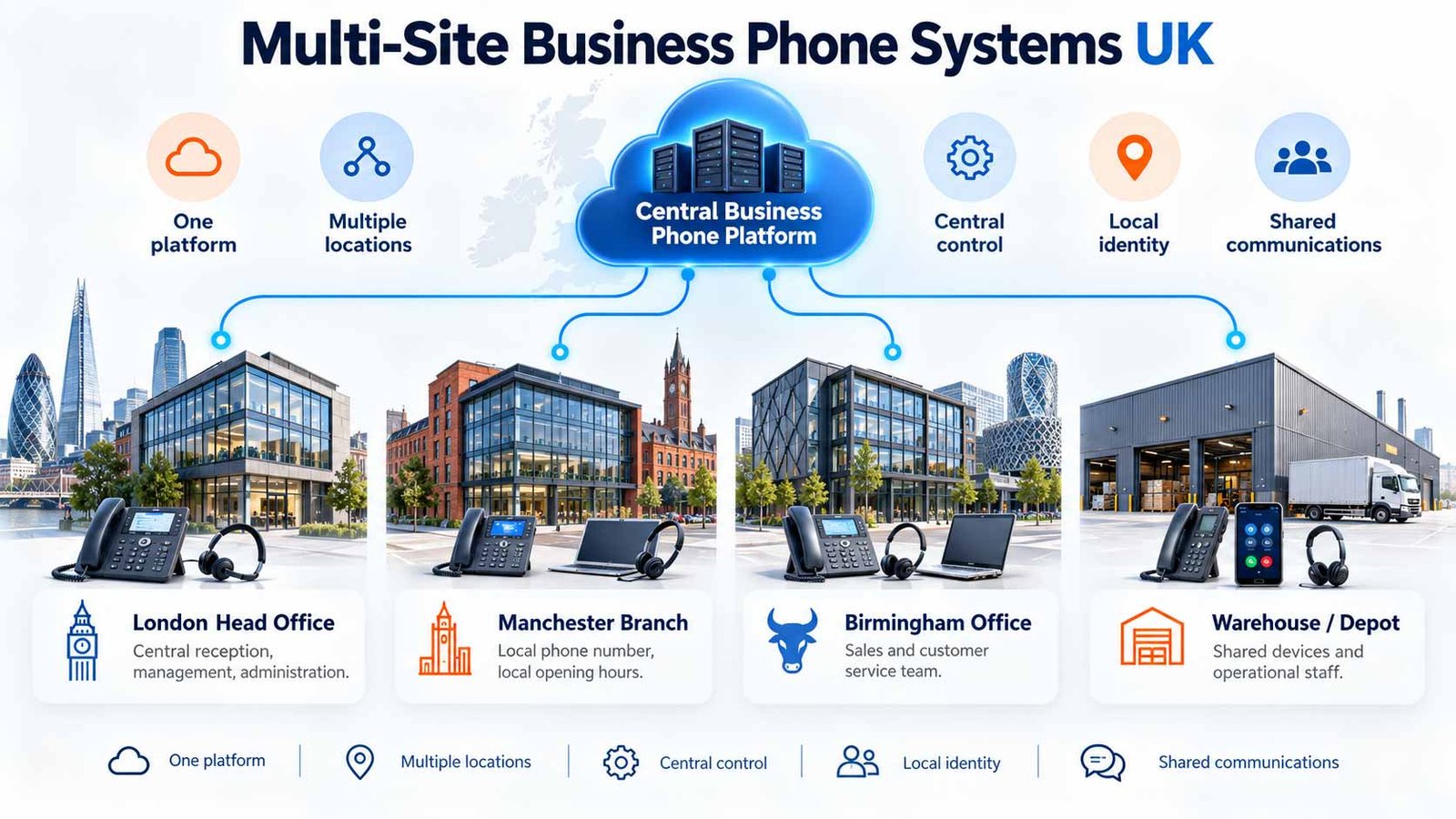
Design one business phone environment across multiple offices without turning every branch into a clone. This guide focuses on the decisions buyers need to make about central control, local identity, cross-site routing, failure isolation, emergency-location governance and phased migration.
Fast answer: A strong multi-site business phone system gives the organisation one control plane without making every site operationally dependent on every other site. Centralise what should be consistent — users, policy, reporting and administration — while preserving the local rules each branch needs for numbers, opening hours, caller identity, routing, connectivity and continuity. The buyer goal is not simply “one portal”; it is central control with a controlled failure blast radius.
Jump to a section
One system, one directory and one portal are only the starting point. A multi-site design must also answer which controls should be business-wide, which must remain site-specific, and what happens when a branch becomes isolated.
The Multi-Site Operating Model Test uses three principles:
What a Multi-Site Business Phone System Actually Means
A multi-site business phone system connects two or more physical business locations — such as a head office, branch, warehouse, clinic, shop, depot or satellite office — within a coordinated telephony environment.
Modern platforms can give those sites a shared user directory, common administration, cross-site extension dialling, shared queues and centrally managed calling policy. 8×8, for example, documents site-level administration with common properties and multi-site call handling from one platform.
But “single platform” should not be confused with “every site must behave identically”. A Manchester sales office may need different business hours from a London head office. A warehouse may need shared devices and paging-style workflows. A clinic may need stricter role separation. A retail branch may need its own local number identity but overflow to a central team.
A multi-site phone system is successful when the business can manage the estate as one environment without losing the site-level controls needed for local operations, customer identity and continuity.
When a multi-site design is different from remote working
A remote user is usually one person or a small group using the business phone service away from a fixed office. A site is an operational location with its own network, local staff, opening hours, devices, number identity and failure risk. Those differences justify a separate design layer.
If you are still choosing the overall business phone-system category rather than designing several locations, start with the business phone systems comparison. If you have already chosen a hosted operating model and want to compare platforms by control and resilience, use the cloud phone systems comparison.
The Multi-Site Control Plane Test: One Platform, Several Local Operating Models
The first design question is not “Can the provider support multiple sites?” Most serious business platforms can represent more than one location. The better question is:
Can we separate what should be controlled globally from what each site must be allowed to control locally?
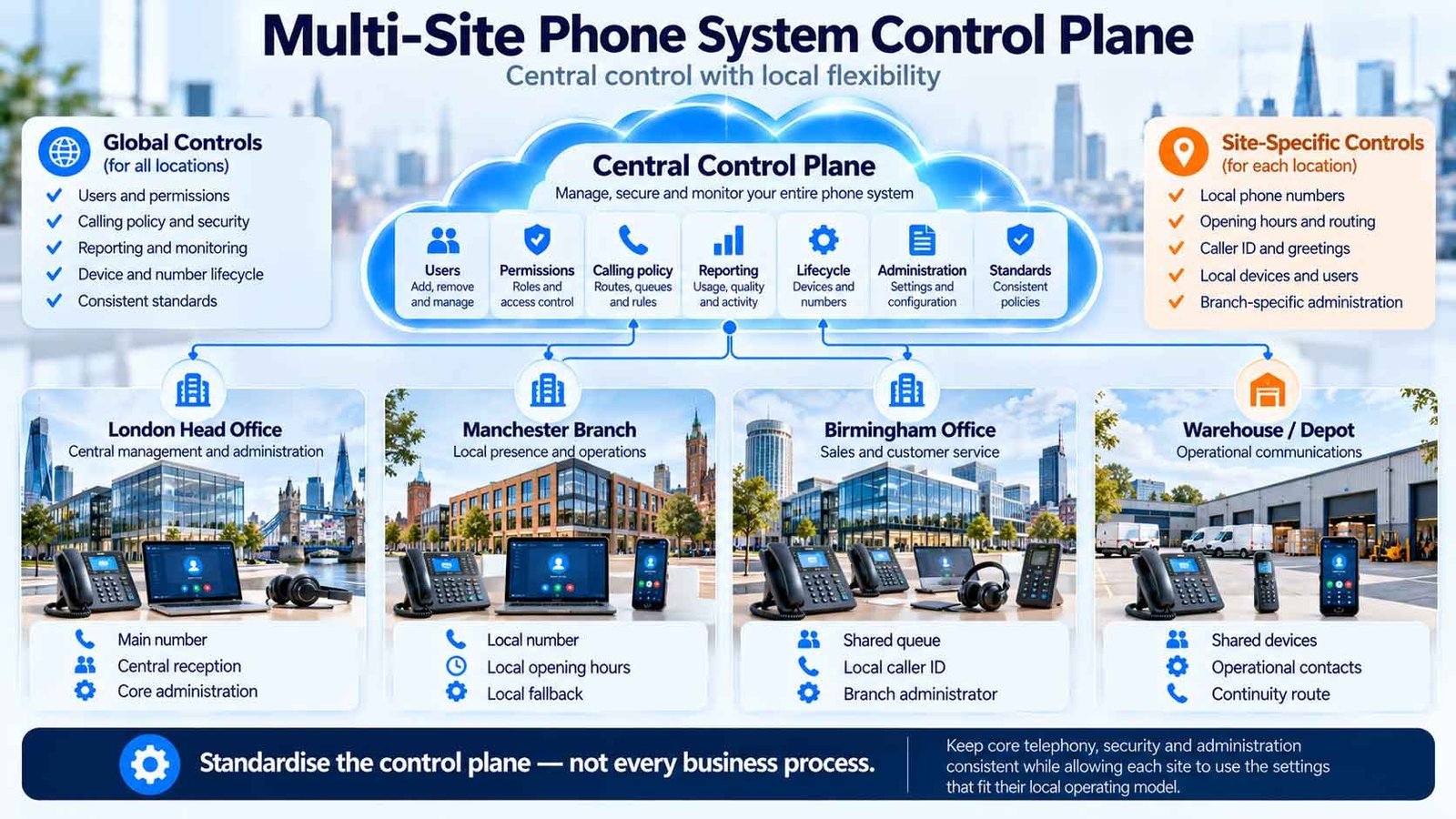
| Control area | Usually global | Usually site-specific | Buyer question |
|---|---|---|---|
| User lifecycle | Global naming, licence policy, joiner/mover/leaver process | Site assignment, local device or workspace | Can a user move between sites without being rebuilt from scratch? |
| Extension plan | Mixed common length and collision rules | Site codes where numbers repeat | What happens if two branches already use extension 201? |
| Business hours | Organisation-wide holiday policy where appropriate | Local opening and closing times | Can one branch change hours without affecting the rest? |
| Caller identity | Brand rules and governance | Local branch number / CLI where needed | Which number should customers see when each site calls out? |
| Queues and groups | Mixed shared company teams | Branch reception, local departments | Which queues are genuinely cross-site and which must remain local? |
| Admin rights | Global policy and audit | Local delegated scope | Can branch admins change only their own site? |
| Reporting | Mixed organisation-wide view | Site-level operational reporting | Can management compare sites without losing local detail? |
8×8’s current site model is a useful example of this distinction: site-level properties can include address, language, time zone, dial-plan behaviour and receptionist handling, while the service remains centrally administered.
Create a Site Profile Before You Configure the Platform
The fastest way to create a fragile multi-site phone system is to start by cloning the first branch. Instead, document each location as a small operating profile. That exposes where standardisation helps and where a local rule is justified.
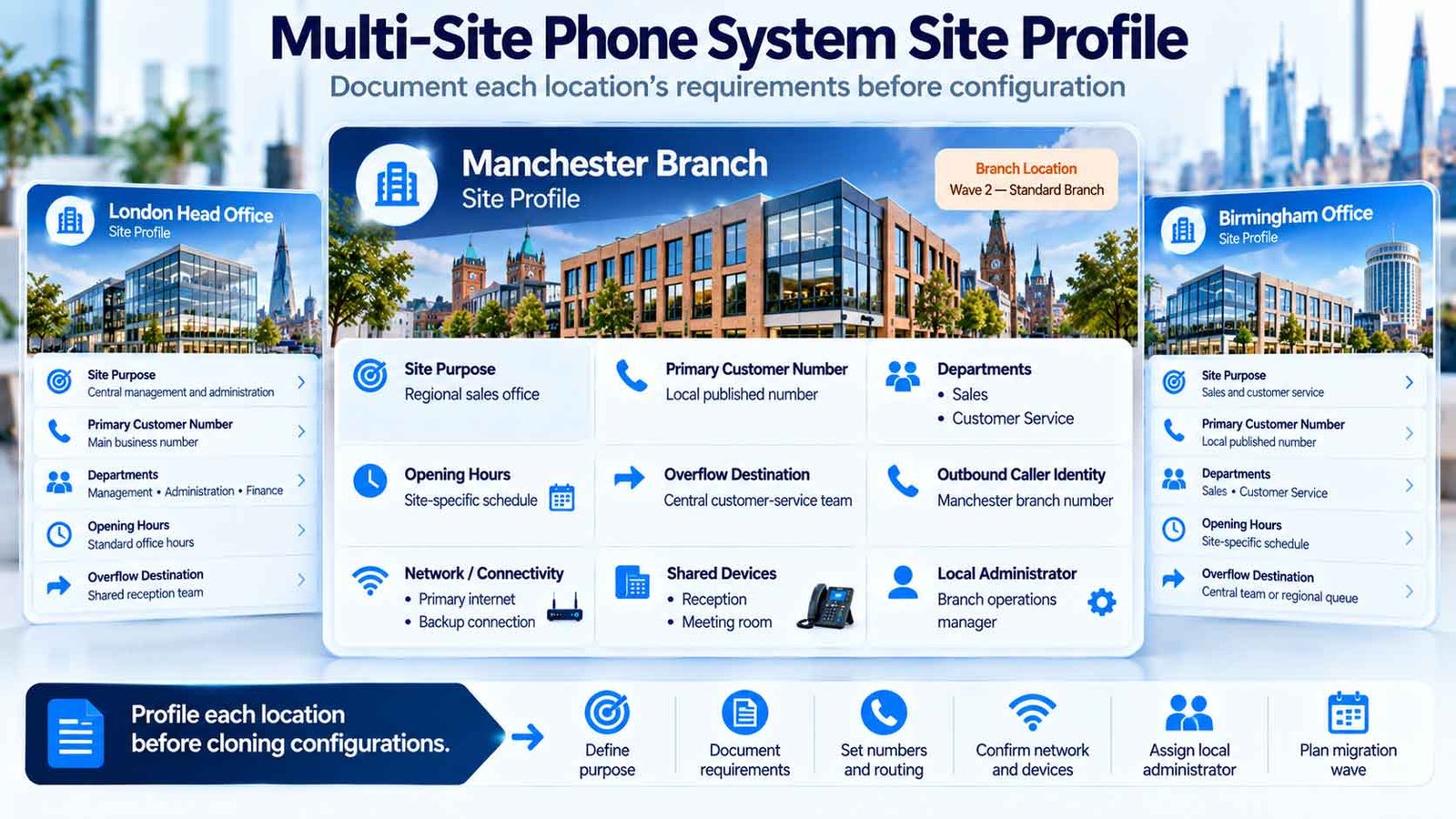
| Site-profile field | Example question | Why it matters |
|---|---|---|
| Site purpose | Head office, sales branch, clinic, warehouse, shop, depot? | Different operations create different call patterns and device needs. |
| Primary customer number | Does the site have its own published number? | Defines local identity and number-porting scope. |
| Departments / teams | Which groups answer locally? | Prevents every queue being made global by default. |
| Opening hours | Does the branch open on different days or times? | Determines local time profiles and out-of-hours behaviour. |
| Overflow destination | Where do unanswered calls go? | Defines cross-site resilience and customer continuity. |
| Outbound identity | Head-office number or local branch CLI? | Affects customer recognition and callback behaviour. |
| Network / connectivity | Primary circuit, Wi-Fi design, backup route? | Defines site-specific failure exposure. |
| Shared devices | Reception, warehouse, hot desk, meeting room? | Affects provisioning, licensing and emergency-location handling. |
| Local admin owner | Who can change hours, users or routing? | Prevents unnecessary central bottlenecks or excessive local privilege. |
| Migration wave | Pilot, standard, complex or legacy site? | Controls cutover risk instead of moving every site together. |
One Site Profile per location. The provider should be able to show how the platform represents every field that materially affects calling, administration and continuity.
Decide the Customer-Facing Number Model Before You Design Cross-Site Routing
Multi-site telephony becomes confusing when the business mixes number identity and routing logic into one decision. Start by deciding how customers should recognise each location.
Common number models
One national / main entry point
Customers call one main business number and the phone system routes them to the right site or team. This can simplify marketing but increases the importance of central routing and fallback.
Local number per branch
Each site keeps a geographic or other published number. Calls can still be answered elsewhere, but the customer-facing identity remains local.
Hybrid identity
A central company number exists alongside branch numbers and departmental DDIs. This is common when the business serves both national and local audiences.
Direct-to-user / department DDIs
Some callers bypass reception and reach a named user or team directly. This can reduce transfers but creates a larger number inventory to govern and port later.
For the differences between 01, 02, 03, 0800, virtual numbers and DDIs, see the business phone numbers guide. For each site, answer three questions: which numbers belong to which site or function, what should they present outbound, and where should they route if the normal site is unavailable?
Build a number inventory, not just a list of “main lines”
For every important number, record the current provider, service address where relevant, published purpose, normal destination, out-of-hours destination, emergency owner, porting dependency and whether the number must survive a site closure or relocation.
If existing numbers need to move to the new service, plan the transfer using the number porting guide. Agree the target number-and-routing design before scheduling the move.
Cross-Site Routing Should Solve a Business Problem, Not Create a Telephone Maze
The attraction of a multi-site platform is that calls can move across offices. The risk is that every queue starts ringing everywhere, responsibility becomes unclear and callers bounce between branches.
Use cross-site routing only where there is a defined operating reason.
| Routing pattern | Good use | Common failure |
|---|---|---|
| Central reception → local branch | One consistent first answer with local expertise after transfer. | Reception has no visibility of branch availability and transfers callers blindly. |
| Local branch → central overflow | A branch keeps local identity but does not lose calls when staff are busy. | Overflow answers without knowing which branch or number the caller used. |
| Shared national queue | Sales/support teams genuinely operate as one distributed team. | Local specialists are dragged into unrelated demand. |
| Site-to-site disaster overflow | Another branch can cover during a local outage or closure. | No one has tested whether agents, permissions and scripts work during the failover. |
| Time-zone / hours routing | Calls follow sites that are open when locations have different hours. | Holiday calendars or daylight-saving rules are not governed centrally. |
Keep the customer context with the call
If a call overflows from Birmingham to Manchester, the answering user should ideally know which number was called, which site normally owns the customer journey and why the call arrived there. Without that context, cross-site resilience can create a poor customer experience even when the call technically connects.
For IVR, queue, ring-group, overflow and fallback configuration, use the business call routing guide. Across multiple locations, decide which site owns each stage and under what conditions another site is allowed to take over.
The Site Independence Test: What Happens When One Branch Becomes Isolated?
Cloud telephony can centralise administration, but every physical site still has local dependencies: power, switches, Wi-Fi, routers and internet access. The buyer should test the blast radius of a site failure before deciding that a multi-site design is resilient.
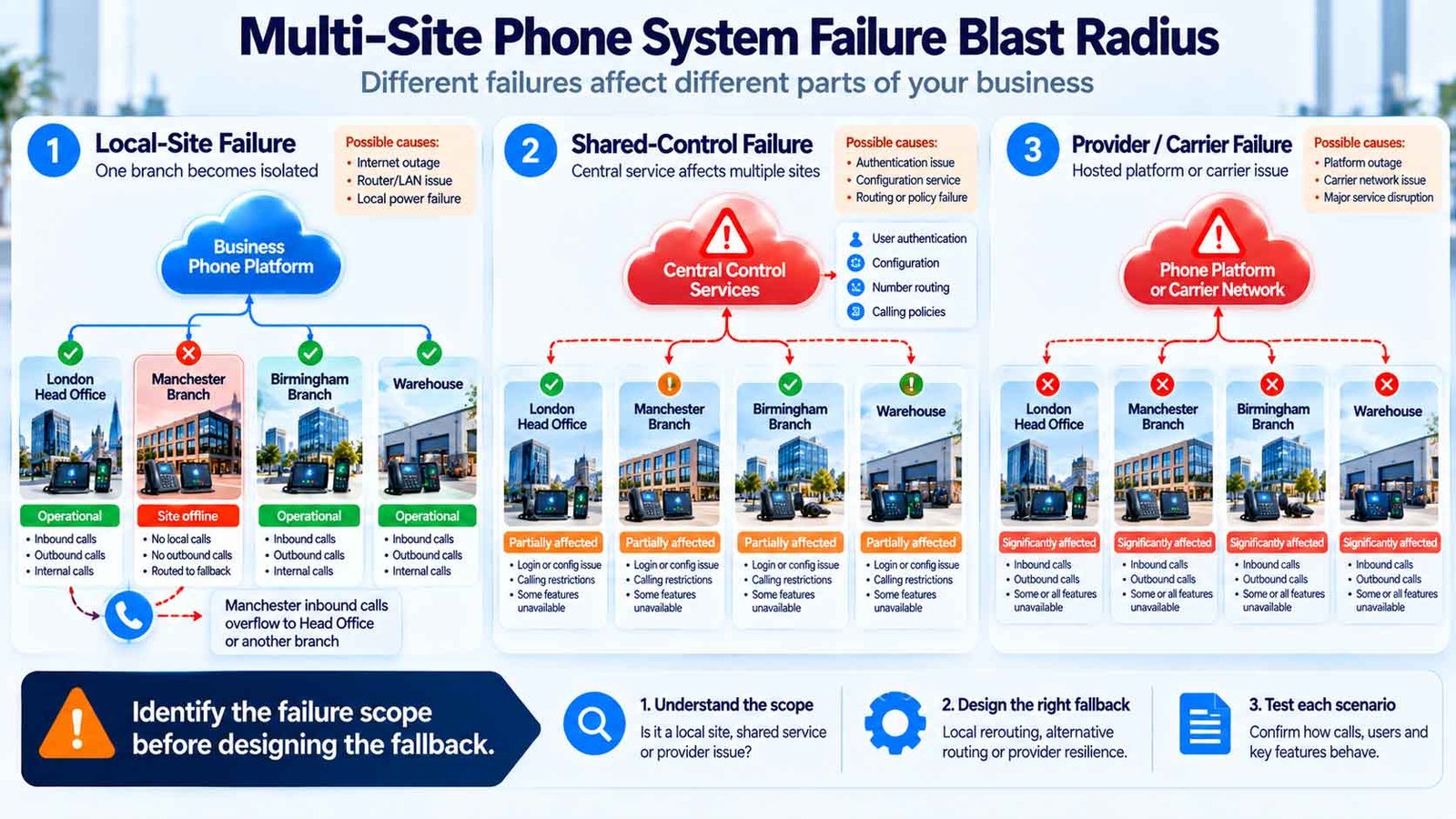
Questions for a local-site failure
- Do callers to the branch number reach another site automatically?
- Can staff use mobile applications over a separate mobile network?
- Can the central team change routing if the branch has no internet?
- Are branch queues dependent on users who are now unreachable?
- Does the backup circuit carry the voice service correctly?
- What happens to existing calls when the site switches WAN path?
Advanced survivability is architecture-specific
Some telephony architectures provide specific branch-survivability mechanisms rather than relying only on cloud diversion. Microsoft Teams Direct Routing, for example, supports a Survivable Branch Appliance model in which eligible clients can continue certain PSTN calling functions through a local SBA/SBC during an internet outage, subject to the documented prerequisites and supported-client behaviour.
That does not mean every multi-site business needs local survivable infrastructure. It means the buyer should understand the continuity model of the architecture being proposed instead of assuming all cloud deployments fail or recover in the same way.
For site continuity, test what calling remains available if a branch loses local connectivity or power. Assess latency, jitter, packet loss and QoS separately using the VoIP call quality and reliability guide.
Multi-Site VoIP Needs an Emergency-Location Process, Not Just a Dial Plan
In a multi-site environment, users, devices and numbers can move more easily than they did on a traditional fixed telephone installation. That flexibility creates a governance requirement: the organisation must understand how its provider handles 999/112 access and caller-location information for the service being deployed.
Ofcom’s General Conditions require regulated providers to support access to 999 and 112 and, where technically feasible, make accurate and reliable caller-location information available. Ofcom also includes specific requirements for VoIP outbound services and warns that access can depend on power and internet availability.
Buyer controls to confirm for every site
- What address or location information is associated with each site or user?
- Who is responsible for updating that information when a user or device moves?
- How are shared-area phones, hot desks and nomadic users handled?
- Does the provider require site, address or emergency-location data during provisioning?
- What happens to emergency calling during a local power or internet failure?
- Are users given any required warnings or instructions about those limitations?
Do not treat this as a one-time installation field. A site opening, closure, office move, extension reassignment or remote-working policy can make previously correct location data stale. Build ownership of emergency-location information into the joiner/mover/leaver and site-change process.
Every multi-site deployment should have a named owner for site/address data and a repeatable process for updating it. The exact technical mechanism depends on the provider and architecture.
Central Administration Should Not Mean One Super-Admin for Everything
Multi-site systems are often sold on centralised administration. That is useful, but a single all-powerful admin account can become an operational bottleneck and a governance risk.
Design roles around the actions people actually need to perform.
| Role | Typical permitted actions | Actions to restrict |
|---|---|---|
| Global telephony admin | Platform policy, site creation, number inventory, global routing standards, integrations, role assignment. | Use strong controls; avoid daily sharing of the account. |
| Site admin | Local users, device assignment, business hours, approved local queue membership. | Other sites, global carrier settings, organisation-wide security policy. |
| Reception / operations lead | Presence, approved queue changes, temporary routing within defined limits. | Licensing, number ownership, security configuration. |
| Read-only / reporting | Site dashboards, call volumes, operational reports. | Configuration changes. |
Current multi-site platforms can support role-based administration and site-level management; 8×8, for example, explicitly documents central administration, role-based controls and site properties.
The buyer requirement is not “does RBAC exist?” It is “can our exact global/site role model be reproduced without giving local staff excessive access or forcing every minor change through head office?”
Use Migration Waves Instead of Moving Every Site on the Same Night
Multi-site migrations create an opportunity that single-site projects do not have: one location can prove the design before the rest of the estate follows.
Do not automatically choose the head office as the pilot. The best pilot is representative enough to expose the design, but not so operationally critical that every issue becomes a crisis.
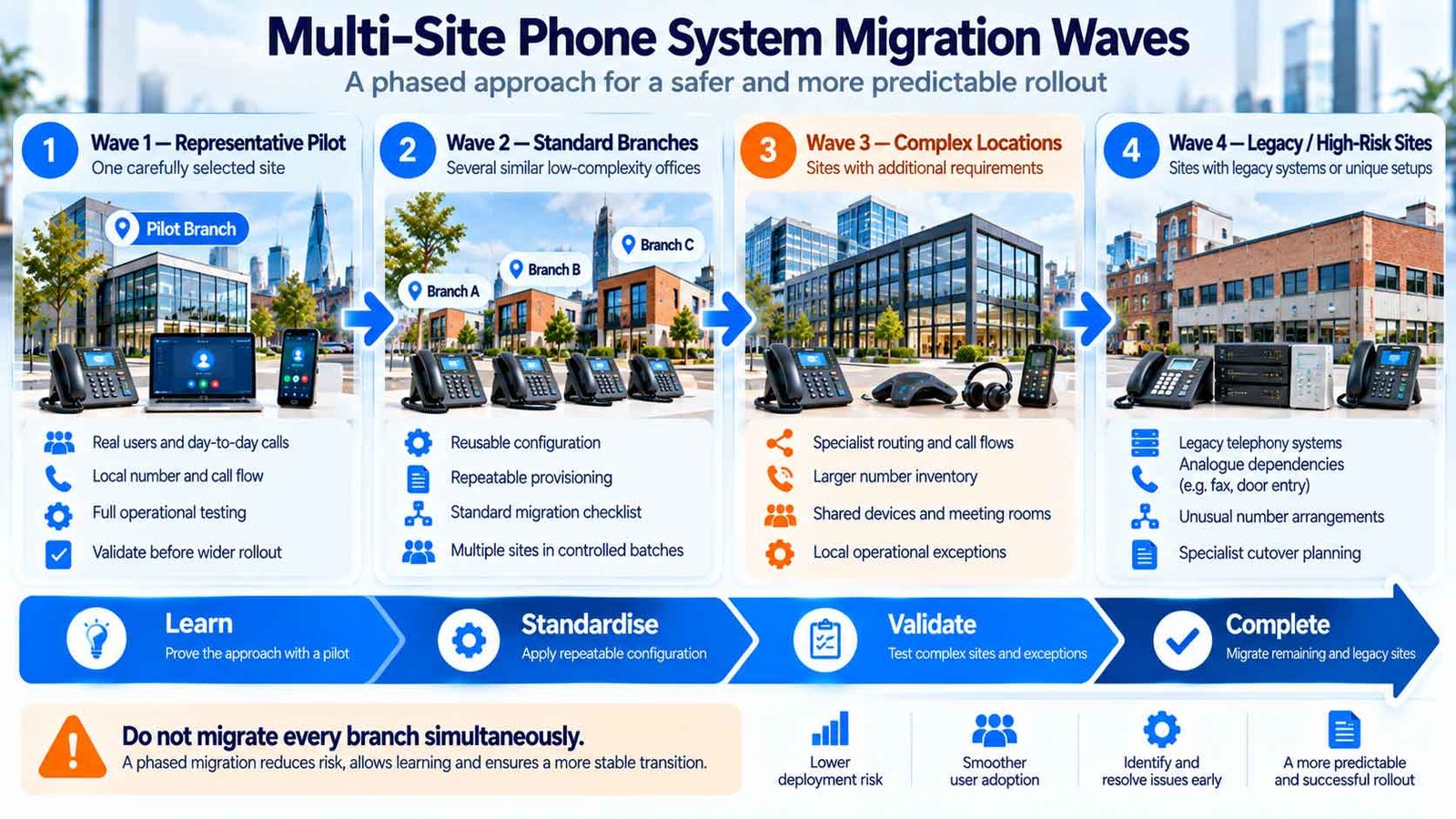
Define exit criteria for every wave
A site should not be called “complete” merely because handsets register. Confirm inbound calling, outbound caller ID, internal extension dialling, queues, after-hours routing, failover, emergency-location records, reporting and number ownership before the project moves to the next wave.
Plan existing-number transfers using the number porting guide. For the wider deployment sequence — networking, devices, testing and go-live — use the VoIP setup guide.
Ask the Supplier to Demonstrate Your Multi-Site Scenarios Before You Buy
A multi-site demo should not be a tour of menus. Give every shortlisted supplier the same scenarios and ask them to reproduce the expected outcome.
| Scenario | What the supplier should demonstrate |
|---|---|
| 1. Create a new branch | Create the site, apply the correct policy, assign its number identity and add users without rebuilding the whole system. |
| 2. Move a user | Move a user from Site A to Site B and show which extension, caller ID, emergency-location and permission fields change. |
| 3. Different opening hours | Change one branch’s hours without affecting the rest of the organisation. |
| 4. Cross-site overflow | Let Branch A overflow to Branch B while preserving enough context for the answering user. |
| 5. Local caller identity | Show how outbound CLI is selected for users who work across more than one site. |
| 6. Branch outage | Simulate or explain how inbound calls behave when one site loses its normal connection. |
| 7. Local admin | Give a branch administrator rights to their own site and prove they cannot alter another branch. |
| 8. Site reporting | Show call volumes and service performance by branch as well as organisation-wide. |
| 9. Close a branch | Retire a site without losing numbers, recordings, users or routing logic that must remain elsewhere. |
| 10. Port a site number | Explain the migration dependency and how routing is staged before, during and after the port. |
| 11. Shared queue membership | Add users from several sites to one company queue while retaining local site functions separately. |
| 12. Emergency-location change | Show the supported process for updating location data when a user or device moves between physical locations. |
If a scenario is business-critical, ask to see how it is configured, governed and tested. “Supported” and “easy to operate at scale” are not the same thing.
The Multi-Site Buyer Evidence Test
Supplier comparison becomes more useful when every proposal has to answer the same operating-model questions.
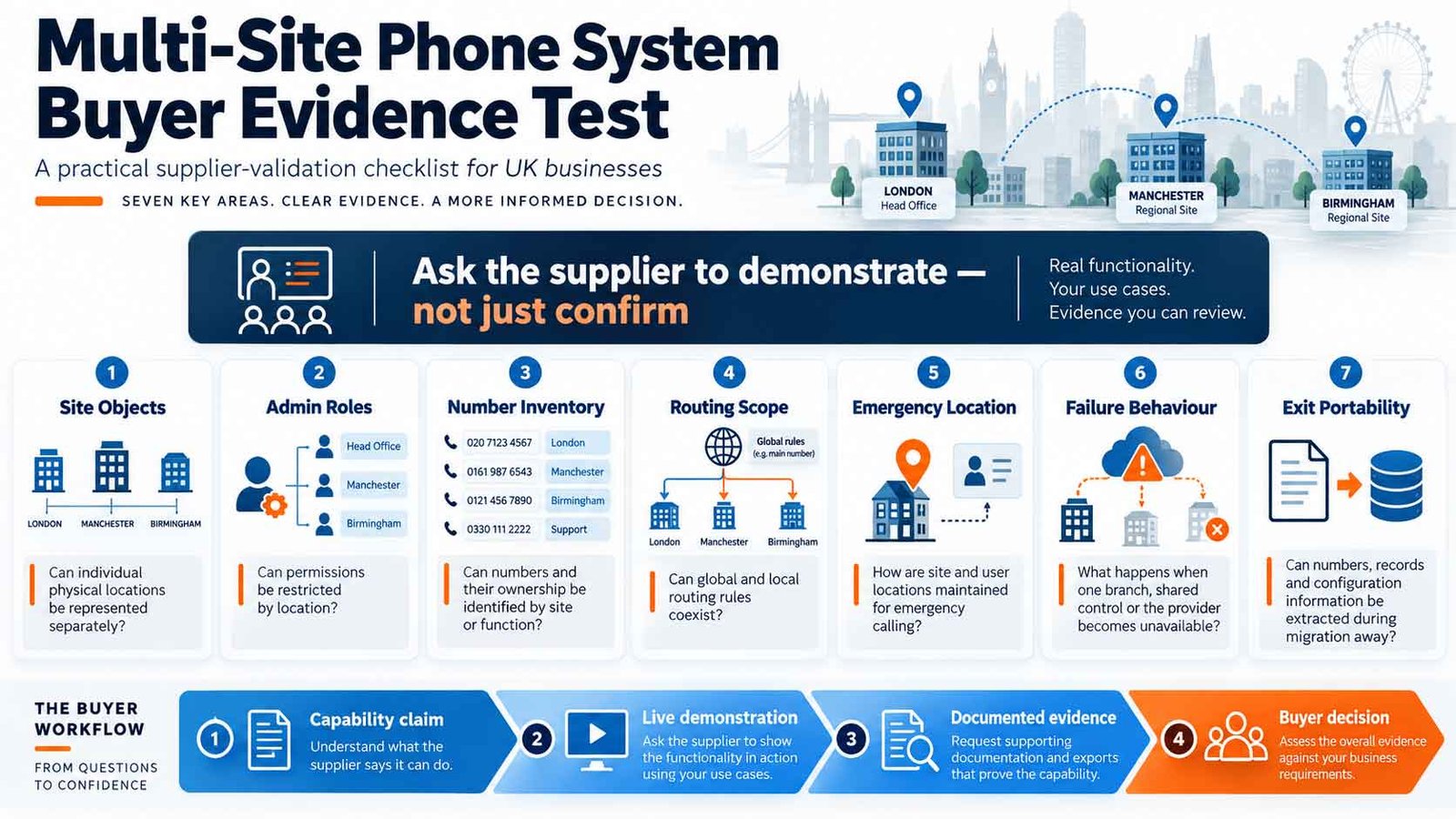
Why this is a stronger buyer test than “supports multi-site”
“Multi-site support” is a capability label. The evidence pack turns it into an operating model. Two suppliers may both support many locations while differing substantially in delegated administration, extension planning, local-number identity, site outage behaviour and migration tooling.
Once your site architecture is documented, continue through the VoIP guides library to review other system requirements. Give every shortlisted supplier the same multi-site specification rather than relying on its demonstration script.
Multi-Site Business Phone System Buyer Checklist
Before approving a multi-site phone-system design, confirm the following:
- Every physical location has a documented Site Profile.
- We know which configuration is global and which is site-specific.
- Extension collisions and site-code rules are resolved before migration.
- Every published business number has a named purpose and owner.
- We know which number each site and user should present outbound.
- Local and organisation-wide opening-hours rules are documented.
- Cross-site overflow exists only where a real operational requirement justifies it.
- Users receiving overflow calls can identify the originating branch or number.
- Each site has a defined internet/power continuity model.
- We know what happens to inbound calls if one branch is unreachable.
- Local admin roles cannot alter other sites without authority.
- Global administrators can report and audit changes across the estate.
- 999/112 access and caller-location processes have been confirmed with the provider.
- There is a named owner for keeping site/location data current.
- Number porting is mapped by site and migration wave.
- A representative pilot site will prove the target design.
- Each migration wave has acceptance and rollback criteria.
- The supplier has demonstrated branch creation, user moves, overflow, outage handling and site-level administration.
- We can export or document the number inventory, user/site map and routing model for future exit or supplier change.
- The final architecture is included in the written supplier requirements.
If the business cannot explain what should happen to a branch’s customers, users, numbers and calls when that branch loses connectivity — or when the branch permanently closes — the multi-site design is not finished.
Multi-Site Business Phone System FAQs
What is a multi-site business phone system?
It is a coordinated phone environment serving two or more physical business locations. Sites can share administration, users, extensions, queues and reporting while still keeping local numbers, hours, routing or permissions where needed.
Is multi-site VoIP the same as a cloud phone system?
No. Cloud describes where and how the phone platform is delivered. Multi-site describes the organisation’s operating requirement across several locations. Many cloud systems support multiple sites, but the quality of site-level control, delegation, routing and continuity can differ.
Can different branches keep their own local phone numbers?
Often yes, subject to the provider, number availability and porting arrangements. A multi-site design can keep local branch numbers while still routing and administering calls centrally. The detailed number strategy should be defined separately from the routing design.
Can staff call colleagues at another office using extensions?
Many multi-site platforms support internal extension dialling across locations. The design must address extension uniqueness or site codes where branches already use the same extension ranges. 8×8, for example, documents both unique cross-site extension dialling and site-code handling where extension numbers repeat.
Should every branch use the same call-routing rules?
Not automatically. Standardise rules that genuinely belong at organisation level, but keep branch-specific opening hours, reception behaviour, number identity and local workflows where operations differ. The goal is controlled consistency, not forced uniformity.
What happens if one branch loses internet access?
The outcome depends on the architecture. Possible continuity routes include backup internet, mobile applications, another site taking over calls, cloud diversion or architecture-specific branch-survivability mechanisms. Buyers should test the exact proposed path rather than assuming “cloud” automatically solves a local outage.
Can each branch have its own phone-system administrator?
Many business platforms support delegated or role-based administration, but the scope varies. Test whether a branch admin can make the local changes you want without viewing or changing other sites.
How should 999 and 112 location information be handled across multiple sites?
Confirm the provider’s supported location process for fixed, mobile and nomadic use. Ofcom requires regulated providers to support emergency-service access and, where technically feasible, accurate caller-location information. The business should also have a process for keeping location data current when users or devices move.
Should we migrate all branches at the same time?
Usually there is value in proving the target design at a representative pilot before moving the whole estate. The right sequence depends on business criticality, number-porting dependencies, legacy equipment and how similar the sites are.
What should we ask a multi-site phone-system supplier to demonstrate?
Ask the supplier to create a branch, move a user between sites, apply different hours, configure cross-site overflow, restrict a site admin, show site reporting, explain branch-outage behaviour, update location data and describe how numbers and configuration are exported at exit.
Sources & Methodology
The Multi-Site Operating Model Test distinguishes three connected design decisions: central administration, branch-level requirements and continuity at each location. Use it to document what must be shared across the organisation, what each site controls and how calling continues during disruption.
Technical and regulatory references informing this guide:
- 8×8 — Multi-Site Support for current examples of site creation, cross-site call handling and central site administration.
- 8×8 Admin Console — Set up sites for site properties, extension/site-code behaviour and site-level administration concepts.
- Microsoft Learn — Teams Direct Routing Survivable Branch Appliance for an architecture-specific example of branch calling continuity during internet disruption.
- Ofcom — General Conditions of Entitlement for current UK obligations covering emergency-service access and caller-location information.
- Ofcom — Emergency-services compliance programme for Ofcom’s 2026 summary of obligations concerning 999/112 access and caller-location information.
Important: provider architectures differ. Features such as site codes, delegated administration, branch survivability, emergency-location handling and routing scope must be validated against the service actually being purchased. Examples in this guide illustrate buyer questions rather than universal platform behaviour.
Last reviewed: 30 September 2026.
 CompareVoIPService.co.uk
UK-focused VoIP guidance
Multi-Site Business Phone System Plan
Compare Multi-Site Phone Systems Beyond the “One Portal” Claim
Use the same site model, number, routing, administration, continuity and migration requirements with every shortlisted provider. That makes it easier to compare what each platform can actually demonstrate across your branch estate.