


Avaya IP Office Phone Systems, Explained for UK Businesses
Understand your IP Office installation, licences, connected phones and SIP calling before deciding whether to retain, upgrade or replace the system.
Editorial architecture illustration—not a manufacturer product photograph or a verified deployment.
Quick answer: Avaya IP Office is an on-premises business communications platform that can combine compatible digital, analogue and IP telephone services with PBX call routing, voicemail and supported staff applications. For a UK business, keeping it in service depends on the exact software release, hardware, licence entitlements, SIP provider, maintenance support and tested emergency/failure routes—not the Avaya brand name alone.
Jump to a Section IP Office basics
What Is an Avaya IP Office Phone System?
Avaya IP Office is a business PBX and unified communications platform commonly deployed on an organisation’s premises or on supported dedicated/virtual server infrastructure. It controls internal extensions and the way calls reach teams, receptionists, voicemail or other destinations. External UK calls still require an appropriate network service and numbering arrangement.
IP Office has been installed in small and medium-sized businesses, branch offices and larger connected estates. Its architecture can include both legacy telephone interfaces and IP telephony. That flexibility is useful for retaining compatible equipment—but it can also hide old cards, handsets, trunks and applications that must be checked before any change.
Extensions, hunt groups, auto attendants, time profiles, transfers and voicemail depend on the installed features.
SIP/other eligible trunks, number rental, porting and tariff are separate commercial/technical responsibilities.
A capability described in current R12.3 documentation may not exist on an older R9, R10 or R11 installation.
The business needs a maintainer who knows its equipment, configuration, licences, backups and incident route.
Avaya continues to publish IP Office product information describing it as an on-premises communications solution. This page focuses on understanding an existing or proposed IP Office estate—not rating Avaya against other telephone vendors.
How Does Avaya IP Office Handle Business Calls?
On a typical incoming call, the caller dials an organisation’s UK number. Its selected carrier routes the call to the configured IP Office trunk. IP Office applies the incoming call route, time conditions and hunt-group or extension rules. Supported phones and client apps then alert the appropriate users. Outbound routing also depends on short codes, permissions and the carrier’s caller-ID rules.
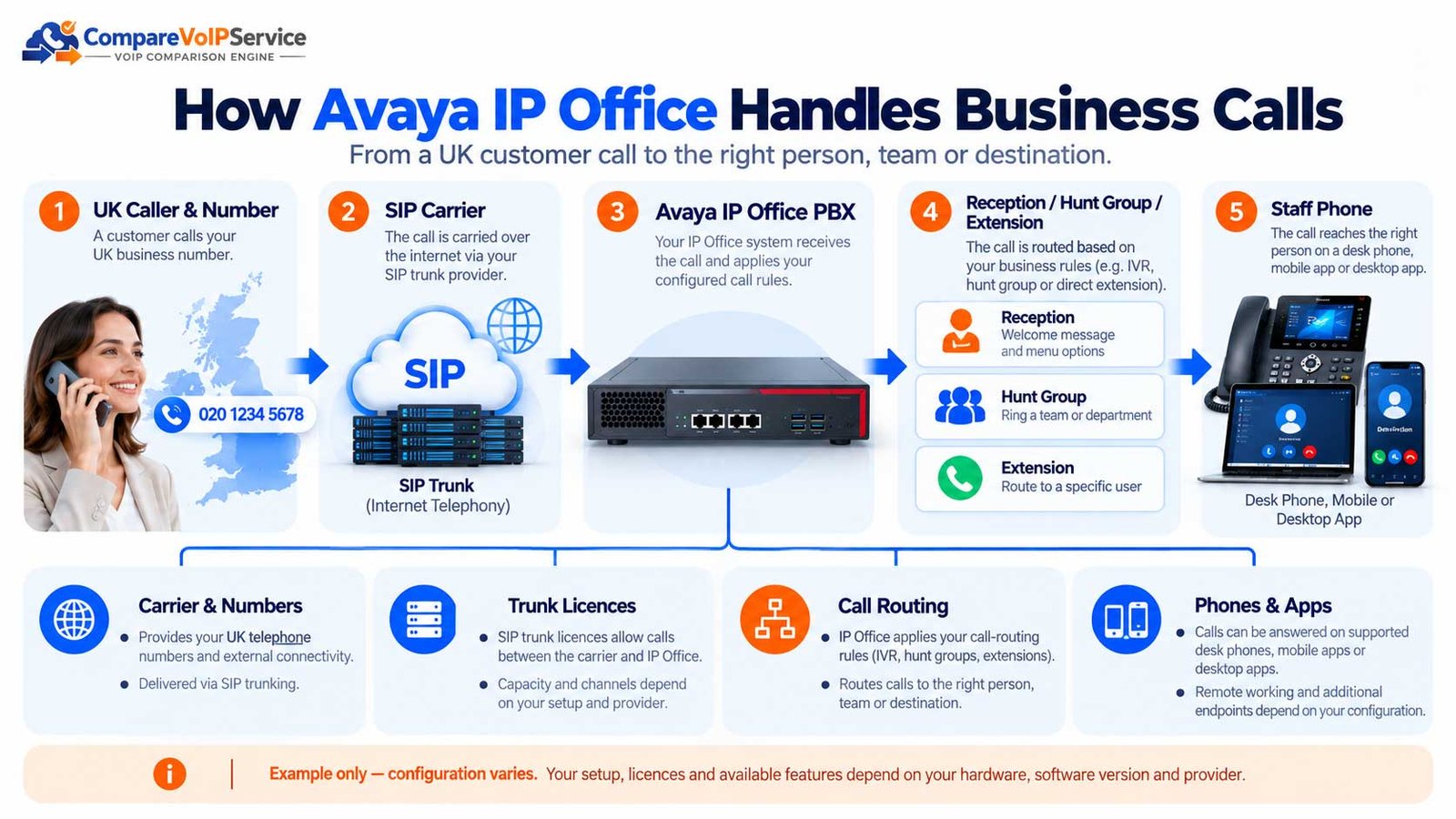
View the text-based call path
The control unit or server, network, trunk and endpoints are different failure domains. A successful extension-to-extension call does not prove that public inbound, outbound or emergency calls work. Avaya’s SIP trunk documentation identifies additional IP Office trunk configuration and licensing dependencies.
Which Avaya IP Office Releases Are Still Suitable?
Start with the version actually installed. An “Avaya IP Office” quotation or existing asset label is not enough to establish current support, security patch entitlement or an eligible direct upgrade. Record both the application software release and the underlying controller/server hardware.
| Release evidence | What you can conclude | Required action |
|---|---|---|
| R12.3 documentation exists | Avaya has published R12.3 feature and administration material. This does not mean every earlier installation can directly upgrade. | Ask the maintainer for the exact supported target build, firmware and migration path. |
| R12.1 / R12.2 documentation | Intermediate releases have specific feature, device and update conditions. | Inspect release notes and compatibility before proposing a version step. |
| R11.x or older installed | Age alone does not determine exact contractual support; an Avaya 2024 notice restricted support for several R11.1/11.0 releases. | Check exact R11.1.3 build or earlier version against current lifecycle and partner entitlement. |
| Version unknown | Hardware labels and handset types cannot prove system software. | Obtain system inventory, licensing evidence, backups and maintenance contract before pricing. |
Table scrolls horizontally on smaller screens.
Avaya’s June 2024 notice stated that several R11.1/11.0 releases would no longer receive critical patch and service-pack support from August 2024, while describing R11.1.3 and R12.0 differently. Do not apply that historic notice indiscriminately to every release or assume a support term remains unchanged today.
See the Avaya R12.3 release changes and the Avaya 2024 release lifecycle notice. Confirm the live position with an authorised support partner before writing “supported” or “end of support” on a purchase order.
What IP Office Hardware and Editions Exist?
The phrase “IP Office system” can refer to different hardware and software arrangements. It is not a single-size appliance with identical expansion or licensing rules. The installed edition, IP500 V2 cards, application servers and virtualised components determine what can be kept or changed.
| Deployment component | Typical role | Check before retaining |
|---|---|---|
| IP500 V2 control unit | On-premises PBX controller with supported station/trunk/voice-compression expansion | Installed base cards, expansion units, firmware, SD contents, supported telephones and licences. |
| Server Edition | Linux-based server roles for larger/connected deployments and supported applications | Server specification, virtualisation, primary/secondary roles, application service location and upgrade process. |
| Legacy Basic / Essential / Preferred configurations | Feature/edition terms documented across different product generations | Actual entitlement and edition availability on the installed release; never infer from historic product brochures. |
| Connected branches and applications | IP Office network, voicemail, portal and client/application dependencies | Version consistency, support owner, backup scope, links between nodes and failover behaviour. |
Table scrolls horizontally on smaller screens.
Avaya’s platform description includes IP500 V2, Linux-based applications and virtualised server arrangements. Its headline multisite maximum is a documented platform ceiling, not a capacity commitment for your present equipment.
How Do Avaya IP Office Licences and Trunk Channels Work?
IP Office licensing is not just a user-seat count. The installed licence model can affect available applications, user features, trunk sessions, software upgrades and supported phones. A business can have spare carrier capacity but still be restricted by its IP Office licensed SIP sessions—or the reverse.
| Item | What to establish | Common mistake |
|---|---|---|
| Software release/upgrade entitlement | Current support agreement; any required major-release upgrade licence; existing PLDS records | Assuming access to installer files makes the upgrade licensed. |
| SIP trunk sessions | Total licensed IP Office SIP sessions and carrier channel limit | Counting employees instead of peak concurrent external call legs. |
| Voice compression resources | Required VCM resources on applicable IP500 V2 configurations and codec needs | Assuming all IP calls need no DSP/VCM resources in every call path. |
| User / application licences | Workplace, portal, voicemail, reporting, recording and specialist user features | Assuming every advertised application is included in the base package. |
| Phone and expansion compatibility | Supported handsets, firmware, cards and DECT base arrangements | Treating “Avaya handset” as proof of compatibility on the target release. |
Table scrolls horizontally on smaller screens.
A service might provision 16 external SIP channels while IP Office has only 10 licensed SIP sessions; the smaller configured limit can block calls. This is a hypothetical example, not a recommended licence bundle.
Avaya documents SIP trunk session licensing and release upgrade licence conditions. Have the qualified maintainer prepare a written, configuration-specific entitlement schedule.
Which Phones, Apps and Features Work With IP Office?
IP Office estates often mix several types of endpoint: digital desk phones, Avaya IP handsets, SIP phones, DECT and supported computer or mobile clients. That can help a gradual migration, but handsets are not all interchangeable and some may rely on old station cards or firmware.
Identify handset model and generation, provisioning method, button behaviour, power and supported software.
Check the exact OS, user entitlement, calling features and network requirements before promising remote softphone use.
Document extension membership, overflow, voicemail, night service and any specialist operator console.
Verify whether reporting, call recording and retention tools are installed, licensed and operated lawfully.
Avaya’s Workplace Client documentation describes supported platforms, while its telephone installation notes illustrate why release and operating mode matter.
Can Avaya IP Office Use SIP Trunks and Keep UK Numbers?
A compatible SIP trunk can connect an eligible IP Office configuration to UK public calling without automatically replacing the PBX. It still requires vendor/carrier interoperability, SIP session entitlement, dial-plan rules, valid numbers, CLI and adequate network/media paths. Certain installed systems may need an SBC, updated software or an alternative migration route.
| Dependency | Business question | Who normally verifies it? |
|---|---|---|
| SIP carrier | Does the selected carrier support this exact IP Office release/topology and UK number service? | Carrier and Avaya-qualified partner |
| Inbound DDIs | Where will every main number, department number and direct dial terminate after porting? | Carrier/porting team + PBX maintainer |
| Outbound CLI | Which valid diallable number can each team present, and who authorises it? | Carrier + PBX routing owner |
| SBC / NAT / media | Is there a supported connection path and two-way audio under the real firewall rules? | Network/SBC engineer + partner |
| Legacy devices | Are alarms, lifts, fax or payment devices attached to old lines or PBX ports? | Business owners + specialist suppliers |
Table scrolls horizontally on smaller screens.
For detailed trunk sizing and service ownership, see our UK SIP trunking guide. Number transfer itself is covered by the business number-porting guide. This page keeps the focus on IP Office prerequisites.
How Reliable Is an Avaya IP Office Phone System?
System availability depends on more than having an Avaya box that powers on. Your service chain can include an on-site controller, application server, SBC, firewall, switching, PoE desk phones, internet or private access circuit, SIP carrier and stored routing configuration. The failure of one component may affect some calls but not others.
| Failure | Possible impact | Acceptance test / evidence |
|---|---|---|
| Office power or PoE loss | Local desk phones, network and PBX hardware may become unavailable. | UPS scope, battery duration, alternate service and approved emergency route. |
| Internet or private circuit loss | SIP connection or remote client access may stop. | Secondary connectivity independence and inbound network divert. |
| IP Office controller/server failure | Internal call control, voicemail or trunk reachability may be lost. | Configuration plus application/data restoration plan and realistic recovery owner. |
| SIP carrier failure | Outside calls may fail even when internal calls work. | Agreed network failover, diversions and carrier fault escalation. |
| Bad change or corrupt backup | Routing, user access or voicemail may be lost. | Backups, restore rehearsal, configuration export and release rollback constraints. |
Table scrolls horizontally on smaller screens.
Avaya’s backup policy explicitly distinguishes system backups from some separately retained files such as licence keys and custom prompts. Back up the whole service dependency chain, not only the main configuration.
What Must UK Businesses Check for 999, 112 and Power Cuts?
In the UK, emergency access is a regulated function of the voice service. Ofcom’s General Conditions require relevant providers to ensure emergency-organisation access and to make accurate and reliable caller-location information available where technically feasible. A business still needs to give its providers correct site/location details and test the practical call path with the responsible specialist.
Record the registered site and number/CLI arrangement for each office, remote user scenario and movable endpoint.
Ask the provider for its authorised test method and records; do not make unnecessary live emergency calls.
Document which routers, phones, SBCs, gateways and IP Office components need backup power, and a separate route.
Identify monitored alarm, lift phone, fax, payment terminal and other legacy devices for specialist sign-off.
Ofcom’s emergency access compliance material explains the relevant obligations. For the wider switch-off timetable, Openreach continues to identify 31 January 2027 as the PSTN retirement milestone. It is not evidence that an old PBX or attached device will automatically work after migration.
Should You Retain, Upgrade or Replace Avaya IP Office?
The sensible starting point is not “replace Avaya” or “keep Avaya”. It is the remaining usefulness of a supported, recoverable IP Office estate compared with the technical and commercial work required to modernise it.
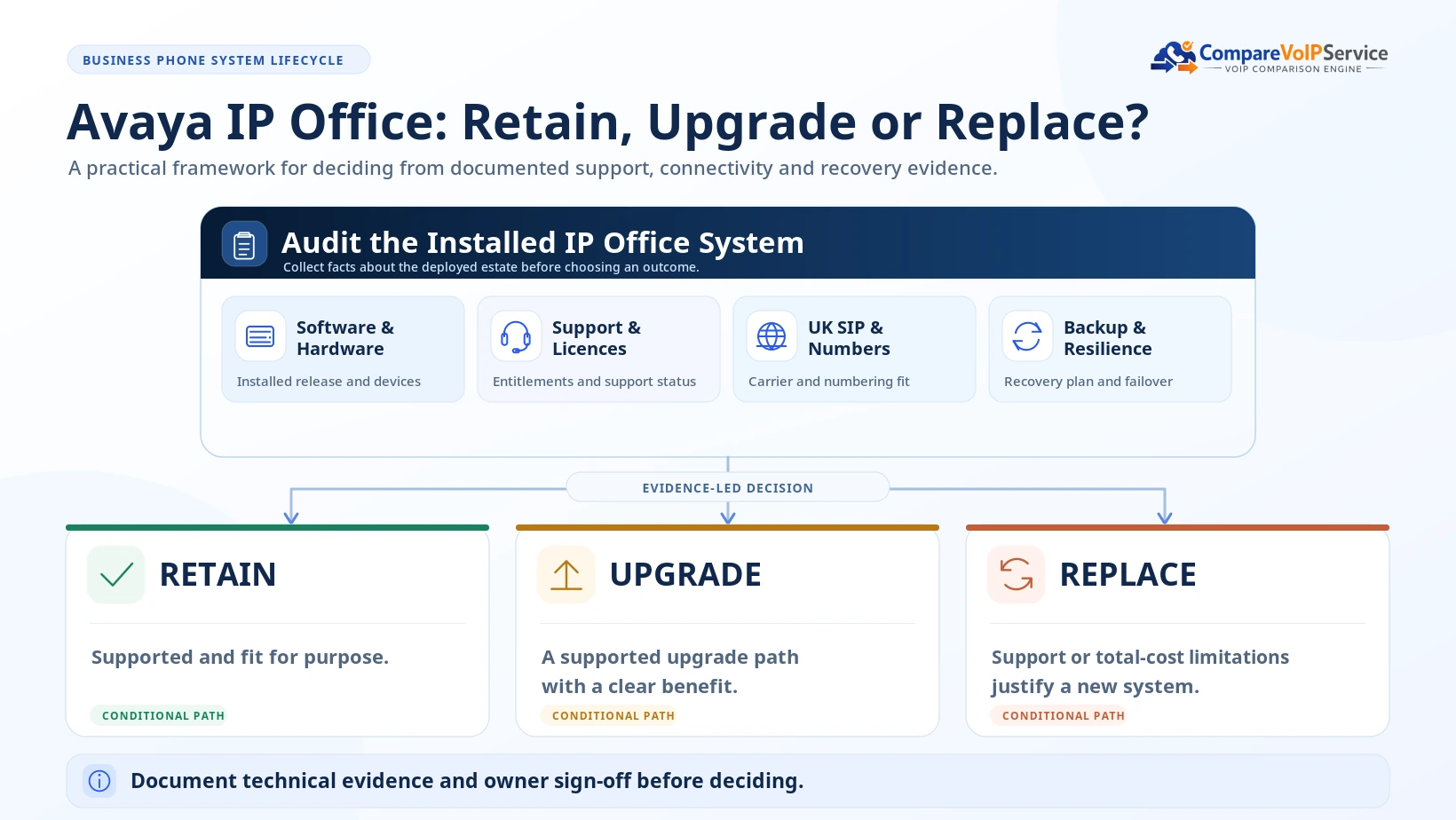
| Option | Consider it when | What must be proven |
|---|---|---|
| Retain and maintain | The installation remains supported, secure, reliable, feature-suitable and affordable. | Exact release and contract support, carrier readiness, security, backup and continuity. |
| Upgrade IP Office | The business needs newer capabilities but can preserve supported hardware or server investments. | Supported upgrade sequence, licence conversion, handset/cards, downtime and rollback requirements. |
| Replace the PBX | Ageing modules, limited support, complex applications or high ownership costs make retention unattractive. | Like-for-like requirements, migration costs, numbering, devices, training and exit plan. |
| Stage a mixed migration | Several branches or specialist devices cannot be migrated together safely. | Interoperability, temporary routing, ownership, realistic branch-by-branch acceptance. |
Table scrolls horizontally on smaller screens.
Avaya warns that upgrades can interrupt calls and require backups, release notes and configuration-specific procedures. A direct jump between widely separated releases may not be a supported path. Arrange a maintenance window and signed rollback plan.
Read Avaya’s Manager upgrade precautions and server upgrade policy. The broader business-wide programme belongs to our PSTN-to-VoIP migration guide.
What Does Avaya IP Office Cost to Keep or Upgrade in the UK?
Avaya IP Office does not have one meaningful universal UK business price. A retained system can appear inexpensive because the appliance was purchased years ago, yet ongoing support, replacement parts, user apps, licence changes, service outages and migration effort can dominate the real decision.
| Cost line | Include in the written quote | Avoid assuming |
|---|---|---|
| Hardware and replacements | Controllers, servers, expansion cards, phones, PoE, UPS and spares | That an existing platform has no replacement cost. |
| Software and licences | Upgrade, user/application entitlements, SIP sessions, support/maintenance | That old licences transfer automatically to a new release. |
| Carrier and numbers | UK SIP channel/usage charges, DDI rental, porting, CLI, call bundles | That public calling is included with an IP Office licence. |
| Professional services | Inventory, engineering, backups, test plan, cutover, rollback and training | That a supplier can estimate labour without the as-built configuration. |
| Continuity and operations | Dual access, monitoring, power protection, recovery exercise and support hours | That an SLA for one vendor covers carrier/network/PBX faults. |
| Exit and transition | Overlap of services, number porting, disposal and contract terms | That replacing the PBX immediately ends the existing service contract. |
Table scrolls horizontally on smaller screens.
Ask each supplier to cost the same period, sites, users, concurrent calls, numbers, duties and support hours. Show VAT consistently and keep assumptions explicit.
Is Avaya IP Office Suitable for Your Business?
IP Office can still be a credible fit for an organisation that has a working, supported estate, significant desk-phone or branch investment, a responsible maintenance partner and a verified UK digital connectivity route. An unsupported or poorly documented deployment may instead increase operational risk.
| Business situation | What IP Office may offer | Caution |
|---|---|---|
| Existing multi-extension site | Keep known routing, user workflows and supported endpoints. | Check version, maintenance and recovery—not just how old the box looks. |
| Distributed offices | Manage supported connected nodes with consistent dial plans. | Network links, per-site emergency location and upgrades can be complex. |
| Business with very old handsets/cards | Potentially retain selected assets during staged changes. | Old equipment or unsupported software may negate savings. |
| New small team with no PBX | Full call-routing control can suit specialist needs. | A managed hosted option may simplify service ownership. |
| Organisation with limited in-house IT | Partner-led support may reduce operational burden. | Require one written fault triage and replacement-parts arrangement. |
Table scrolls horizontally on smaller screens.
For market-wide alternatives, see the existing UK business phone systems guide. That page owns broad rankings; this article explains IP Office’s product-specific operating and retention requirements.
Avaya IP Office UK Readiness and Upgrade Checklist
This is the original practical output of the guide: a single acceptance record to be completed by the business, Avaya-qualified maintainer, carrier and network provider. A successful test call is not enough to sign off migration.
Record release/build, edition, IP500 V2/server topology, branch nodes, cards, user licences and support expiry.
Inventory UK DDIs, CLI, short codes, hunts, IVR, opening hours, external diversions and porting owner.
Check desk/DECT phones, Workplace, voicemail, portal, recording, integration and user features.
Confirm carrier/SBC design, SIP/RTP, firewall rules, privilege, updates, call fraud and network resilience.
Obtain the provider’s approved 999/112/location verification; separately inspect alarms, lifts and payment devices.
Take and restore-test necessary backups, agree defects, maintenance contacts, cutover, rollback and written acceptance.
| Acceptance question | Evidence to retain | Responsible sign-off |
|---|---|---|
| Does the exact target build remain eligible? | Release notes, model/firmware matrix, licence schedule | Avaya support partner |
| Can numbers route both ways? | Inbound DDI and outbound CLI call results | Carrier + PBX maintainer |
| Does expected load fit? | Peak calls, licensed SIP sessions and carrier limits | Business + supplier |
| Does emergency calling comply? | Approved carrier verification and site location record | Voice provider + site owner |
| Can faults be recovered? | UPS/divert tests, backup copies and restore plan | IT + continuity owner |
| Can old services be ceased? | Port confirmation, device-dependent service inventory and approval | Named business owner |
Table scrolls horizontally on smaller screens.
Avaya IP Office Frequently Asked Questions
Is Avaya IP Office still available?
Avaya maintains an official IP Office product page and R12.3 documentation. That does not prove the availability of every older hardware module or the support status of a particular installed system. Ask an authorised UK partner to confirm the exact offer.
Is Avaya IP Office a cloud phone system?
The product is commonly described as an on-premises or privately deployed communications platform, with supported server and virtualised options. It should not be confused with Avaya Cloud Office, a different commercial product.
Can my existing Avaya IP Office use SIP trunks?
Possibly. The precise release, controller, SIP licences, VCM resources where applicable, SBC/network and carrier interoperability must be checked before a connection is approved.
Can we keep our UK business telephone numbers?
Often eligible numbers can be ported, but the current and gaining providers must validate number rights, DDIs, routing, paperwork and cutover. Do not cancel working lines until porting is confirmed.
Does upgrading IP Office require new licences?
It can. Avaya documents major-release upgrade entitlement and PLDS migration conditions; required licensing depends on your source and target release and support agreement.
Will all Avaya handsets work with R12.3?
Do not assume so. Phone models, firmware, system mode and the target release govern compatibility. Have the maintainer produce a supported endpoint schedule.
What is the difference between IP500 V2 and Server Edition?
IP500 V2 is a hardware control unit with supported expansion cards; Server Edition uses Linux-based server roles and can incorporate supported physical or virtual infrastructure. Exact functions and scale depend on the licensed system.
Does an IP Office installation include a UK SIP provider?
Not automatically. The PBX and external public calling are distinct. Confirm the SIP service, UK numbers, rate plan, emergency routing and commercial ownership.
Can IP Office users work remotely?
Supported Avaya Workplace clients and related telephony services can enable remote use in eligible configurations. Feature entitlement, authentication, device and network requirements vary.
Can IP Office support 999 and 112?
The complete configuration must be checked with the regulated voice provider, including routes and accurate site/location information. Confirm alternative arrangements for connectivity or power failures.
Is it cheaper to retain or replace Avaya IP Office?
There is no universal answer. Compare whole-life costs for maintenance, hardware, licences, SIP service, power/network resilience, migration effort and support over the same evaluation period.
How do I know my system is too old to keep?
Inspect official release support, security maintenance, spare parts, handset/card support, recovery capability and whether the upgrade cost is reasonable. A documented technical assessment is better than an age-only rule.
Official Sources and Editorial Method
The article is based on official Avaya product and documentation pages and UK regulatory sources. It does not imply hands-on testing of IP Office hardware, verified UK dealer prices or a certified migration. Release, licence and product availability claims must be reconfirmed for each installation before purchase or change.
- Avaya — IP Office official product overview
- Avaya — IP Office R12.3 platform overview
- Avaya — IP Office R12.3 release changes
- Avaya — SIP trunk licence entitlements
- Avaya — SIP trunking requirements
- Avaya — Upgrade policy
- Avaya — IP Office backup and restore policy
- Avaya — 2024 lifecycle notice
- Ofcom — Emergency service access and caller location
- Openreach — UK business PSTN migration
Editorial review: 22 October 2026. Product lifecycle and release information can change; the current manufacturer notices, active support contract and authorised configuration advice take precedence.
IP Office Readiness Brief
Check the Whole IP Office Estate Before You Upgrade
Confirm the installed release, hardware, licences, UK SIP service, handsets and recovery needs first. Then use one consistent checklist for retain, upgrade or replacement proposals.

Bhav Giva
Founder & Lead Analyst at CompareVoIPService.co.ukBhav Giva publishes UK-focused business communications research and practical VoIP buying guidance. This independent guide explains Avaya IP Office and how UK businesses can evaluate software lifecycle, installed hardware, SIP connectivity, resilience and a supported upgrade or replacement decision.