

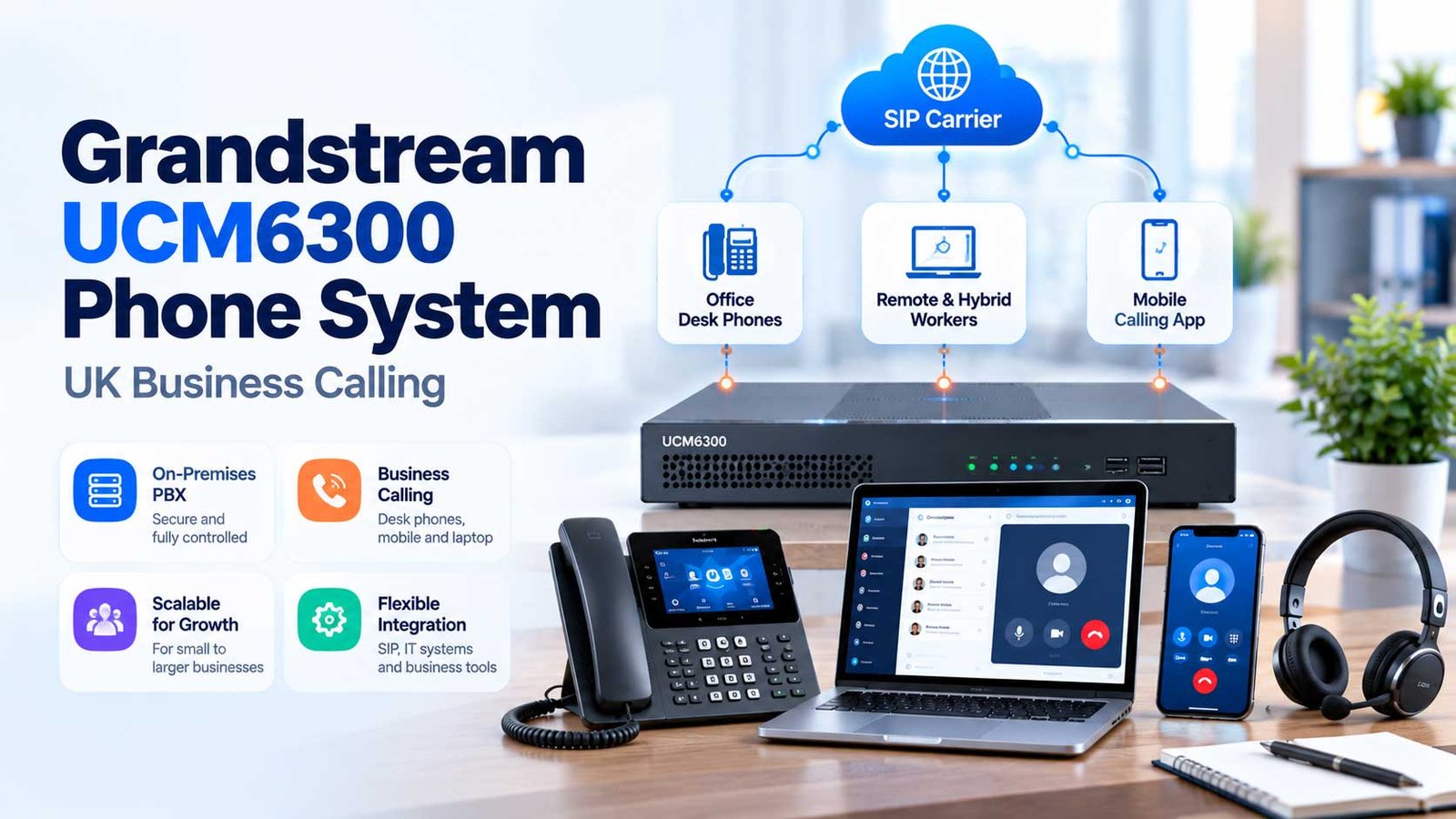
Grandstream UCM6300 Phone Systems, Explained for UK Businesses
Understand the UCM appliance, Wave apps, GDMS and RemoteConnect, then plan UK numbers, SIP connectivity, capacity, safety and support before ordering equipment.
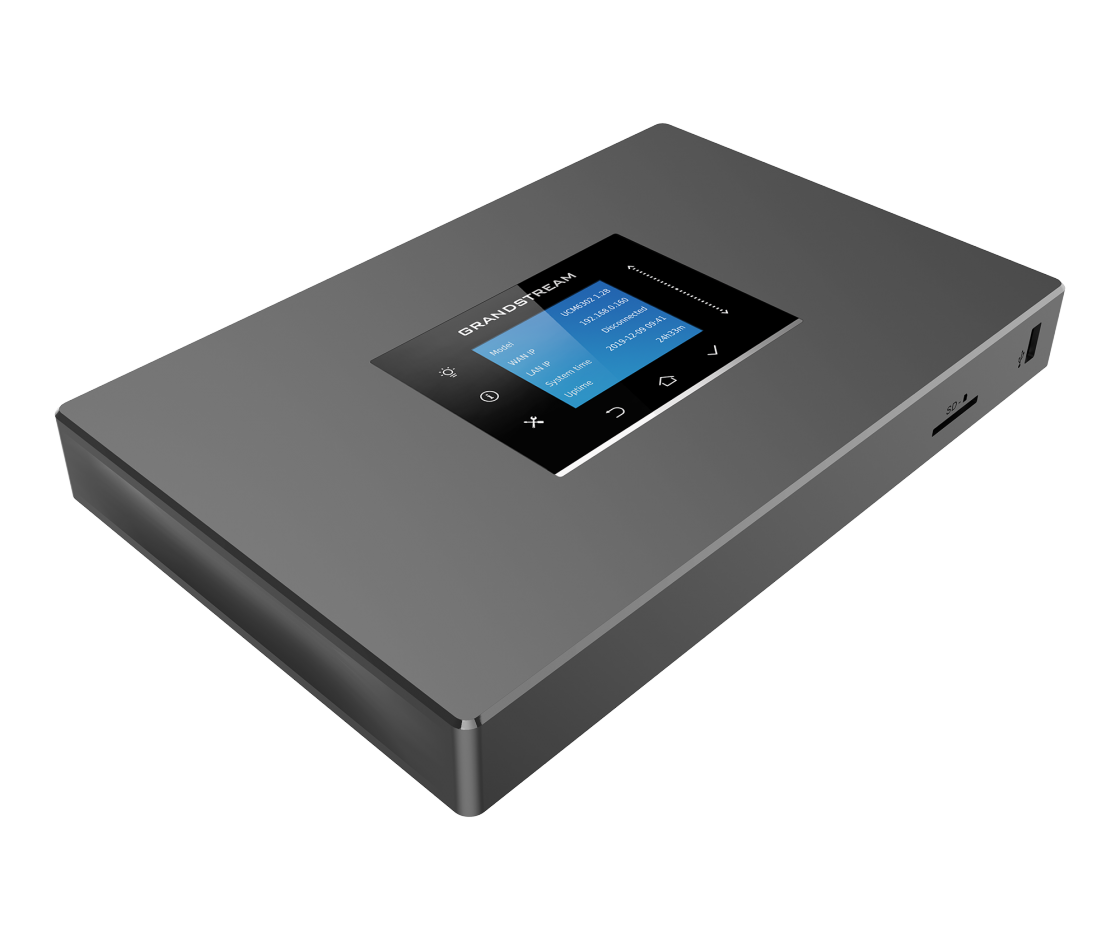
Manufacturer product photo shows UCM6301, not every model. All capacities are model-specific.
Quick answer: Grandstream UCM6300 is an on-premises business IP phone system. It manages extensions, call routing, queues and compatible devices, while UK public calling normally comes from a separate SIP provider. Wave, GDMS and UCM RemoteConnect add user and management options, but do not remove the need to plan numbers, emergency access, network resilience and support.
Jump to a Section UCM6300 basics
What Is a Grandstream UCM6300 Phone System?
The Grandstream UCM6300 is a family of on-premises IP-PBX appliances that manages business extensions, incoming and outgoing routes, call queues, voicemail and supported user devices. Rather than replacing the external telephone network, it controls what happens to calls within the organisation and connects to external calling through a configured SIP trunk or another supported route.
For a UK office, the appliance might sit in a comms cabinet while employees answer calls using compatible desk phones or the Grandstream Wave application. A customer dials the business number, the chosen UK carrier delivers the call, and the UCM applies your opening-hours rules, IVR or queue. Employees can make outside calls through the configured carrier, subject to permissions and caller-ID rules.
It holds extensions, routes, queues, time conditions and call-handling configuration.
SIP service, allocated UK numbers, call charging and emergency-call arrangements require a suitable service agreement.
Staff may call through supported desktop, web or mobile clients; it does not remove the need for configured extensions and connectivity.
Someone must maintain firmware, backups, network rules, number inventories and a recovery procedure.
Grandstream describes the UCM6300 ecosystem as an on-premises IP PBX combined with optional cloud-assisted management and remote connectivity. That is different from buying a complete hosted phone service. See the UK SIP trunking guide for the external connection and the VoIP setup guide for provider-neutral installation fundamentals.
How Does Grandstream UCM6300 Work?
Think of the system as three operational layers: the public phone connection, the UCM call controller and the endpoints your team uses. Your organisation needs all three to make and receive public telephone calls.
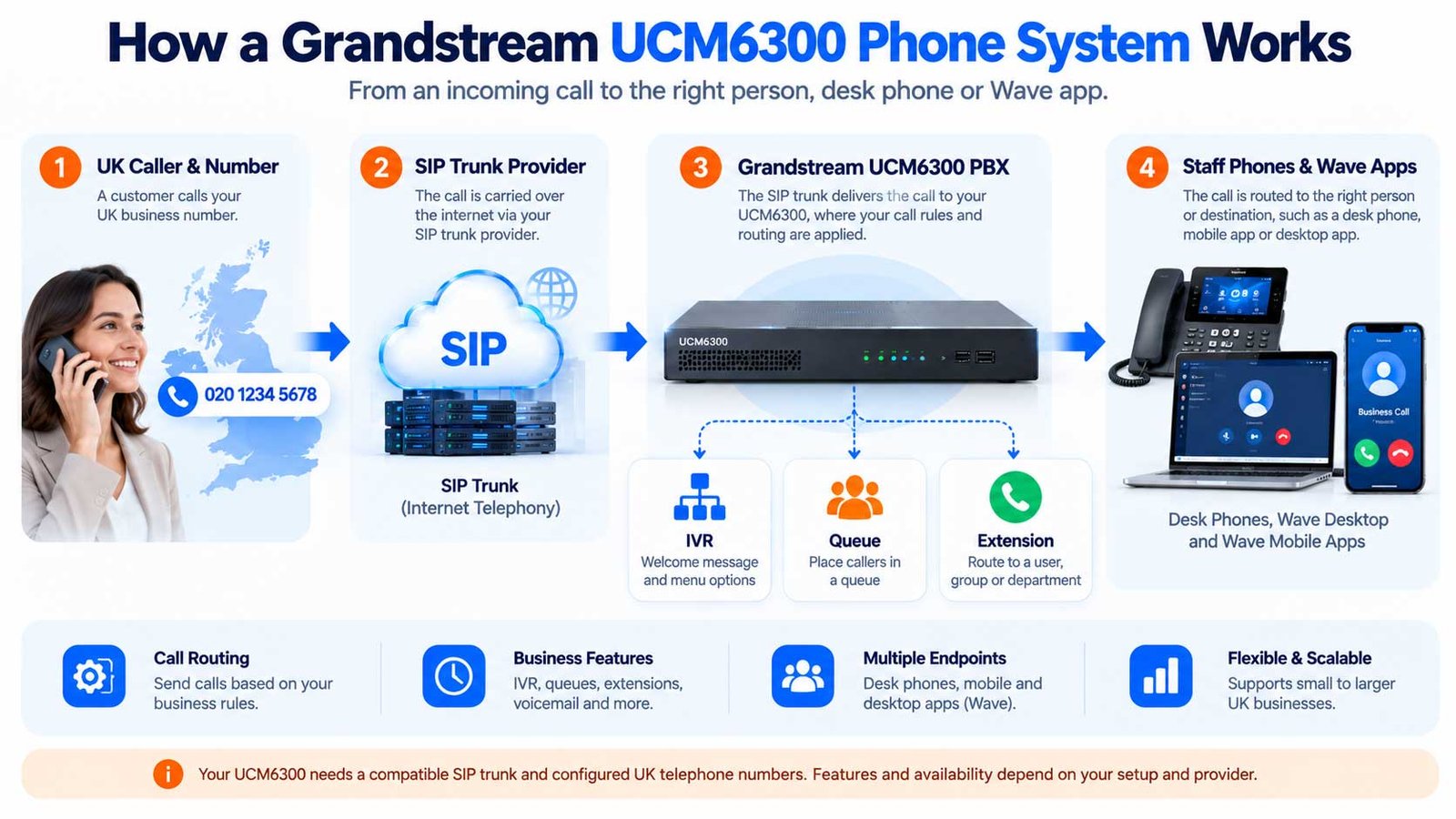
View the step-by-step call-path breakdown
- Number and trunk. A customer dials an eligible UK number. The telephone provider maps that number to your SIP trunk and delivers the call to the correctly configured UCM route.
- Business rules. The UCM can select a reception group, a menu, a queue, voicemail or an out-of-hours destination according to its settings.
- Staff endpoint. An extension rings on an authorised desk phone or Wave client. Where remote devices are used, their registration and media paths must also work.
- Outbound calls. The user’s dialled number passes the UCM’s outbound dial plan and privileges, then the approved carrier route. Caller-ID presentation must be authorised.
The appliance has a model-specific simultaneous-call limit. The external SIP service can have a different concurrency limit. A UCM6308 maximum is not the capacity of every UCM6300 device.
The manufacturer’s SIP Trunks Guide documents inbound and outbound routes. A registered trunk is not proof of working two-way audio, correct UK numbering or functioning emergency calls.
Which UCM6300 Model Does Your Business Need?
Grandstream sells several UCM6300 and UCM6300 Audio models. The model name matters: maximum user count, simultaneous calls, meeting features, analogue connectivity and some hardware details vary. Do not quote “3,000 users and 450 calls” as though it applies to the whole family.
| Model | Published user maximum | G.711 concurrent-call maximum | Position |
|---|---|---|---|
| UCM6301 | Up to 500 | Up to 75 | Compact UCM6300-series appliance |
| UCM6302 | Up to 1,000 | Up to 150 | Higher standard-series capacity |
| UCM6304 | Up to 2,000 | Up to 300 | Larger standard-series model |
| UCM6308 | Up to 3,000 | Up to 450 | Highest listed standard-series capacity |
| UCM6300A | Up to 250 | Up to 50 | Audio-series entry model |
| UCM6302A | Up to 500 | Up to 75 | Audio-series model |
| UCM6304A | Up to 1,000 | Up to 150 | Audio-series model |
| UCM6308A | Up to 1,500 | Up to 200 | Highest listed Audio-series capacity |
On a narrow screen, scroll the table horizontally to see all columns.
Manufacturer-published model limits from the UCM630x Series and Audio Series manuals, checked 21 October 2026. These are specified ceilings, not load-test results or guaranteed real-world throughput. Media encryption, codecs, conferences, recording and workload can impose other constraints.
Appropriate to consider where the standard series feature set, including its published video/collaboration capabilities, is required.
Consider when the audio-oriented edition fits the call requirement; confirm the exact selected model and current firmware feature set.
Choose from the actual peak call requirement, support lifecycle, interface and telephone-line needs, rather than buying by employee count alone. Manufacturer sources: UCM630x Series manual and UCM630x Audio Series manual.
Wave, GDMS and UCM RemoteConnect: What Is Included?
These three names describe different jobs. They are often shown together in Grandstream diagrams, but they should not be treated as a single licence or an interchangeable service.
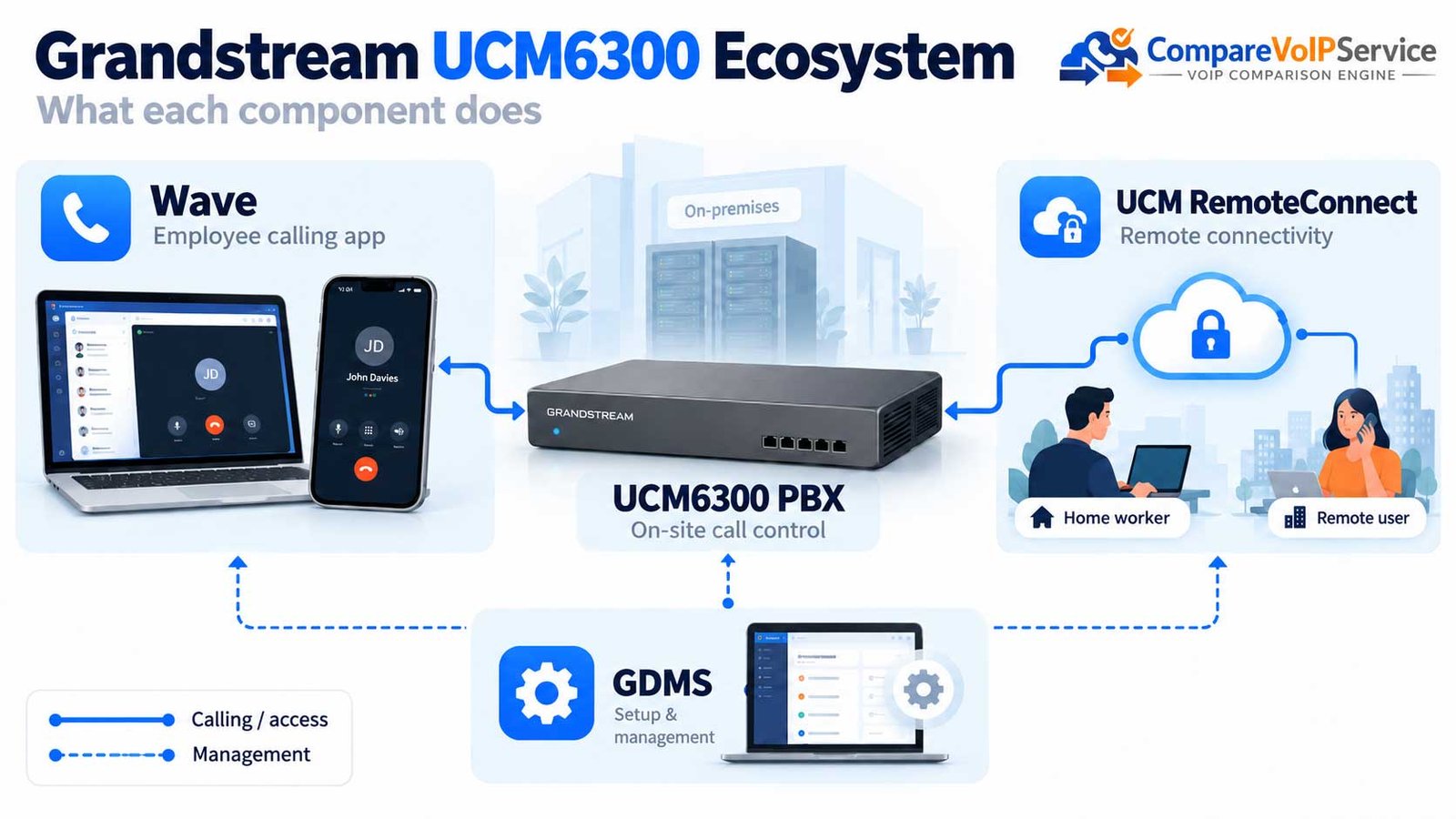
| Component | Primary job | What UK buyers must verify |
|---|---|---|
| UCM6300 appliance | Stores the PBX configuration and processes supported calls | Model, firmware, location, power, backup and administrator ownership |
| Wave | App for supported calling and collaboration on user devices | Platform compatibility, enabled extension, network, user experience and access controls |
| GDMS | Remote device management, provisioning and supported monitoring | Appropriate organisation access, features by product, credentials and support accountability |
| UCM RemoteConnect | Cloud-assisted NAT traversal/remote extension connections and eligible auxiliary services | Plan limits, remote registrations, concurrent remote sessions, administration and expiry behaviour |
On a narrow screen, scroll the table horizontally to see all columns.
For example, an employee working from home might use Wave, but that does not mean every external connection can be made without restriction. Grandstream counts remote registered endpoints and certain remote call legs according to the selected RemoteConnect plan; one employee using two clients may consume two remote registrations. Details and capabilities can change by plan and firmware. See its RemoteConnect FAQ.
A UCM6300 can remain an on-premises system even while it is configured through a cloud management platform. CloudUCM and SoftwareUCM are separate Grandstream deployment products; do not confuse them with GDMS or RemoteConnect.
What Can Staff Do With a Grandstream UCM6300?
Features depend on the selected model, firmware, configured permissions and connected services. The UCM630x documentation describes business call functions such as time-based inbound routing, IVR, queues, ring groups, voicemail, transfers, conference facilities and call records.
Present an approved greeting, capture a keypad option and route to a relevant department or queue.
Ring a team, queue calls and set overflow destinations; test the experience during staff absences.
Assign supported SIP endpoint registrations, provision devices and manage user permissions.
Support selected hybrid workers with compatible Wave applications and properly governed remote access.
Retain appropriate call-detail information and use recordings only where permitted and configured.
Explore documented connections to CRM/PMS or other systems; validate exact functions and deployment dependencies.
The UCM’s Zero Config guide describes provisioning templates for compatible Grandstream endpoints. A supported desk phone still requires network design, PoE/power where applicable, firmware compatibility and a working user account. Do not assume every third-party handset will support every vendor-specific feature.
Which SIP Trunk and UK Telephone Numbers Are Required?
The UCM gives a business control over extensions and routes; the UK public calling service comes from an eligible provider. A compatible SIP trunk usually supplies external calling, while the phone numbers, porting, commercial terms and emergency-calling process must be agreed separately.
| Requirement | Practical question | Who usually owns it |
|---|---|---|
| SIP trunk compatibility | Does the selected carrier support the UCM firmware, authentication, codec, DTMF and NAT/media method? | Carrier and installer |
| UK numbers and DDI inventory | Which main, department and direct numbers are provided or ported and where do they route? | Carrier, porting team and business |
| Outbound caller ID | Can users present the correct authorised and valid UK numbers? | Carrier plus PBX administrator |
| Inbound/outbound routing | Are business hours, queues, transfers, DDI matching and dial rules tested? | Installer and business call-flow owner |
| Emergency route | Which supported path carries 999/112, with correct location and viable fallback? | Responsible voice provider, with business/installer coordination |
On a narrow screen, scroll the table horizontally to see all columns.
Document the PBX model, firmware, SIP settings, number inventory and test ownership before signing a number-porting instruction. For the broader connectivity decision, use the SIP trunking UK guide; for 01/02, 03, Freephone and DDIs, use the business phone numbers guide.
How Can Grandstream UCM6300 Support Remote and Multi-site Staff?
Remote users can introduce complexity beyond the core PBX: each client needs the correct extension, authentication, media connectivity and an agreed emergency-location approach. Grandstream offers RemoteConnect to reduce the need for direct inbound internet exposure in supported deployments, but the plan and network requirements still apply.
Compatible desk phone on a managed LAN, reachable UCM, tested internal and public calling, reliable local power.
Approved Wave or supported remote phone, identity/access controls, secure connectivity, privacy and emergency-location instructions.
WAN or supported remote endpoint design, site numbering and call fallback; verify the behaviour during link failure.
App policy and support, business caller ID, loss-of-data/coverage fallback and clear distinction from native mobile emergency calling.
RemoteConnect’s free Basic level is not equivalent to paid levels: published limitations cover remote sessions, eligible features and some remote administration. The official FAQ warns that a plan downgrade can disable supported cloud storage, reporting and other functions. Check the exact active subscription and plan quotation at procurement.
What Does a Grandstream UCM6300 System Cost in the UK?
There is no reliable single UK price for a complete installation. The appliance’s retail price is only one part of a working telephone service. Total cost depends on the model, installer, office network, handsets, carrier rates, number requirements, optional RemoteConnect plan and support.
| Cost component | How it arises | What to request in writing |
|---|---|---|
| PBX appliance | One-off hardware purchase | Exact SKU/model, warranty, return terms and support lifecycle |
| Installation/configuration | System design, menus, dial plan, users, security and training | Setup scope, time, documentation and handover |
| Telephones / headsets | Compatible desk phones, Wave-capable user devices, accessories | Per-endpoint costs, PoE and replacements |
| SIP trunks and numbers | Carrier channels, number rentals, porting and usage charges | Monthly and out-of-bundle charges, VAT and minimum term |
| RemoteConnect | Optional plan for relevant remote features and limits | Plan name, endpoint/session allowance, renewal and downgrade effects |
| Networking and resilience | Internet, LAN, router/firewall, UPS and backup path | Supported design, recovery constraints and power run time |
| Ongoing support | Updates, backups, monitoring, incident response and admin time | Named support owner, hours, SLA and exit access |
On a narrow screen, scroll the table horizontally to see all columns.
Practical first-year comparison: hardware + deployment + user equipment + 12 months of telephony/connectivity/optional plan charges + support + recovery arrangements + applicable VAT. For later years, remove non-recurring items only where the quote genuinely confirms no further charges.
This guide does not present an unverified “UK Grandstream monthly price”, fixed channel tariff or permanent free entitlement. Compare current written quotes and official plan conditions, separating ex-VAT and inc-VAT figures.
How Many Users and Concurrent Calls Should You Plan For?
Start with the busiest realistic call period, not the number of staff on payroll. Estimate the maximum simultaneous conversations the PBX must handle and compare that with the carrier channel ceiling, RemoteConnect session allowance and any feature-specific constraints.
The business would verify at least four distinct limits: supported users, UCM simultaneous calls, SIP carrier concurrency and the applicable remote session/device limits. The numbers are illustrative only, not measured traffic or a recommended purchased size.
- Gather records. Obtain call reports, busy periods, queue statistics and known seasonal demand.
- Include special activity. Consider recording, conferences, encrypted media, transfers and remote users where relevant.
- Verify two or more ceilings. Compare the selected UCM model, carrier channels and optional cloud plan limits.
- Ask for a test plan. Define acceptable blocked-call behaviour, audio quality and evidence of headroom.
How Should You Secure a Grandstream UCM6300?
A PBX is a communications control system with administrative accounts, public-call privileges and potentially sensitive call records. If it is exposed or misconfigured, the impact can include unauthorised calls, access to recordings, route changes and interruption of service.
Restrict administrators, enable suitable authentication and MFA where available, remove default access paths, and separate user roles.
Follow Grandstream-supported NAT, firewall, TLS/SRTP and RemoteConnect guidance. Avoid unsupported public port forwarding.
Restrict premium and international routes where unnecessary, review alerts and agree an out-of-hours response to anomalous usage.
Use supported firmware, secure configuration backups and a tested restore sequence; control who can retrieve call recordings.
Grandstream documents secure boot, certificate and media security capabilities for the platform, but those product features do not by themselves prove a deployment is secure. Record the actual firmware version, access policy, backup owner, carrier controls and restore test. Use the current manufacturer manual for configuration-specific details.
What Must UK Businesses Check for 999, 112 and Power Failure?
Do not assume that buying a Grandstream PBX creates a working UK emergency-calling service. The responsible communications provider must address its applicable regulatory obligations, while the buyer and installer must confirm that the whole phone route works for the relevant sites and users.
| Check | Required evidence | Typical accountable party |
|---|---|---|
| 999 / 112 dialling | Provider-approved test or verification of emergency call routing and dial-plan privileges | Voice provider and installer |
| Caller location | Documented, current site/number location information and remote-user process | Voice provider with business inputs |
| Power outage | What still works if router, UCM, PoE switch or internet access loses power? | IT/installer and continuity owner |
| Carrier or broadband fault | Fallback routes and staff instructions tested at agreed scope | Carrier, installer and business |
| Remote staff | Clear limitations, alternative emergency calling and location updates | Business, user and responsible provider |
On a narrow screen, scroll the table horizontally to see all columns.
Ofcom’s guidance on emergency access during power cuts explains provider expectations under General Condition A3. Grandstream also publishes an emergency-call configuration guide, but its example uses non-UK emergency numbers, so UK installers must implement the correct 999/112 routes and provider-approved verification process.
Agree the official test/verification method with the responsible voice provider. An analogue failover port or second connection is not a verified emergency fallback until the actual supported wiring, power and route have been tested.
What Happens if the UCM, Internet or Remote Service Fails?
A UCM appliance adds local control but can also be a local single point of failure. A cloud remote-access feature does not replace on-site electricity, the LAN or a functioning public telephone carrier. Design for failures separately.
| Failure | Likely effect | Mitigation to verify |
|---|---|---|
| Local power or PoE failure | PBX or phones may stop | UPS duration, independent backup device and recovery procedure |
| Broadband or network failure | Public SIP calling or remote clients may be unreachable | Network diversity, carrier-side divert and alternative mobile route |
| UCM hardware/firmware fault | Extension and call-handling functions may stop | Supported spare/backup design, encrypted restore and named response owner |
| SIP provider outage | Public calls fail while local PBX may remain healthy | Carrier outage escalation, alternate route and number fallback |
| RemoteConnect downgrade/outage | Some remote-user and cloud features may change or stop | Plan monitoring, licence renewal and alternative communication instructions |
On a narrow screen, scroll the table horizontally to see all columns.
Document which controls belong to the UCM administrator and which belong to the carrier or internet supplier. A provider promising “resilience” should describe the actual failure domains and demonstrate the intended route, not merely list backup products.
When Is Grandstream UCM6300 the Right Choice?
The UCM6300 can suit a business that values local call-control ownership and has access to competent telephone-system administration. It may be less suitable when no one is willing to manage security, backups, hardware and provider relationships.
| Business situation | Grandstream approach could fit if… | Caution / alternative |
|---|---|---|
| Single office with an IT partner | The team wants control of an on-site PBX and has suitable support | Hosted calling may be operationally simpler where no admin is available |
| Hybrid workforce | RemoteConnect/Wave conditions fit actual users, devices and network conditions | Confirm remote plan concurrency and fallback; avoid treating it as unlimited |
| Established desk-phone estate | Endpoint compatibility and provisioning are confirmed | Check firmware and support rather than assuming any SIP phone behaves identically |
| Multi-site business | Call flows, WAN/branch dependencies and disaster recovery are professionally designed | Location-specific 999/112 and resilience need separate work |
| Business replacing an end-of-life PBX | Lifecycle, purchase cost and carrier dependencies support a fresh system | Compare total operational cost with supported hosted alternatives |
On a narrow screen, scroll the table horizontally to see all columns.
The 3CX phone systems guide explains another PBX ecosystem, while the Yeastar P-Series is another appliance/software/cloud product family. Use those pages for product education, not as a substitute for a scored, evidence-based side-by-side comparison.
Grandstream UCM6300 UK Deployment and Acceptance Checklist
Use this framework with the reseller, installer, business owner and chosen telecoms provider. It is a proposed decision and acceptance record, not a certificate that an implementation has been tested.
Record model, firmware, warranty, asset location, maximum users/calls, analogue ports and supported endpoint list.
Inventory every number/DDI, SIP carrier, authentication route, porting plan, dial rule, CLI and carrier contact.
Check bandwidth, LAN/PoE, firewall, remote endpoints, QoS needs, updates and secure administrative access.
Note GDMS responsibility, Wave clients, RemoteConnect plan, remote registrations, sessions and expiry behaviour.
Validate incoming/outgoing calls, transfers, queues, voicemail, office hours, remote users and two-way audio.
Use provider-approved 999/112 checks, confirm caller location, test power/network failure and record recovery owner.
Before transferring any existing numbers or cancelling old service, require a written go-live window, test evidence, rollback/forward plan and confirmation that dependent devices such as alarms and lifts have been separately assessed.
Grandstream UCM6300 Frequently Asked Questions
Is the Grandstream UCM6300 a cloud phone system?
No: the UCM6300 is an on-premises IP PBX. Grandstream provides cloud-assisted management and remote connectivity, and separate CloudUCM/SoftwareUCM products also exist.
Does UCM6300 include SIP trunks and UK telephone numbers?
Not automatically. Public calling, UK numbers, porting, tariffs and emergency arrangements depend on a supported provider and the agreed service contract.
Does the UCM6300 require a licence per user?
Grandstream promotes the UCM6300 hardware platform with many built-in PBX functions, but optional cloud plans and other services have separate entitlements. Ask the supplier for a written bill of materials and current terms rather than assuming all services are free.
What is the difference between UCM6300 and UCM6300A?
The UCM6300 and UCM6300 Audio series have different published models, capacity maxima and product emphasis. Select the exact SKU and compare current official datasheets and firmware features.
What is Grandstream Wave?
Wave is a Grandstream user application for supported calling and collaboration on compatible desktop, web and mobile clients connected to a configured UCM environment.
Can remote workers use a UCM6300?
Yes in supported configurations, including eligible Wave/remote device connectivity. Check authentication, network behaviour, UCM RemoteConnect plan limits and emergency-calling arrangements for each remote user.
How many calls can a UCM6302 handle?
Grandstream publishes up to 150 concurrent G.711 calls for UCM6302, subject to feature, codec and real deployment constraints. Separate carrier and remote plan ceilings may also apply.
Will it work with any SIP desk phone?
Interoperability is not guaranteed for every device or feature. Confirm the exact phone model, firmware, provisioning method and call-function support with the installer and manufacturer.
Can UCM6300 keep an existing 020 or 03 number?
It can receive numbers routed through a compatible provider, but retaining or porting a particular number depends on the current and gaining provider, eligibility and a managed porting process.
Is Grandstream UCM6300 suitable for UK 999 calls?
A compliant service requires a responsible voice provider, supported route, correct caller-location arrangements and tested failure behaviour. Do not assume PBX emergency-route settings alone satisfy all UK requirements.
What happens when the internet connection fails?
Public SIP calling and remote users may lose connectivity. Confirm independent access, network-side diverts, backup power and an alternative way for staff to reach emergency services.
How do I compare a UCM6300 quote?
Compare the appliance, installation, compatible endpoints, SIP channels/calls, number rental, support, RemoteConnect plan, security and resilience, clearly identifying VAT and contract terms.
Sources, Evidence and Editorial Method
This independent guide was researched against official manufacturer documentation and UK regulatory material on 21 October 2026. Manufacturer material verifies published specifications and supported features; it does not prove that a particular UK supplier will implement or support every option. The sizing example and acceptance checklist are original illustrations, not commissioned technical tests.
- Grandstream — UCM6300 Series product
- Grandstream — UCM630x Series user manual
- Grandstream — UCM6300 Audio Series product
- Grandstream — UCM630x Audio Series user manual
- Grandstream — UCM6300 Ecosystem Deployment Guide
- Grandstream — UCM RemoteConnect FAQ
- Grandstream — Zero Config Guide
- Grandstream — SIP Trunks Guide
- Grandstream — Emergency Calls Configuration
- Ofcom — emergency access during power cuts
UK SIP coverage, prices, product availability, optional cloud plans, emergency service processes, supported firmware and provider responsibility require confirmation at the actual procurement date. No independent device benchmark, price survey, Google Search Console assessment or hands-on PBX installation is claimed here.
UCM6300 Readiness Brief
Compare the Whole UCM6300 Setup, Not Just the Appliance
Confirm model capacity, numbers, remote users, UK emergency readiness, network support and recovery requirements. Use the same checklist when asking suppliers for comparable quotes.

Bhav Giva
Founder & Lead Analyst at CompareVoIPService.co.ukBhav Giva publishes UK-focused business communications research and practical VoIP buying guidance. This independent guide explains the Grandstream UCM6300 ecosystem and how to evaluate its model limits, remote tools, UK SIP arrangements and implementation responsibilities.