


FreePBX 17 Phone Systems: How Business Calling Works
Understand Asterisk, supported Debian hosting, UK SIP trunks, paid modules and operational responsibility before committing to a FreePBX deployment.
Original conceptual architecture—not an official product screenshot or tested deployment.
Quick answer: FreePBX 17 is a web-based, open-source configuration platform for Asterisk, installed through the supported Debian 12 route. It can manage extensions, routing, queues and other PBX functions, but does not automatically include UK telephone numbers, SIP calling, commercial modules, hosting or maintenance. A usable UK business service needs a compatible stack, a contracted carrier, tested emergency arrangements and a named technical owner.
Jump to a Section FreePBX basics
What Is a FreePBX 17 Phone System?
FreePBX 17 is open-source web-based PBX management software built to configure and operate the Asterisk telephony engine. It is not itself a UK telephone-number service or a hosted carrier plan. A working business installation also needs compatible hosting, endpoints, external calling connectivity, security, ongoing maintenance and agreed operational responsibility.
Asterisk handles signalling and call-processing functions. FreePBX provides a more accessible interface for managing extensions, inbound routes, outbound routes, interactive voice response (IVR), queues, voicemail and installed modules. The exact capabilities available depend on the software stack, modules and configuration.
It processes sessions and dialplan behaviour; FreePBX manages much of its configuration.
Staff or a specialist configure call flows, users and supported modules in the web interface.
You still need a UK carrier, eligible numbers, outbound routing and agreed emergency-calling arrangements.
Someone must patch, monitor, secure, back up and restore the complete system.
This guide explains the FreePBX 17 operating model for UK businesses and the checks required before treating it as a dependable telephone service. It is distinct from general VoIP installation instructions or a comparison of hosted providers.
How Does FreePBX 17 Work With Asterisk?
A customer dials the organisation’s UK business number. The telephone network and selected SIP carrier deliver the call to the configured Asterisk system. Inbound routes direct it to an IVR menu, time condition, ring group, queue, extension or voicemail as configured in FreePBX. Outbound calls use the approved outbound route, trunk and caller ID.
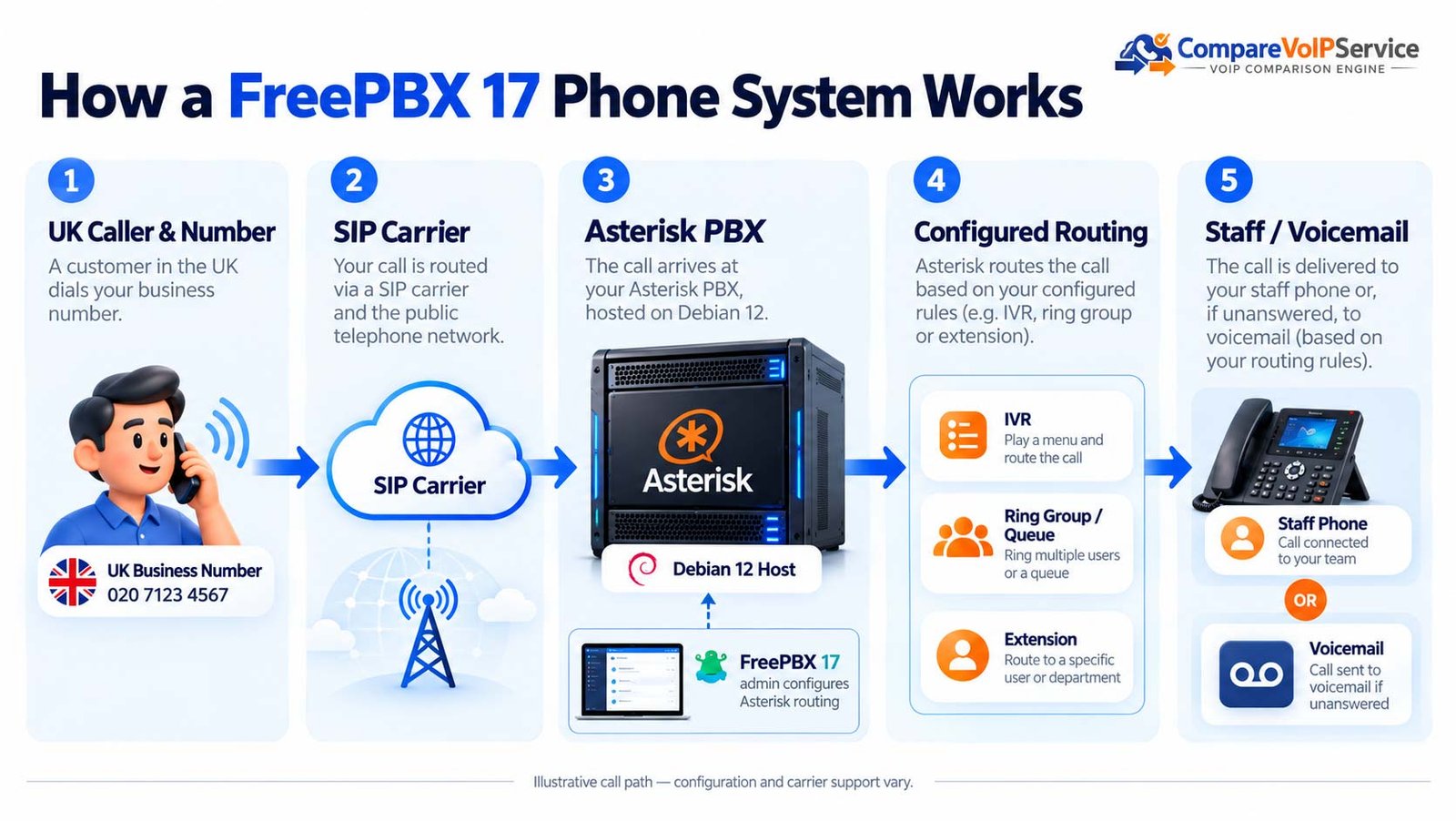
View the original detailed call-path breakdown
SIP signalling sets up and manages sessions, while media commonly uses RTP. A registered trunk does not prove two-way audio, DTMF menus, transfers or caller ID are correct. Network Address Translation (NAT), codec selection, firewall policy and the carrier’s tested configuration all matter.
| Component | What it does | Who must manage it |
|---|---|---|
| Debian 12 host | Operating system, compute, storage and network | Business IT, hosting provider or specialist MSP |
| Asterisk | Telephony engine and dialplan execution | PBX administrator / support contractor |
| FreePBX modules | Administration of routing, extensions, queues and features | PBX administrator / module maintainer |
| UK SIP carrier | Numbers, external call routing and tariff | Contracted communications provider |
| Phones / softphones | User endpoints, audio and physical power | Business IT and endpoint supplier |
An advertised “FreePBX server” may cover only hosting or initial installation. Require a written statement of who supplies the trunk, UK numbers, configuration changes, patches, backup restoration and incident support.
FreePBX 17, Debian 12 and Installation Options
FreePBX 17 is officially supported on Debian 12 (“Bookworm”). The FreePBX project publishes an installer script for Debian 12 and an ISO-based installation route that automates parts of the Debian installation and runs the installer. Its download guidance lists a starting host requirement of 2 GB RAM and 20 GB storage, not a capacity guarantee for production call loads. Refer to FreePBX’s current download instructions.
| Approach | Potential advantage | Important limitation |
|---|---|---|
| Debian 12 virtual machine | Flexible compute, snapshot policy and local control | Sizing, security and recovery are your responsibilities |
| On-site dedicated server | Local infrastructure and direct network control | Power, hardware repair, backup and site connectivity risk |
| Hosted Debian VPS | No physical office server to maintain | Confirm security, provider voice policy, backups and resilient public connectivity |
| FreePBX 17 ISO | Can simplify supported installation | Must still follow current installation documentation and licensing conditions |
Do not paste installation commands from a random tutorial into a live system. The official installer uses elevated privileges and retrieves packages; review the supported GitHub repository, prerequisites, network restrictions and rollback plan before any deployment. This guide deliberately does not reproduce an untested root-level install script.
The current official FreePBX 17 route uses Debian 12. Avoid assuming that Ubuntu, an arbitrary Linux image or an old FreePBX Distro can be upgraded in place and remain supported.
What Is Free in FreePBX 17 and What Costs Extra?
The FreePBX project describes its core platform as open source and GNU GPL-licensed, but “free software” is not the same as a zero-cost UK business telephone service. Some modules and related Sangoma services can involve separate commercial entitlements. The exact module list and licence conditions must be checked at the version being purchased.
| Item | Typical arrangement | Buyer check |
|---|---|---|
| FreePBX base platform | Open-source management framework | Confirm supported software and module versions |
| Optional commercial modules | Feature-specific purchase/activation where applicable | Request a dated per-feature entitlement list |
| Server or VPS | Own hardware, host subscription or support contract | Compute, storage, backup, SLA, monitoring |
| SIP calls and telephone numbers | Carrier charges independent of the PBX | Channels, call rates, DDI rent, porting, VAT |
| Endpoints | Desk phones, adapters or compatible softphone products | Provisioning and updates for the specific models |
| Support | In-house expertise or contracted administrator | Fault response, patching, recovery and change cover |
For example, a team with an existing virtualisation host may have little new hardware spend but still face recurring UK SIP trunk rental, mobile-call charges, hosted backup and a specialist maintenance contract. Another organisation may buy a commercial module and managed hosting to reduce the administration burden. Compare both proposals on the same support scope.
No representative 2026 UK business price is claimed here. Ask for written quotations specifying VAT treatment, per-module entitlements, concurrency capacity, SIP tariffs and setup charges.
Extensions, IVR, Queues and Business Call Routing
FreePBX supports a broad set of call-management patterns through its modules and the underlying Asterisk platform. A real installation may combine internal extensions, call groups, reception queues, IVR menus, time conditions, voicemail and outbound permission classes. Features vary by enabled modules and tested configuration.
Associate staff with supported SIP extensions and devices, and document each user’s emergency location.
Direct different opening-hour and menu choices to the right destinations.
Distribute calls to staff, with separately configured overflow and failure behaviour.
Manage messages and call records within relevant storage, privacy and module constraints.
Keep routing simple enough to test. A complex IVR with many nested choices can increase caller effort even if technically possible. For general call-distribution choices, refer to the business call-routing guide.
Can FreePBX 17 Work With Existing Desk Phones and Remote Staff?
FreePBX manages Asterisk extensions, but a particular phone or softphone must support the chosen signalling, authentication, codec and provisioning method. A supported SIP interface alone does not prove one-click device provisioning, secure remote connectivity or full handset feature support.
| Endpoint type | Check before deployment | Typical risk |
|---|---|---|
| Existing SIP handset | Firmware, PJSIP registration, codecs, TLS/SRTP where required | Manual provisioning or unsupported features |
| New desk phone | Provisioning method, power, emergency calling and updates | Supply/support fragmentation |
| Remote softphone | Identity, network access, encryption, audio devices and support | Exposed SIP service, NAT or location mismatch |
| Analogue device via ATA | Approved gateway, device signalling and dependencies | Fax, alarm or lift equipment not operating reliably |
For remote workers, prefer a deliberately secured access design, centrally managed devices and clearly defined emergency-location procedures. Do not assume exposing SIP service directly to the public internet is an acceptable default.
How Do UK SIP Trunks and Business Numbers Connect?
To call ordinary UK mobile and fixed numbers, a FreePBX system needs an appropriate PSTN connection through a contracted provider. An administrator configures the carrier-facing PJSIP trunk and outbound dial patterns, while the UK provider supplies numbering, permitted CLI presentation, destinations and contractual emergency-call commitments.
| Item | Required evidence | Responsibility |
|---|---|---|
| PJSIP compatibility | Confirmed carrier configuration for the installed Asterisk version | Carrier and PBX engineer |
| DDIs and inbound routes | Full number list mapped to correct destination | Carrier / business |
| Outbound CLI | Only authorised presentation numbers configured | Carrier / PBX engineer |
| Call capacity | Concurrent trunk legs compared with PBX and host capacity | Carrier / IT |
| Number transfer | Written port order, owner, schedule and rollback | Gaining carrier / business |
| Fallback | Tested network divert when PBX/site is unavailable | Carrier / business continuity owner |
A supported carrier should provide a trunk configuration reference and agree the tested behaviour for UK destinations, international blocks, DTMF, transfer and two-way audio. For the separate number-transfer process, use the UK business number-porting guide.
How Much Capacity Does a FreePBX Business Need?
Do not infer call capacity from the fact that FreePBX has no conventional per-user licence requirement for many core features. Concurrent calls can be limited by CPU, memory, media processing, storage/recording workloads, network bandwidth, endpoint behaviour, SIP channels and the chosen hosted-service limits.
Suppose the busiest period produces six external inbound conversations, three external outbound conversations and two additional external connected call legs. Under a carrier model that counts those legs separately, the planning assumption is eleven simultaneous trunk legs, plus an evidence-based allowance for peaks. It is not a standard FreePBX sizing rule. Validate actual call reports, media features and host measurements with the installer.
Include transfers, call queues, conferences, recording and other activities that can add load.
Verify CPU, disk I/O, memory, networking and virtualisation reservations under representative load.
Your carrier’s concurrent-call allocation can block calls before the PBX reaches its practical limit.
Document what happens when resources fail or channels are exhausted—then test it.
How Should FreePBX 17 Be Secured?
Operating a self-managed PBX creates a larger security responsibility than buying a fully managed phone service. An internet-exposed PBX can be targeted for credential theft, unwanted registration attempts, dialplan abuse and fraudulent outbound calls. The FreePBX project recommends updating software, using the PBX Firewall, configuring intrusion detection such as Fail2ban, and restricting trusted access.
- Administration: limit management access to named staff, use appropriate strong authentication, and separate support permissions.
- Network: confirm PBX firewall zones, trusted SIP-carrier addresses, NAT and remote-device access with a qualified engineer.
- Credentials: unique extension secrets, restricted service accounts and secure handling of carrier authentication details.
- Dial rules: block unnecessary high-risk destinations and set carrier-side fraud alerts or spending controls.
- Software: patch Debian, Asterisk, FreePBX and modules under a documented test/change policy.
- Evidence: retain appropriate configuration backups, audit logs and incident contacts.
Avoid copying broad port-forwarding rules from an old guide. The appropriate design depends on whether phones use a VPN, managed SBC, private interconnect or a supported public-facing deployment. Obtain a current vendor-approved access plan.
See FreePBX’s security best-practice documentation before exposing any production service.
What Must You Check for 999, 112 and Caller Location?
A FreePBX deployment does not automatically make an external SIP service compliant with UK emergency-calling obligations. The regulated voice provider’s obligations, the PBX’s dialplan, each calling location, presented number and power/network resilience must work together.
- Confirm that the contracted UK provider offers appropriate access to 999 and 112, including restrictions or limitations.
- Ask how caller-location information is registered and updated for each site and for remote or movable users.
- Check that dialplans and outbound routes do not block or misroute emergency numbers.
- Agree a usable alternative route during power failure, internet loss or PBX outage.
- Use the provider’s approved testing/assurance method; do not make unnecessary live emergency calls.
Ofcom’s General Conditions place emergency access and caller-location duties on relevant regulated providers. Buyers must still document operational responsibilities and the actual end-to-end calling arrangement.
Read Ofcom’s updated compliance guidance when defining the supplier’s obligations.
What Happens When the Server, Broadband or Carrier Fails?
The FreePBX interface may remain accessible while public calls fail—and the SIP carrier may be healthy when the Asterisk server, local power or data network is unavailable. Resilience must be documented for the complete service, not for one component.
| Failure scenario | Possible impact | Practical control to verify |
|---|---|---|
| Server or VM failure | Extensions or call routing stop | Restore time, verified backup, alternate route |
| Office power outage | PBX, switch, router or PoE phones unavailable | UPS duration and alternative working devices |
| Access circuit failure | SIP trunk or remote workers unreachable | Independent route or carrier-side diversion |
| Carrier failure | External numbers or outgoing calls affected | Secondary service / incident escalation / reroute |
| Corrupt update or change | Call flow unavailable or unreliable | Test plan, rollback and known-good backup |
| Storage/recording saturation | Call records fail, database or PBX at risk | Disk monitoring, retention controls and alerts |
A backup file is not a recovery plan unless the business has proved restoration on a compatible system. Record the expected recovery time, administrator, credentials access, number-forwarding options and acceptable period of interruption.
How Do You Move From FreePBX 15 or 16 to FreePBX 17?
FreePBX 17 does not have a supported direct in-place major-version upgrade from earlier FreePBX versions. Sangoma’s documented approach is to create a backup, install a new FreePBX 17 system and restore the backup there. The restoration must be tested before porting numbers or decommissioning the old system.
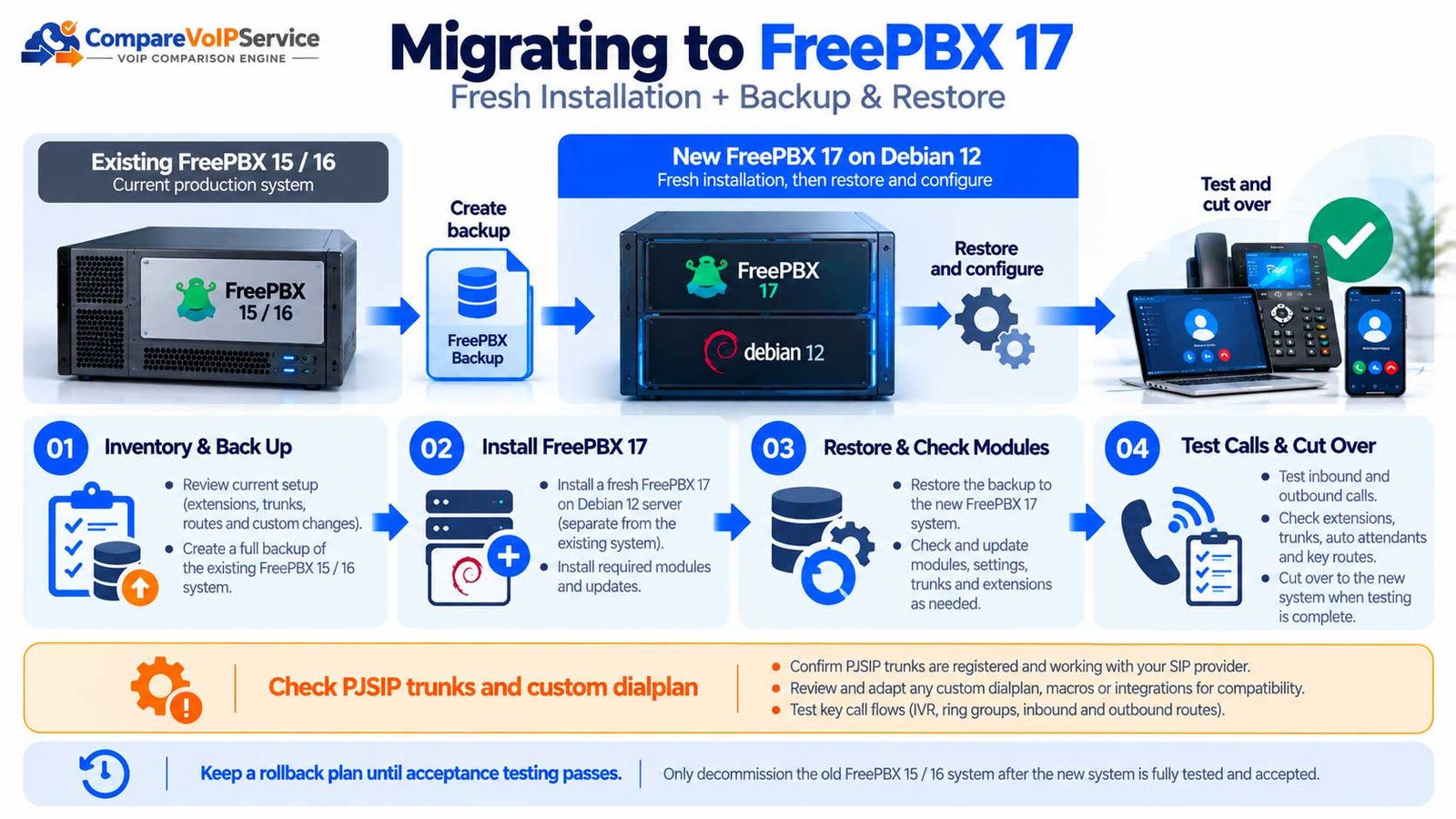
- Inventory the existing build. Record extensions, trunks, routes, call recordings, custom dialplan, modules, integrations and support/activation details.
- Read version-specific migration notes. Confirm operating-system, Asterisk and commercial module compatibility.
- Create and test the source backup. Keep an isolated rollback copy and access to the previous configuration.
- Provision the new Debian 12 host. Follow the current supported FreePBX 17 installation route rather than upgrading the old OS in place.
- Restore and reconcile modules. Resolve entitlements, outdated configuration and any restoration warnings.
- Test PJSIP migration and custom dialplan. Verify trunks, endpoints, inbound/outbound routes, one-way audio, DTMF and transfers.
- Run business acceptance and cutover. Include emergency provider checks, external numbers, failover, rollback and user testing.
Sangoma documents that its default Asterisk 22 environment does not support the legacy chan_sip driver or the Macro dialplan application. FreePBX restore can offer conversion to PJSIP, but any converted trunk or custom dialplan must be validated; do not treat conversion as automatic proof of compatibility.
Official source: Sangoma’s upgrading-to-FreePBX-17 guide.
What Is the Full UK Cost of Running FreePBX 17?
For an accurate business decision, separate initial engineering from recurring operation. FreePBX can avoid some proprietary PBX licence charges while requiring more in-house operational skill. The right comparison is between fully scoped service options rather than open-source software and a provider’s per-user advertised tariff.
| Cost component | Upfront or recurring | Evidence to request |
|---|---|---|
| Server, VM or hosting | Purchase / ongoing subscription | Resource plan, location, availability and backups |
| PBX build and migration | Project fee | Interoperability test scope, configuration, rollback |
| Carrier and UK numbers | Rental, calls, porting | Channels, DDIs, tariff, VAT and exit terms |
| Handsets and user apps | Devices and possible subscriptions | Model support, firmware and replacements |
| Commercial modules | Feature entitlement where required | Licences, renewals and transferability |
| Maintenance and security | Recurring support | Named owner, monitoring, patch schedule and SLA |
| Continuity | Backup connectivity, power and DR | Measured restore target and tested recovery |
Ask whether the provider will own the entire end-to-end calling path or only the VM and software. A low-cost VPS with no call-route support should not be compared as equivalent to a managed business telephone service with documented restoration and emergency arrangements.
When Is FreePBX a Good Choice for a UK Business?
FreePBX is most compelling where an organisation values administration flexibility, needs specific Asterisk-integrated workflows, and has accountable technical capability. That is a different decision from choosing an out-of-the-box managed calling subscription.
Documented support, specific routing needs and a team able to manage telephony, security and change.
A specialist contracts for hosting, SIP, deployment, patching, recovery and clear UK emergency arrangements.
Fewer platform administration resources, simple requirements and one accountable support owner.
The general cloud-versus-on-premises buying decision belongs to the wider phone-system architecture comparison. This guide focuses on the specific FreePBX 17 responsibilities and limits.
FreePBX, Sangoma’s PBXact offering, an individual managed FreePBX hosting service and generic Asterisk development are not identical propositions. Ask for the exact supported product, service and licensing arrangement.
FreePBX 17 UK Deployment Readiness Checklist
Use this record before agreeing a production cutover. The goal is to replace vague claims such as “SIP ready” with dated evidence, owners and an agreed accept/hold decision.
| Check | Evidence needed | Decision owner |
|---|---|---|
| Supported build | Debian 12 / FreePBX 17 / chosen Asterisk and modules verified | PBX administrator |
| Users and endpoints | Extension list, device registration, media and user tests | Business IT |
| UK numbers / CLI | DDI mappings, porting order and outgoing presentation | Carrier + PBX team |
| SIP call paths | Inbound/outbound, DTMF, transfer, voicemail, queue and audio tests | Carrier + PBX team |
| Security | Firewall, MFA where supported, updates, logging and fraud controls | Security owner |
| 999/112 and locations | Supplier-confirmed verification and remote-user location handling | Voice provider + business |
| Backup and recovery | Successful restore, outage route, owner and recovery target | Continuity owner |
| Support contract | Hours, severity, response, escalation and change approvals | Service owner |
Accept only when material call paths, safety arrangements, support duties and recovery controls have been evidenced and signed off. Otherwise record a HOLD decision, defect, responsible party and retest date. This is a reader-facing procurement checklist, not a claim of independent engineering certification.
FreePBX 17 FAQs
Is FreePBX 17 a complete telephone service?
No. It is a PBX management platform for Asterisk. An operational UK business service also needs a suitable host, endpoints, a regulated calling provider, numbers, security and support.
Is FreePBX 17 free for UK businesses?
The core project is open source, but hosting, UK SIP trunks, numbers, engineering, optional paid modules and maintenance may incur costs. Ask for a written all-in quotation.
Which Linux distribution is officially supported?
The FreePBX project specifies Debian 12 for the officially supported FreePBX 17 installation. Check its current download and version documentation before deployment.
Do I need Asterisk with FreePBX 17?
Yes. Asterisk supplies the call-processing engine that FreePBX configures and manages. The supported install packages these together according to its documented release.
Can I upgrade FreePBX 16 to 17 in place?
Not through a supported direct in-place upgrade. The documented route is a new FreePBX 17 installation and Backup & Restore migration, followed by detailed testing.
Will old chan_sip phones and trunks continue to work?
Do not assume so. The default Asterisk 22 installation does not support chan_sip; restoration can offer conversion to PJSIP, but every affected device, trunk and route needs testing.
Can FreePBX 17 retain an existing UK business number?
Often, subject to number eligibility, carrier support, porting rules and the signed transfer order. Do not cancel the old service until porting and routing are confirmed.
Does FreePBX 17 include UK 999/112 access?
FreePBX does not itself provide the public calling network. Confirm that the contracted voice provider supports emergency calls and caller-location requirements and test the configured route by the provider-approved method.
Can staff use FreePBX from home?
Potentially, with compatible phones or apps and a secure remote-access design. Confirm device support, network handling, credentials, location procedures and human support.
How many simultaneous calls can FreePBX 17 handle?
There is no reliable universal figure. Real capacity depends on the host, Asterisk configuration, recording/media workload, network and SIP-provider limits. Test a representative busy period.
Is FreePBX 17 better than 3CX or a cloud phone system?
They have different operating models. FreePBX offers open-source PBX administration with significant operational responsibility; a managed cloud service may transfer more responsibilities to one provider. For a different PBX implementation model, see our 3CX phone systems guide. Compare your exact tasks and support needs.
What is the safest way to launch FreePBX 17?
Start with a documented inventory, supported installation, limited pilot, supplier-approved UK calling checks, security review, tested backup restoration and written acceptance before cutting over important numbers.
Official Sources and Editorial Method
This guide draws on FreePBX/Sangoma documentation and Ofcom’s UK emergency communications framework. Examples are explicitly illustrative. CompareVoIPService has not performed a live FreePBX installation, independently tested UK carrier compatibility or audited a representative sample of supplier prices. Configuration and release eligibility must be confirmed by the appointed supplier.
- FreePBX — FreePBX 17 introduction
- FreePBX — Downloads and Debian 12 installation
- Sangoma — FreePBX 17 installation
- Sangoma — Upgrading to FreePBX 17
- Sangoma — FreePBX 17 FAQ
- Sangoma — Security best practices
- Ofcom — Access to emergency services
Editorial source review: October 2026. The project, its modules, security advisories, carrier terms and UK rules can change; confirm the current position before procurement or deployment.
FreePBX 17 Readiness Brief
Compare the Full FreePBX Service, Not Just the Software
Confirm the supported Debian and Asterisk build, UK SIP trunks, module entitlements, emergency arrangements and recovery plan before comparing hosting or support proposals.

Bhav Giva
Founder & Lead Analyst at CompareVoIPService.co.ukBhav Giva publishes UK-focused business communications research and practical VoIP buying guidance. This independent guide explains how FreePBX 17 and Asterisk operate together, and how UK businesses can assess supported hosting, SIP connectivity, security, migration and supplier responsibilities.