

VoIP HubSpot Integration: Calling, Logging & CRM Workflows
Connect calls with the right HubSpot records—then verify click-to-call, screen pop, activity logs, recordings and failure recovery before relying on the integration.
Reviewed October 2026 · Independent educational guide · Actual provider features vary
A provider connection is only useful if the right events reach the right HubSpot records and exceptions are understood.
Quick answer: VoIP integration with HubSpot can connect telephony call controls and activity with CRM contacts, deals or tickets. But click-to-call, inbound caller matching, missed-call logs, recordings and automation depend on the chosen provider app, permissions and licence eligibility. Map the audio and data paths, then verify the workflows with a structured test.
Jump to a Section What it does
What Is VoIP HubSpot Integration?
VoIP HubSpot integration connects business calling with customer records. Depending on the calling provider and configuration, staff may be able to start a call from HubSpot, see a matching contact on an incoming call, and save call details, outcomes or notes against the relevant record. HubSpot manages CRM information; the telephony service may still carry audio and maintain its own call records.
For a UK buyer, “integrates with HubSpot” is only the beginning. The useful question is whether your exact subscription, UK numbers, call flows, users and record-matching rules produce accurate CRM activity in normal and exceptional situations.
Confirm who supplies the voice service, dialler, inbound handling and any companion softphone.
Verify UK number matching, contact ownership and correct links to tickets or deals.
Check completed, missed, transferred and unanswered calls, not only a successful demonstration.
Confirm what happens if the browser closes, an app disconnects or call data arrives late.
Three Ways to Connect Business Calling to HubSpot
Distinguish the type of integration before comparing features. HubSpot-provided calling, an App Marketplace integration and a custom calling extension differ in service ownership, technical complexity and the available user experience. They are not interchangeable alternatives in every subscription or workflow.
| Approach | What it is | Who to check | Decision evidence |
|---|---|---|---|
| HubSpot calling features | Calling through capabilities provided by HubSpot, subject to HubSpot subscription, seats, number and country rules. | HubSpot administrator | Seat eligibility, minutes, inbound/outbound functions, approved countries and recording rules. |
| Third-party calling app | Phone service supplied by a provider whose integration surfaces calling controls or activity in HubSpot. | Telephony provider + HubSpot admin | Marketplace listing, account authorisation, supported call functions, number coverage and field-level logging. |
| Custom calling extension | A developer-built calling experience using supported HubSpot integration interfaces. | Developer + security owner + carrier | Design, authentication, event delivery, maintenance, audit logs and ongoing API support. |
Swipe inside the table to view every column on smaller screens.
HubSpot official guidance: use a calling app in HubSpot.
What Happens to a Call and Its HubSpot Record?
Map the audio path separately from the data path. A call can be successfully connected by the phone provider even if a HubSpot API request fails. Likewise, a call log in the CRM does not by itself prove where recordings are stored or whether a caller heard the right queue announcement.
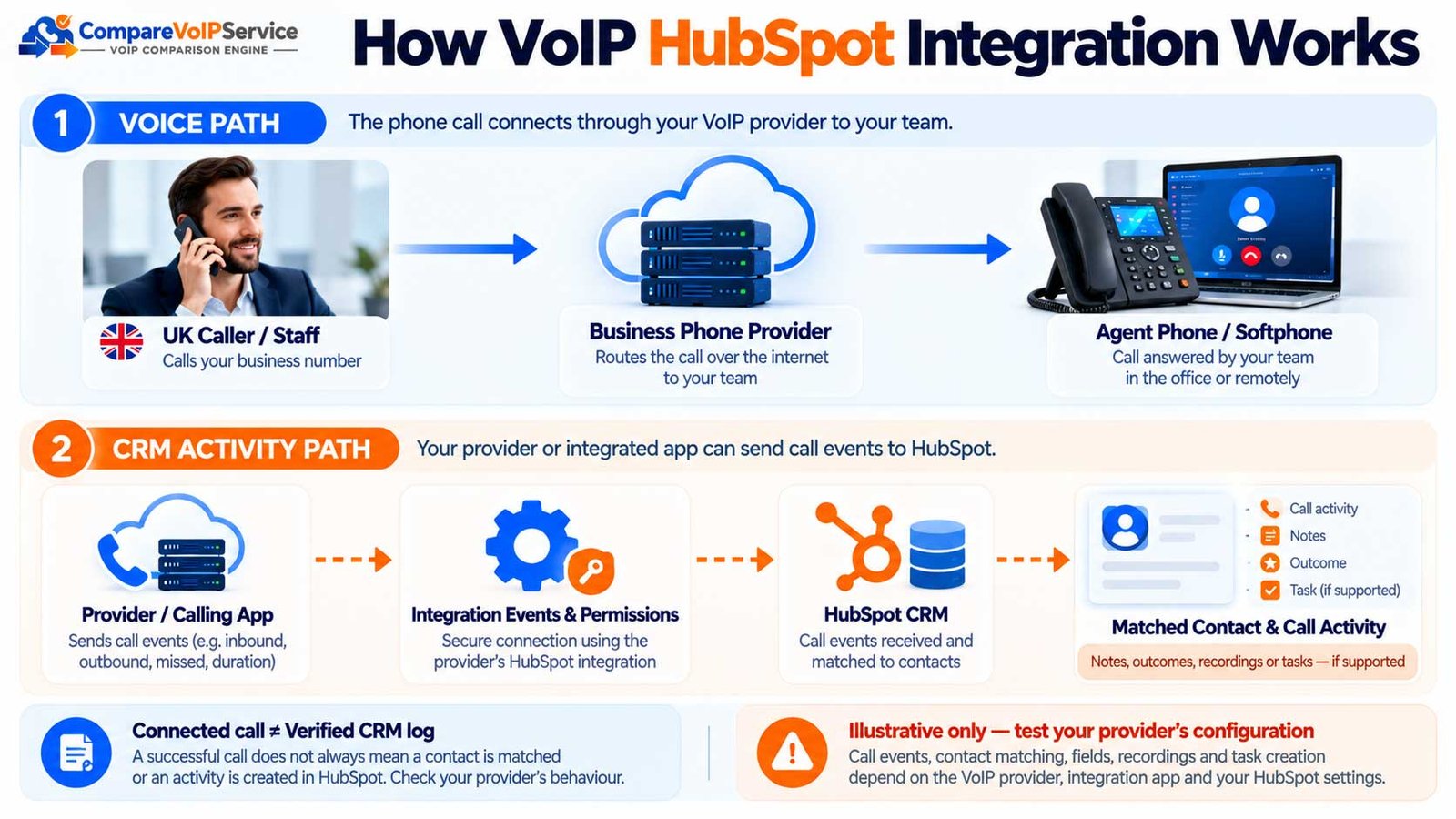
View the original detailed calling and CRM flow
| Component | Operational owner to identify | Evidence to request |
|---|---|---|
| UK numbers and carrier | Phone provider / telecom carrier | Provisioning, porting, CLI, inbound route and business-hours ownership. |
| Calling audio / softphone | Phone provider | Desktop/mobile client requirement, browser support, media reliability and user access. |
| HubSpot contacts and objects | HubSpot account owner | Account permissions, matching rules, object associations and CRM audit history. |
| Integration and sync jobs | App publisher / internal admin | Connection health, token renewal, failed event queue, dedupe and restart behaviour. |
| Recordings and transcripts | Actual storage operator(s) | Storage region, access rights, retention, sharing, export and deletion procedures. |
Swipe inside the table to view every column on smaller screens.
Check HubSpot Plans, App Permissions and UK Calling Eligibility
Verify the exact service and user entitlement before a proof of concept. An App Marketplace listing is evidence that an app exists—not proof that your HubSpot tier, phone service, country, seat type or mobile workflow supports every desired feature.
| Control | What must be confirmed | Suggested proof |
|---|---|---|
| HubSpot account and seats | HubSpot subscription, user seats, administration rights and features needing an upgrade. | Written plan/seat matrix from HubSpot or current account settings. |
| Calling app and version | Supported app, current connector version and owner of updates. | Current Marketplace listing, vendor deployment documentation. |
| UK telephone service | Existing numbers, UK availability, dial plans, number transfer and inbound/outbound permissions. | Written carrier eligibility and number list. |
| Desktop/browser | Browser, popup/cookie rules, supported OS and any companion calling app. | Working installation for each representative user device. |
| App authorisation | Install approvals, connected permissions, CRM object scopes and admin revocation method. | Approved permissions inventory and named integration owner. |
| Recording/AI eligibility | Licences, seats, consent settings, supported languages and feature availability. | Feature-by-feature eligibility confirmation without assuming inclusion. |
Swipe inside the table to view every column on smaller screens.
As one documented example of provider variation, 8×8 describes a required calling client and environment restrictions. These are 8×8 product conditions, not general rules for all HubSpot apps.
How Click-to-Call, Screen Pop and UK Number Matching Should Behave
Click-to-call starts the telephone action from a CRM record where supported; screen pop attempts to present the relevant record when an inbound call arrives. They are different features. Test both from a real operator workstation and from remote-worker setups.
One unambiguous contact should open the intended CRM record; verify formatting with +44 and domestic 0-prefix.
The interface should behave predictably when no usable CLI or contact exists. Confirm whether it offers search or optional new-record creation.
The system should avoid silently opening or updating the wrong person. Define a manual resolution rule.
Confirm the pop-up opens for the correct agent and does not multiply across unsupported simultaneous sessions.
UK E.164 normalisation is a useful test assumption, not a promise that the provider deduplicates or formats every number correctly. Check numbers with extensions, shared switchboards, mobiles and international callers.
| Input case | Expected acceptance evidence | Incorrect behaviour to flag |
|---|---|---|
| Contact stored as 020… and caller presents +44 20… | Correct known contact identified, or documented normalisation rule. | No match or false match due only to prefix formatting. |
| Two contacts share one main number | Agent sees a choice or an explicit policy. | Wrong deal or company gets updated silently. |
| Withheld caller ID | Clear no-match and manual search experience. | False identity assigned as if caller ID existed. |
| Caller rings via a queue | Agent who answers sees the appropriate context, if advertised. | Screen pop appears for an unrelated operator. |
| Outbound call from a company or deal record | Documented supported object and associated contact chosen. | Call is saved on an unrelated or unsupported object. |
Swipe inside the table to view every column on smaller screens.
Confirm Which Call Details HubSpot Actually Saves
A useful call log allows staff to reconstruct a conversation without retyping every fact. It is not enough for an integration to show the number dialled. Ask the supplier to demonstrate correct assignment, call direction, status, outcome, duration, timestamps and record associations for each supported call type.
| Business need | Value or object to verify | Acceptance evidence | Exception to test |
|---|---|---|---|
| Contact match | HubSpot contact / phone number | Correct contact is associated with the right call. | Unknown and duplicated numbers. |
| Call direction | Inbound / outbound | Direction reflects actual event. | Callback and internal transfer. |
| Call status and outcome | Missed, answered, attempted; agent disposition where supported | Consistent outcome labels in HubSpot call index. | Missed call with no voicemail. |
| Call ownership | HubSpot user / agent identity | Correct operator and team are accountable. | Shared phones, reassignment and hot desking. |
| Time and duration | Started at, connected time, duration and timezone | Times agree with the phone service record. | Daylight saving and disconnected calls. |
| Ticket or deal | Associated CRM object | Correct related item is updated only when supported. | Several open deals or support tickets. |
| Notes and task | User note / follow-up action | Human-entered content syncs exactly as configured. | Editing note after the call. |
| Recording reference | Recording visibility or link where eligible | Authorised user can open correct stored recording. | Revoked access or deleted provider account. |
| Retry and duplicate | Provider call/event ID or other dedupe control | One call generates intended records without duplicate activity. | Reconnection or retry after API failure. |
Swipe inside the table to view every column on smaller screens.
HubSpot’s call index documentation explains CRM call summaries, including integrated third-party calls. Your provider must still demonstrate which of these records it supplies.
Do Missed Calls, Transfers, Queues and After-Hours Calls Still Log?
Most implementations pass a successful outbound-call demonstration but fail to document the exceptions that create customer-service problems. Test inbound calls that ring out, are answered by another agent, are transferred, or are routed outside office hours.
| Scenario | Question for the supplier | What to inspect in HubSpot |
|---|---|---|
| Missed incoming call | Does an unanswered inbound call generate an event, and under which settings? | Status, owner, attempted time and correct customer. |
| Abandoned queue call | Does the integration see an abandoned call, or only calls delivered to an agent? | Difference between queue reporting and CRM log. |
| Warm transfer | Does one call create one event or several legs? | Associated users, notes and contact duplication. |
| Out-of-hours number | Does logging continue outside a configured window? | Business-hours filters and missed call tasks. |
| Shared team number | Are events logged from every connected number? | Number scope, owner assignment and call visibility. |
| Mobile answered call | Does a native mobile call sync as expected? | Matched contact and status across devices. |
| Integration disconnected | Are events queued, rejected or permanently lost? | Documented recovery, reauthorisation and backfill policy. |
Swipe inside the table to view every column on smaller screens.
For routing design beyond CRM data synchronisation, use the dedicated business call routing guide.
Recordings, Transcripts, AI Summaries and Call Analytics
Treat recording and AI-generated notes as separate purchased and governed capabilities. HubSpot documents recording review and transcription access for eligible subscriptions and seats, while partner apps differ in supported recordings, transcript uploads and links.
Who captures the media and where does the original recording live?
Who can listen, export, share and erase an audio file or transcript?
Which paid seats, languages, service permissions and provider features are required?
Does a recording link appear on the correct call and remain accessible after contract termination?
HubSpot’s recording and transcript documentation describes subscription-dependent analysis and recording access. Avoid treating a provider’s marketing description as confirmation of your HubSpot entitlement.
For general retention and lawful recording practices, read the site’s business call recording guidance.
UK Privacy, Connected-App Permissions and Data Ownership
Contact data, call notes and recordings may contain personal information. Identify the lawful purpose of processing, user access, notice to callers where required, processor/sub-processor roles and retention arrangements. UK GDPR responsibilities do not disappear because a telephone provider supplies the app.
| Area | Named owner or question | Required working evidence |
|---|---|---|
| Lawful processing and transparency | Business data protection lead | Approved privacy information and processing-purpose assessment. |
| Application permissions | HubSpot super admin | Approved OAuth scopes, installer rights, access inventory and revocation route. |
| Audio and transcript storage | Telephony/app supplier + business | Storage operator/location, access groups, retention and deletion workflow. |
| CRM activities and notes | CRM administrator | Field-level access, sensitive-note policy and record retention. |
| Staff controls | Team manager | Account lifecycle, multi-factor authentication where available, least-privilege review. |
| Incident response | IT/security owner | Contact and evidence procedure for missed syncing, mis-association or unauthorised data access. |
Swipe inside the table to view every column on smaller screens.
See connected app monitoring and HubSpot app permission management. Your privacy lead should separately review current ICO lawful-basis guidance.
What Happens When the HubSpot Connection Breaks?
Integration availability is separate from voice availability. Calls may continue with the phone carrier even if the CRM connection fails. Plan for the operational consequences: missing call records, delayed follow-up, expired authorisation and accidental duplicate events after reactivation.
| Failure mode | Immediate check | Recovery evidence |
|---|---|---|
| Expired authorisation | HubSpot Connected Apps connection status and supplier integration dashboard. | Successful reauthorisation plus a fresh test call; confirm old gaps. |
| API failure or limit | Error/event logs, provider status, token or API usage. | Clear retry/backfill policy with dates and unresolved events. |
| Wrong contact association | Number matching and duplicate records. | Corrected association and rule preventing recurrence. |
| Changed phone-number scope | Supplier list of connected numbers and routing. | Approved number inventory mapped to CRM log events. |
| Duplicate call activity | Event ID, webhook retries and dedupe behaviour. | One authoritative call record after controlled replay. |
| Browser or companion client closes | User workstation, pop-up settings and dialler status. | Live inbound and outbound calling on supported device. |
Swipe inside the table to view every column on smaller screens.
HubSpot’s connected-app management documentation identifies connection status, API usage and error insight features. Confirm which diagnostics are available in the actual account and provider stack rather than promising a particular dashboard.
HubSpot VoIP Acceptance Test Matrix for UK Businesses
Use representative accounts, non-sensitive test data and real permitted test numbers. Record a PASS / FAIL / NOT SUPPORTED outcome for each scenario, with the provider app version, HubSpot account tier, test device, timestamp and evidence link. Do not accept a single successful demonstration as proof of all functions.
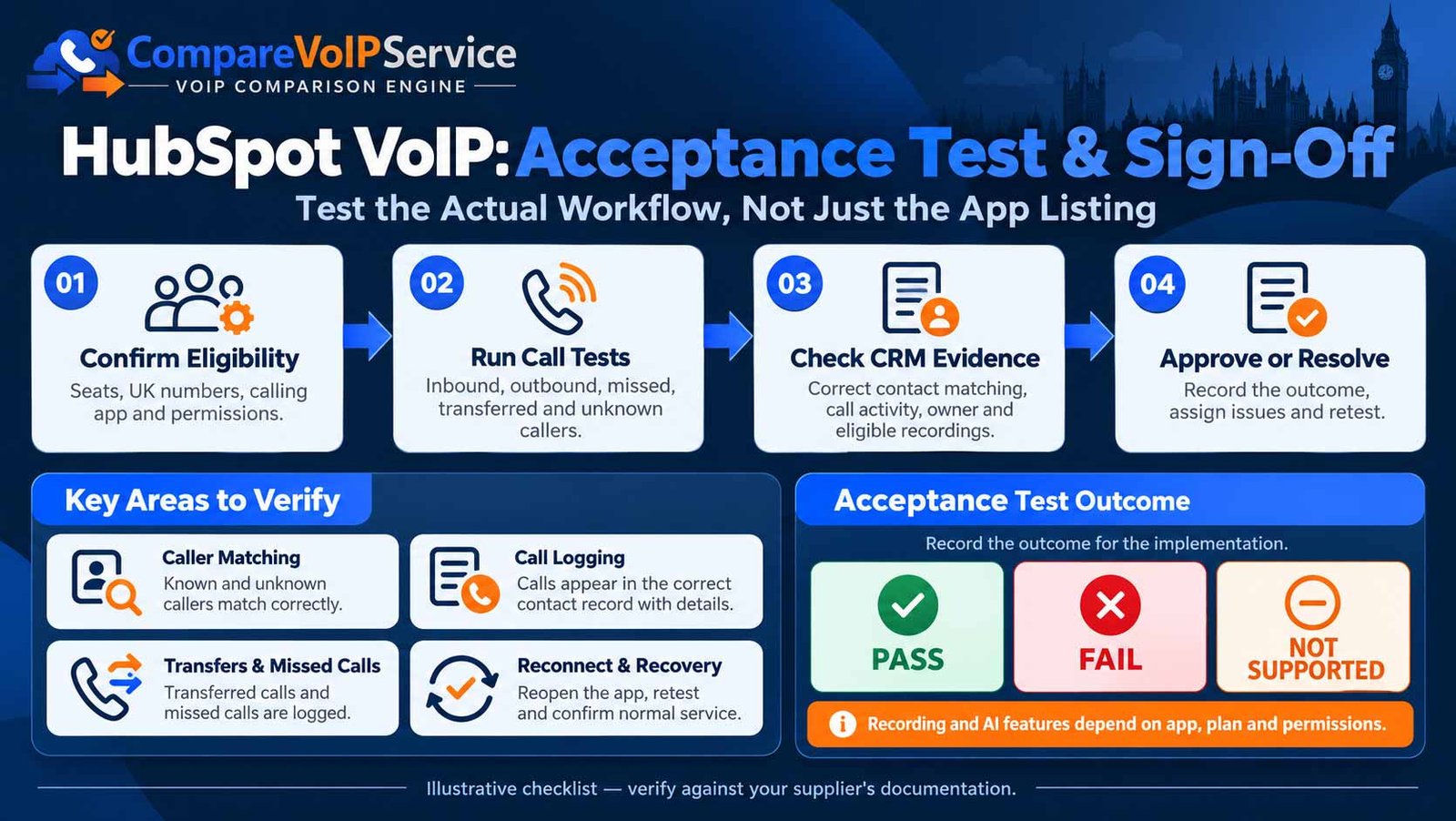
| ID and scenario | Required action | Evidence to retain | Failure / limitation to record |
|---|---|---|---|
| T01 Known inbound | Call from one saved +44/UK contact. | Correct pop-up, agent and activity association. | Wrong or missing record. |
| T02 Unknown inbound | Call from an unsaved permitted number. | Expected manual lookup or creation behaviour. | Unexpected duplicate contact. |
| T03 Duplicate contacts | Use a number on two test records. | Explicit match-choice or documented result. | Silently attached to wrong person. |
| T04 Withheld CLI | Call with caller identity withheld. | No false identity; clear handling. | False customer identification. |
| T05 Outbound from CRM | Dial from a permitted contact record. | Audio connects and activity records correctly. | Unlogged call or incorrect owner. |
| T06 Missed / abandoned | Let an inbound call ring out or leave a queue. | Provider-specific missed/abandoned behaviour documented. | No log contrary to a written claim. |
| T07 Transfer | Transfer between two permitted operators. | Correct call-leg and CRM activity behaviour. | Duplicate or missing follow-up. |
| T08 Out of hours | Call number outside operating window. | Routing outcome and any CRM log match requirements. | Unexplained omission. |
| T09 Recording option | Test recording enabled and restricted access scenarios. | Correct consent/notice process and access restriction. | Unauthorised recording link exposure. |
| T10 Connection loss | With supplier approval, simulate disconnected app then reauthorise. | Documented event loss, retries and clean recovery. | Silent gaps or uncontrolled duplicates. |
| T11 Shared team number | Route two calls to different agents. | Correct assigned user, contact and scope. | Calls only logged for one agent. |
| T12 Mobile/remote operator | Call from approved mobile or remote setup. | Same stated functionality or documented difference. | Provider feature absent on mobile. |
Swipe inside the table to view every column on smaller screens.
Questions to Ask a HubSpot VoIP Supplier Before Signing
Request written answers covering the precise feature and contract combination being purchased. A sales statement such as “HubSpot compatible” should be replaced with a scoped support schedule and named responsibility owner.
| Question | Evidence to request | Acceptance owner |
|---|---|---|
| Which Marketplace app, version and model of integration? | Live listing, supported guide and update owner. | CRM admin |
| Which HubSpot subscriptions and seats are needed? | Written entitlement list including paid AI/recording functions. | Business owner |
| Which UK numbers, dial plans and user devices are supported? | UK number/seat scope and compatible clients. | Telephony admin |
| What happens with unknown, duplicate and withheld caller IDs? | Screenshots or demo acceptance evidence. | Sales/service ops |
| Will missed calls, transfers, queues and mobile calls log? | Function-level statement and documented limitations. | Operations lead |
| What CRM fields and objects are written? | Field mapping, ownership and event reference specification. | CRM admin |
| Who stores recordings and transcripts? | Security/privacy annex, access model and deletion policy. | Privacy lead |
| What if the integration disconnects or API events fail? | Support SLA, error visibility, retry and backfill policy. | IT lead |
| How will the vendor handle version changes and data export? | Upgrade policy, support escalation and exit provisions. | Procurement |
Swipe inside the table to view every column on smaller screens.
Two Practical HubSpot Calling Scenarios
Example A: five-seat UK sales team
Illustrative scenario, not a customer case study. A five-person sales team wants click-to-call from HubSpot contacts, screen pop for returning leads and an accurate outcome for unanswered calls. The project owner collects number lists, obtains app eligibility for the exact HubSpot seats, tests UK +44 matching and checks whether every agent’s outbound calls log under their own user. Before go-live, the team verifies how duplicates and contact creation work.
Example B: shared support telephone number
Illustrative scenario, not a measured deployment. A service desk routes a shared incoming number to a queue and wants answered, missed and transferred calls associated with support records. The implementation must decide who owns a missed queue call, whether transfers create more than one event, whether ticket associations are supported, and how recordings can be accessed without unnecessarily exposing customer data.
| Sales team | Support desk |
|---|---|
| Correct contact, agent owner and call outcome. | Correct team, queue exception, ticket association and handoff record. |
| Reliable outbound click-to-call on approved devices. | Consistent inbound logging across shifts and shared numbers. |
| Timely follow-up with no duplicate contact creation. | Documented missed-call task and integration incident handling. |
Swipe inside the table to view every column on smaller screens.
If the business still needs to decide which CRM telephone features matter overall, use the wider business phone integrations hub, then return to this HubSpot-specific test framework.
A Practical Five-Stage HubSpot Calling Rollout
| Stage | Work package | Evidence before moving on |
|---|---|---|
| 1. Define | Specify call journey, users, objects, numbers, opt-in recording needs and ownership. | Signed requirements and data-flow map. |
| 2. Prove | Validate app listing, HubSpot plan/seat scope, carrier and permissions. | Documented feature and access matrix. |
| 3. Configure | Connect a sandbox or controlled environment, map numbers, users and logging rules. | Configuration record and rollback/disable method. |
| 4. Test | Run T01–T12, including exceptions, access and sync failure tests. | Recorded results, defects and decision log. |
| 5. Release | Pilot representative team, train users, monitor errors and confirm support ownership. | Approval sign-off, issue owners and review date. |
Swipe inside the table to view every column on smaller screens.
The integration must not be represented as live or reliable until it passes the agreed tests. After release, review the same controls when call routing, permissions, app versions or CRM workflows change.
Frequently Asked Questions
Can HubSpot work with an existing VoIP provider?
Potentially. Check that the precise phone-service product has a supported HubSpot integration or a maintained custom extension, and verify the HubSpot account, country, seat and user-device requirements.
Does a third-party HubSpot calling app use HubSpot calling minutes?
HubSpot states that integrated third-party calling apps do not consume HubSpot calling minutes. Provider call charges, licences and connector subscriptions may still apply.
Will every inbound call open a HubSpot contact?
No universal guarantee. Screen pop depends on the supplier app, supported inbound calling, phone-number matching, window/client state and account permissions.
Does HubSpot always create a contact for unknown callers?
No. Contact creation depends on app rules, selected configuration, data permissions and the precise workflow. Test that it does not generate unnecessary duplicates.
Are missed calls and transferred calls automatically logged?
They may be logged differently by each integration, or may need specific settings. Confirm queue, number and business-hours scope in the provider documentation and test actual examples.
Can an integration associate calls with deals or tickets?
Some integrations and eligible HubSpot features support associated CRM objects, but this is neither universal nor always automatic. Test the exact ticket/deal association you need.
Does HubSpot store all recordings from a connected phone service?
Not necessarily. Storage, links, entitlement, provider access and transcript availability depend on the calling service and HubSpot features. Verify who retains the original audio.
Can HubSpot transcribe calls from any provider?
No. HubSpot documents specific supported integrations, subscription tiers and seat conditions for recording transcription and analysis. Confirm these against your installation.
Will the integration work on mobiles?
Mobile and desktop experiences can differ. Check both the telephony client and HubSpot app/browser requirements, then run an authorised mobile acceptance test.
Can an app stop logging calls without phone calls stopping?
Yes, in some arrangements. CRM events and voice calling may be separate services. Aircall, for example, documents logging gaps when its HubSpot connection is inactive.
What should a UK business check for privacy?
Identify the lawful processing purpose, privacy information, app scopes, recording access, storage, retention and processors. Obtain appropriate advice for the actual use case.
What is the most important step before signing?
Obtain written provider-specific feature and limitation evidence, then run representative inbound, outbound, missed-call, matching and failure-recovery tests before accepting the integration.
Official Documentation and Evidence Notes
Last reviewed: 22 October 2026. Feature, product and plan eligibility can change. Always confirm the current supplier documentation and your own account entitlements before implementation.
- HubSpot: Use a calling app in HubSpot.
- HubSpot: Review calls in the call index.
- HubSpot: Recordings and transcripts.
- HubSpot: Manage access to apps.
- HubSpot: Connected apps and errors.
- Aircall: Configure the HubSpot integration.
- 8×8: 8×8 Work for HubSpot requirements.
- 8×8: Handle calls in 8×8 Work for HubSpot.
- ICO: A guide to lawful basis.
Editorial methodology: This is a supplier-neutral evaluation framework built from published primary documentation. The two scenarios are fictional illustrations. We have not logged into a HubSpot tenant or tested named telephony integrations, and no actual implementation compatibility, pricing or compliance result is claimed.
Browse the broader VoIP and CRM integration guide for CRM-wide concepts and the VoIP security guide for baseline telephony access controls.
HubSpot Calling Readiness Brief
Verify the Whole HubSpot Calling Workflow, Not Just the App Listing
Agree what the integration must record, which users and numbers are eligible, and what happens when a call is missed, transferred or not synchronised. Use the test matrix and supplier checklist before approving a deployment.

Bhav Giva
Founder & Lead Analyst at CompareVoIPService.co.ukBhav Giva publishes UK-focused business communications research and practical VoIP guidance. This guide explains how to evaluate HubSpot-connected calling, call logging, contact matching, supplier responsibilities and integration acceptance evidence. It does not claim hands-on verification of individual supplier applications.