

From Microsoft Teams to a complete business phone system.
Understand what Teams Phone adds, what you still need for external UK calls, which connection route fits, and how to protect your numbers, budgets and callers.
Four layers to check before calling it a finished business phone system.
Short answer: Microsoft Teams Phone adds cloud PBX calling features to Microsoft Teams. To make and receive calls with ordinary UK phone numbers, users need suitable Teams Phone entitlement plus a supported PSTN service, correct number assignments and a properly configured calling environment. The best arrangement depends on the carrier model, user roles, reception needs and business continuity.
Jump to a Section
What Is Microsoft Teams Phone?
Microsoft Teams Phone is a cloud-based business telephone system built into Microsoft Teams. It adds PBX-style call handling—such as transfers, voicemail, auto attendants and call queues—to a Microsoft Teams environment. With suitable licences and a connection to the public telephone network, staff can make and receive calls to ordinary UK business, landline and mobile numbers.
Teams meetings, internal Teams-to-Teams calls and a telephone service for customers are not the same thing. A company can use Teams daily for chat and meetings but still have no configured external telephone calling. In most deployments, enabling Teams Phone is only one component of the complete system.
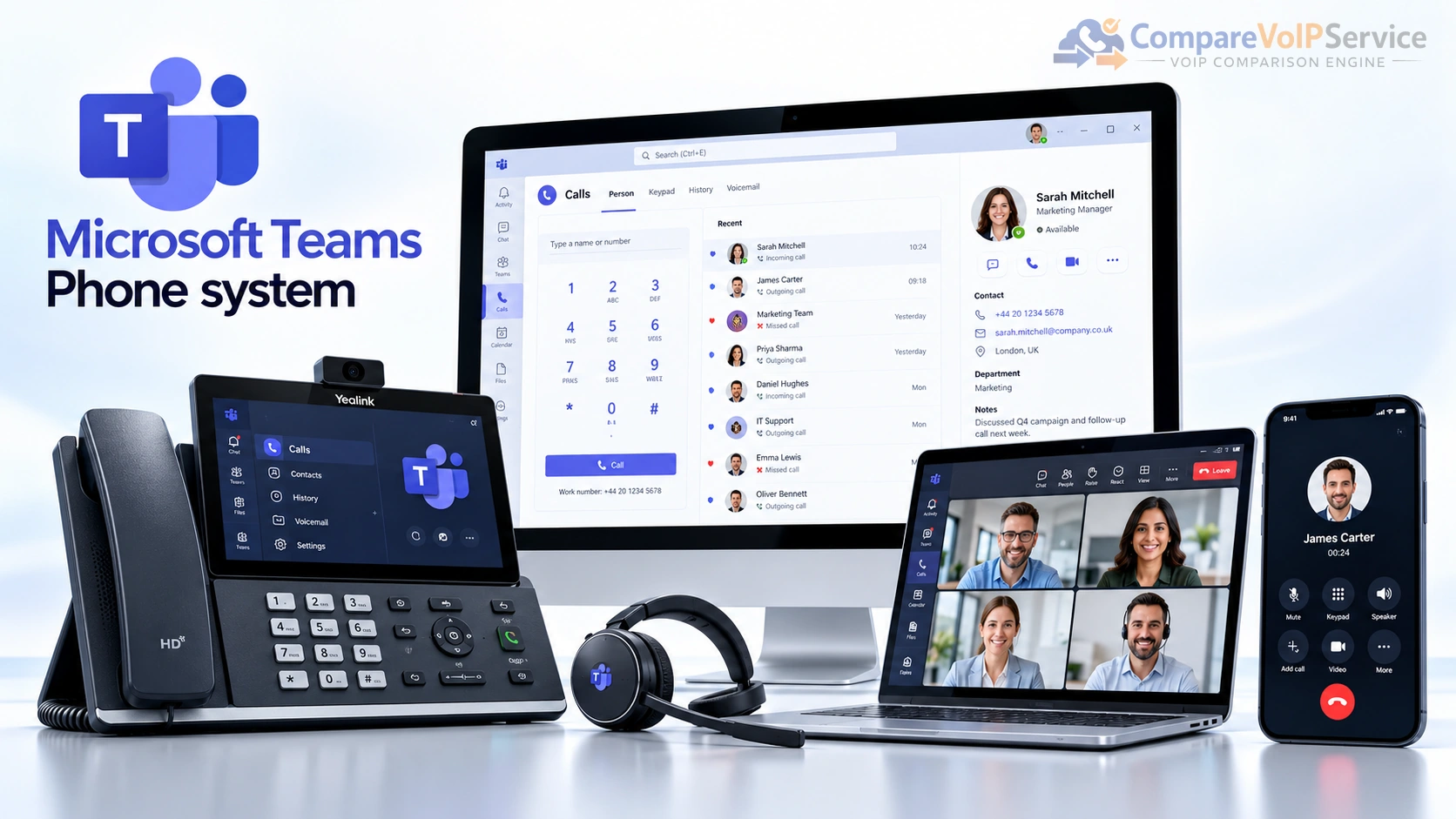
Chat, meetings and calling within Teams. This alone does not guarantee a public number or a dial pad for making ordinary external calls.
Microsoft’s cloud PBX calling capabilities, subject to the eligible licences assigned to each user and any applicable features.
A Microsoft or supported third-party route that carries calls between the Teams environment and the public telephone network.
UK phone numbers, suitable endpoints, configured business call flows, emergency arrangements and a clear operating/support model.
For a UK business, the real purchase decision is therefore not simply “Do we have Teams?” It is whether the organisation can assemble licensing, calling service, numbers, call handling and accountable support into a working, affordable telephone system.
How Does a Microsoft Teams Phone System Work?
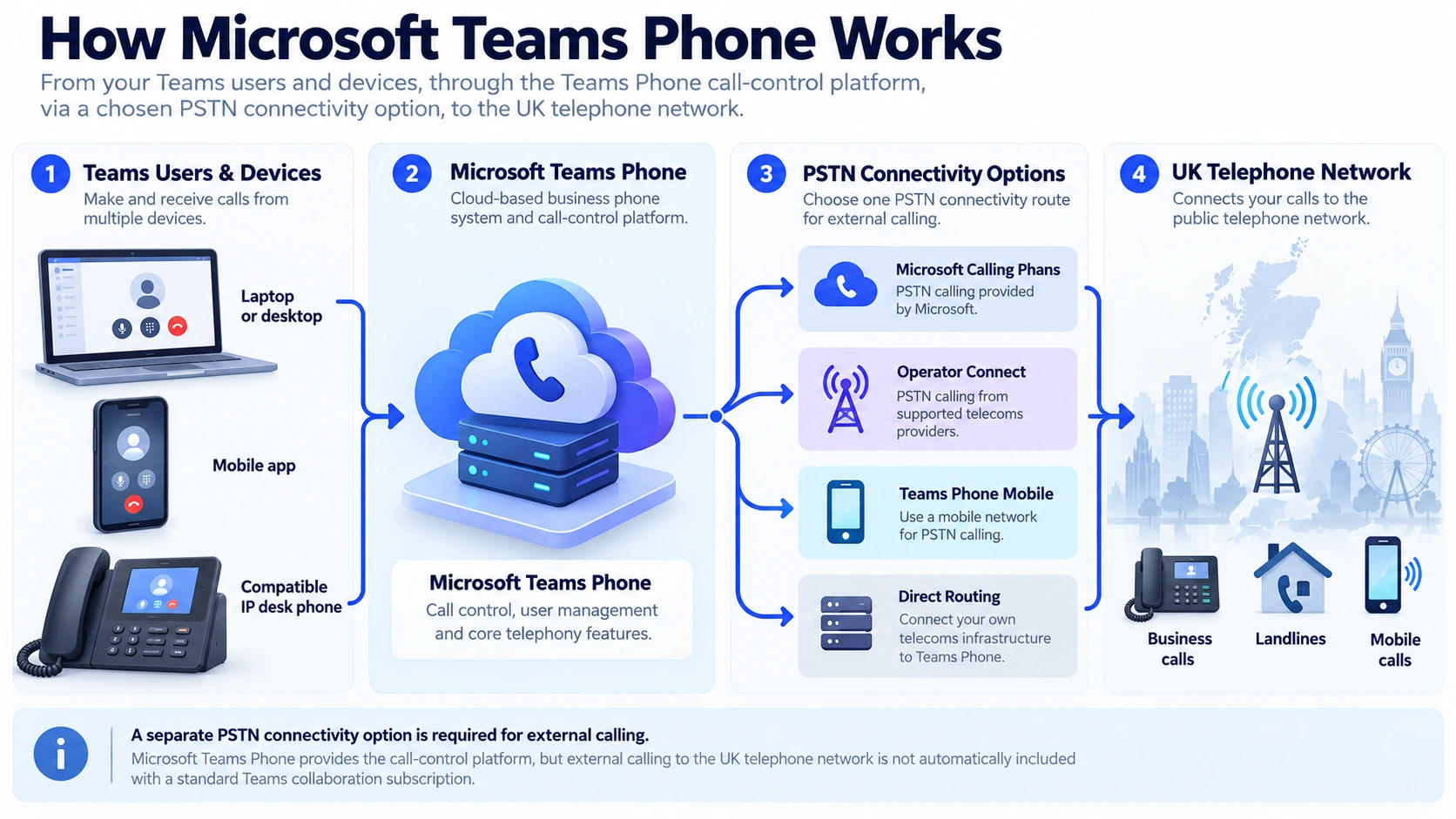
Teams Phone provides the call-control layer within Microsoft’s cloud services. Your chosen PSTN connection transports external calls; the Teams tenant applies policies, number assignments and call routing; then the call reaches an employee, queue, auto attendant or authorised shared destination. An office computer, smartphone or supported desk phone can be an endpoint, but the device does not replace the underlying voice-service contract.
What Happens When a Customer Calls?
- The public number receives the call. The number may be supplied through Microsoft or a participating communications provider, depending on the design.
- The PSTN route connects it to Teams. Teams Phone recognises the number assignment or voice application and applies the approved inbound configuration.
- The relevant destination is selected. A user may ring directly, or an auto attendant may route the call into a team or call queue.
- The employee answers on a supported device. Their experience depends on sign-in, policies, connectivity and available call-handling features.
- Fallback rules decide the next step. Busy or unanswered calls need configured overflow, voicemail, an alternative agent or a documented continuity arrangement.
An external call from an employee follows the reverse pattern. Teams Phone applies user permissions and a dialling route, then sends the call through the selected PSTN service. A Teams-to-Teams conversation between colleagues may not need a PSTN route at all.
What Do You Need to Make External Calls?
Before ordering a new supplier package, check which elements are already included in your Microsoft 365 agreement and which are not. The exact entitlement can differ by tenant, subscription family and purchase channel. The following checklist prevents buying a telephone licence without the service needed to use it.
| Component | What It Enables | Who Should Verify It |
|---|---|---|
| Eligible Microsoft Teams entitlement | Access to the required Teams experience; check whether Teams is included or separately licensed. | Microsoft 365 tenant and licence administrator |
| Teams Phone entitlement | Cloud PBX calling features for users; may be an add-on or included in an eligible suite. | Licensing administrator |
| PSTN service | External inbound and outbound calls through Calling Plan, Operator Connect, Teams Phone Mobile or Direct Routing. | Carrier and Teams implementation owner |
| UK number plan | User numbers, main/reception numbers, any DDIs and approved caller ID arrangements. | Number-holding operator and business owner |
| Voice-application design | Auto attendant, call queue, resource accounts, opening hours and overflow. | Teams administrator and operations lead |
| Endpoints and networks | Supported computers, headsets, phones, suitable Wi-Fi and office/remote connectivity. | IT and network owner |
| Emergency calling and support | Approved 999/112 design, location process, helpdesk and outage escalation. | Regulated voice-service operator and business risk owner |
Ask the supplier to show a live external incoming call, a live outbound call, a reception queue, the number assignment, the emergency-calling configuration and the person responsible for each support boundary. A Teams licence screenshot on its own does not prove you have a complete telephone system.
Teams Phone licensing is generally assigned per person using Teams Phone. Service functions such as auto attendants and call queues can also require appropriately licensed resource accounts, which are different from employee accounts. Shared Calling is a separate way to provide calling without issuing every user a dedicated public number; neither approach means no licence is needed.
Four Ways to Connect Microsoft Teams to UK Telephone Numbers
Microsoft documents four principal PSTN connectivity approaches. They have different ownership and operational consequences, and eligible organisations can mix them for different departments or locations. The correct choice depends on number compatibility, supplier relationships, mobile-working needs and who will manage the telephony layer.
Microsoft Calling Plan
Microsoft supplies the eligible public telephone service and numbers within the supported markets. This can simplify procurement for suitable users and numbers, but the business must validate available plans, minutes, porting restrictions and local calling requirements.
Best starting question: Do our UK numbers and usage fit Microsoft’s exact Calling Plan offer?
Operator Connect
A participating telephone provider supplies PSTN connectivity, numbers and carrier-related support through an integration approved for Teams. Businesses that already use or prefer a participating carrier should check number portability, queue support, incident ownership and service terms.
Best starting question: Can an eligible operator support our existing numbers and locations under one accountable agreement?
Teams Phone Mobile
A participating mobile operator links an eligible SIM-enabled company mobile number to Teams Phone, so a mobile-first employee can use that number through Teams and the native mobile dialler where supported.
Important limitation: Microsoft documents support for user numbers, not voice-application numbers for reception queues or auto attendants. Confirm UK operator availability before assuming compatibility.
Direct Routing
A supported session border controller (SBC) connects Teams Phone to a chosen PSTN carrier or managed routing service. This can support specialist integrations and existing telephony arrangements, but brings additional configuration, monitoring, resilience and support responsibilities.
Best starting question: Who operates the SBC, carrier link, routing policies and recovery process?
| Connection Model | Service Owner | Good Fit to Explore | Key Caveat |
|---|---|---|---|
| Calling Plan | Microsoft for PSTN service | Straightforward supported Microsoft-hosted calling | Eligibility, available number types and call allowances |
| Operator Connect | Participating operator | Carrier-managed UK numbers and telephony support | Operator coverage and terms |
| Teams Phone Mobile | Participating mobile operator | SIM-based mobile-first employees | User numbers; not queue/auto-attendant service numbers |
| Direct Routing | Customer, carrier and/or managed integrator | More tailored telephony and legacy integration | SBC, support and resilience engineering |
This is a selection overview, not an exhaustive Operator Connect versus Direct Routing comparison. The detailed commercial and operational side-by-side belongs in its own approved planned guide rather than being duplicated here.
Which Business Calling Features Are Included?
Teams Phone can provide everyday PBX features including an external dial pad, call hold, consultative transfer, forwarding, voicemail and caller-history functions. Auto attendants and call queues can direct customers to reception or a department. Some advanced intelligence, recording and queue-supervision capabilities depend on separate eligibility or configuration; do not assume that all features appear under the same licence.
Create a business-hours greeting or menu and distribute inbound calls to an appropriately staffed group. Specify after-hours and overflow behaviour.
Use the Teams calling experience on suitable computers, mobile apps and eligible Teams-certified devices. Verify support for any existing desk phones.
Route missed calls to appropriate destinations and transfer customers without treating chat/meeting functionality as a substitute for a telephone plan.
Use the Teams admin centre, permission policies and call-quality tools to monitor a deployment. Actual reporting detail depends on the feature, licence and retention.
Basic Call Queues Are Not the Same as Advanced Queue Supervision
Microsoft’s core auto-attendant and call-queue functions are designed to route calls. The separate Queues app provides more advanced agent and supervisor workflows such as enhanced queue views and reporting; Microsoft’s guidance identifies additional Teams Premium and Teams Phone requirements for relevant users. Confirm the exact capability and entitlement before presenting Teams as a complete contact-centre replacement.
An auto attendant or call queue that directly answers calls is associated with a Teams Phone Resource Account licence. Microsoft currently states that these licences have no acquisition charge, but they still need to be assigned correctly. Do not assign an ordinary employee Teams Phone Standard licence to the resource account.
The right buyer question is not just “Does Teams have call queues?” but whether the available call flow, reporting, transfer behaviour and licensing match the workload your reception or customer-service staff actually handle.
Microsoft Teams Phone Licensing and UK Costs
Licensing is the most common area for incomplete quotes. Some Microsoft 365 subscriptions include relevant Phone entitlements; others require Teams Phone Standard as an additional subscription. A separate Teams entitlement may also be required. If external numbers are needed, the PSTN arrangement must be included or sourced independently.
Our Microsoft Teams Phone licensing UK guide explains E5 entitlements, Teams Phone Standard, Calling Plan bundles, resource accounts and shared-device licensing. This page covers the complete Teams Phone system, PSTN connectivity and UK rollout decisions.
The prices below are Microsoft’s published UK online examples checked in October 2026. They are monthly equivalents of annual-payment subscriptions, exclude VAT, and may vary by eligibility, channel or subsequent pricing changes. Verify the offer at purchase time.
| Offer | Published Price | What the Offer Means |
|---|---|---|
| Teams Phone Standard | £7.70 / user / month | Cloud calling capability. Add an eligible PSTN service separately unless it is already covered by the chosen package. |
| Teams Phone With Pay-As-You-Go Calling | £9.20 / user / month | A bundle including Teams Phone Standard plus a Microsoft Calling Plan with metered outbound minutes; call rates may apply. |
| Teams Phone With Domestic Calling | £13.10 / user / month | A bundle including Teams Phone Standard and an eligible domestic Calling Plan; confirm minute allowance, destinations and terms. |
Source: Microsoft’s UK Teams Phone pricing page. These are not complete managed-system quotes and do not include every possible Teams licence, VAT, device, migration or support charge.
The £9.20 and £13.10 illustrated bundles already include Teams Phone Standard. Do not add another £7.70 to each user simply because Teams Phone Standard also appears as a standalone licence option.
Worked UK Buying Example: Twelve Office Users
Suppose a small company has 12 licensed users who need public outbound calls. At the advertised £13.10 domestic-calling bundle, the illustrative licence subtotal is £157.20 a month excluding VAT (12 × £13.10), assuming every user is eligible for that exact offer. This is a calculation example—not a provider quotation or evidence of the business’s total telephony cost.
Still check the underlying Teams entitlement, actual call usage, reception and service-number requirements, audio-conferencing extras where relevant, devices, number porting, setup, ongoing support, networking and continuity. If an Operator Connect supplier provides the calls instead, obtain a separate carrier quote and verify how your Teams Phone entitlement is licensed.
Build a Like-for-Like Whole-System Quote
| Cost Component | Questions to Ask |
|---|---|
| Microsoft 365 / Teams baseline | Do employees already have eligible Teams licences? Does any suite include Phone? |
| Teams Phone entitlement | How many individually licensed users? Which roles need extra queue-supervision features? |
| PSTN and numbers | Which carrier, line charges, call allowance, per-minute rates, routing and service numbers? |
| Devices and networking | Headsets, certified handsets, shared-area devices, broadband/Wi-Fi, power protection? |
| Implementation | Porting, queues, policy setup, testing, user training and rollback? |
| Support and continuity | Named provider, SLA scope, incident escalation, carrier failover and out-of-hours cover? |
Ask suppliers to show a per-user and per-business subtotal with VAT status clear. Microsoft may bill one component while a telephone partner bills others. The buyer needs one comparison that covers all required layers.
Can You Keep Your Existing UK Business Phone Numbers?
Often it is possible to retain a business’s established geographic and non-geographic numbers, but it is not automatic. The receiving service, number type, losing carrier, current contract and porting process all matter. A successful Teams demo on a temporary number does not demonstrate that your 020, 0116, 03 or service number can move to the intended provider.
Microsoft publishes a dedicated UK phone-number management reference for acquiring and porting numbers into Microsoft’s own service. It gives an indicative 12–30 business-day porting period and requires a letter of authorisation. Its published restrictions include limitations around partial porting and number categories. Those are Microsoft Calling Plan rules; Operator Connect and Direct Routing carriers may have their own procedures and eligibility.
Four Questions Before Requesting a Port
- Who currently controls the numbers? Obtain the account name, service agreement, published DDIs, main number and any service numbers.
- Which receiving route will hold them? Name Microsoft, the Operator Connect provider or the Direct Routing carrier, rather than saying only “move to Teams”.
- Which numbers must stay grouped? Check business-hours menus, queue numbers, geographic identities, 0800 services and emergency or fax dependencies individually.
- What happens on cutover day? Agree port timing, emergency/location information, external inbound/outbound calls, caller ID, voicemail, rollback and responsibility for failed ports.
Microsoft Calling Plans do not sell ordinary mobile numbers in the same way as geographic telephone numbers. Teams Phone Mobile instead integrates eligible company SIM-enabled numbers through participating mobile operators. Confirm which service you are discussing.
The site’s UK business number-porting guide covers the wider transfer process. This section establishes the Teams-specific questions, rather than replicating a full number-porting manual.
Emergency Calling, Security and Reliability
A cloud telephone solution still relies on several systems beyond the Microsoft platform. A working Teams app does not by itself prove the carrier, local internet connection, business number, emergency-location information or office power protection will behave correctly in a failure.
999/112 and Caller-Location Checks
Emergency access and caller-location obligations must be designed with the selected regulated communications provider. Check how the chosen PSTN service handles 999 and 112, what address or dynamic location information it uses, and how staff working remotely are covered. This deserves particular attention for multi-site businesses, shared offices and employees who use the same laptop at home and at work.
Ofcom also addresses access to emergency organisations during power cuts. Agree the practical alternative for vulnerable users and any business-critical location. Do not make test calls to real emergency numbers without an approved procedure with the service provider.
Reliability Has More Than One Failure Domain
| What Can Fail | Business Impact | Required Check |
|---|---|---|
| Internet, Wi-Fi or power at a site | Devices cannot reach Teams even if cloud services remain available. | Connectivity backup, power protection, mobile fallback and user instructions. |
| Chosen PSTN carrier or route | Incoming or outgoing public calls may fail while internal Teams works. | Carrier incident ownership, diversion/failover and external-number checks. |
| Tenant permissions or licence assignment | A user can lose dial-pad or queue access after changes. | Controlled admin changes and licence monitoring. |
| Device or headset | Poor audio, missed calls or failed login despite healthy services. | Certified device testing and spare-device process. |
| Call queue configuration | Calls reach the wrong department or time rule. | Operational acceptance calls, holiday schedules and queue overflow. |
Microsoft’s Call Quality Dashboard can help administrators analyse call quality, but it does not supply a substitute broadband connection or guarantee third-party carrier recovery. Use the site’s separate VoIP Call Quality and Reliability guide for broader networking and fault-isolation methods.
Privacy, Recording and Administration
Assign appropriate administrative roles, apply multi-factor authentication and least privilege, establish retention and recording policies, and determine who can access call records. If calls are recorded or monitored, check the applicable UK GDPR and ICO obligations, explain relevant monitoring appropriately and distinguish policy-based recording products from ordinary voicemail or transcription features. Advanced AI/call-summary features should only be promised after checking their actual licence, availability and data-governance configuration.
Is Microsoft Teams Phone Right for Your Business?
Teams Phone is often a credible option where a company already uses Microsoft Teams heavily and wants business calling inside the same employee experience. It is not automatically the cheapest or simplest answer for every organisation—especially where large inbound queues, unusual telephony devices, specialist integrations or limited internal Microsoft administration capacity are involved.
| Business Situation | What to Evaluate | Possible Direction |
|---|---|---|
| Microsoft 365-heavy consultancy, 15 staff | Existing Teams adoption, a main number, modest reception and remote access. | Explore Calling Plan or Operator Connect with a clear support package. |
| Mobile-first sales team | Company mobile numbers, native dialler, Teams history and UK operator eligibility. | Evaluate Teams Phone Mobile for eligible employees. |
| Multi-site organisation using legacy PBX devices | Specialist analogue lines, existing handsets, site resilience and SBC capabilities. | Assess managed Direct Routing alongside the broader migration plan. |
| Busy contact centre with complex analytics | Supervisor workflows, skills, reporting, integrations and service levels. | Validate Teams queue capabilities against real requirements; do not assume basic call queues are a full CCaaS platform. |
| Small team with no internal Microsoft 365 administration | Licence management, phone incidents, coverage and technical support ownership. | Assess a managed Teams Phone offer against a hosted-PBX alternative. |
Define the caller journey, exception handling, emergency provisions and support ownership first. A service that fits 12 office users may not fit a customer-service queue with sustained incoming calls. The published Microsoft Teams vs RingCentral comparison serves the separate head-to-head selection task.
Teams Phone should be evaluated as an operating model: its suitability depends on the exact tenant, number plan, support partner, user roles and the business’s tolerance for administration complexity.
How Do You Move From an Existing PBX to Teams Phone?
A safe migration needs a documented telephone estate before any number porting. Inventory live numbers, queues, reception menus, alarm/lift/fax or payment-terminal dependencies, staff extensions, current support contacts and out-of-hours routes. A meeting rollout checklist is not sufficient for business-critical telephony.
Six Stages for a Controlled UK Rollout
- Discover the current estate. Map numbers, carriers, devices, sites, reception paths, special lines and which people own contracts and administration.
- Confirm licences and PSTN model. Validate actual tenant SKUs, calling method, ports and geographic/mobile/service-number eligibility before ordering.
- Design call flows and continuity. Configure main number handling, open/closed hours, queues, transfers, emergency-location rules and agreed backups.
- Pilot on controlled numbers. Test a representative mix of staff, headsets, certified devices, home workers, departments and external carriers.
- Port and cut over in stages. Agree change windows, numbers included, operational ownership, communication to users and a formally approved fallback for incidents.
- Verify after go-live. Test every public number externally, inspect transfer and voicemail behaviour, review call quality and reconcile carrier/Teams invoices.
Ask the provider to demonstrate the correct route for both incoming and outgoing public calls. Include at least one actual mobile-network call from outside your business, rather than relying only on internal Teams test calls. Where an existing number cannot be ported to the selected operator, establish the alternative before advertising a go-live date.
For the general infrastructure, router and device preparation steps, see the existing business VoIP setup guide.
Microsoft Teams Phone Readiness Checklist
Use these twelve questions in the supplier meeting. Each should receive an explicit answer, accountable owner and practical demonstration before the service is accepted. The boxes below are a private on-page checklist; they do not save information or send it to any provider.
Teams Phone Buying & Migration Evidence Pack
Bring a simple number inventory, list of users and roles, planned call-flow diagram, expected call volumes, emergency-location information and copy of the intended support agreement. Ask each supplier to fill the same requirements sheet and identify assumptions.
- Documented number map: every advertised number, holder, port route and destination.
- Licence matrix: roles, Teams/Phone entitlements, voice apps and enhanced queue requirements.
- Call-path sketch: carrier to Teams to reception, users, overflow and out-of-hours routes.
- Risk ownership: emergency calling, broadband/power loss, security, carrier incidents and support escalation.
- Controlled test record: external calls, transfers, caller ID, voicemail, queue fallback and authorised rollback.
Frequently Asked Questions
Is Microsoft Teams Phone Included With Microsoft 365?
Not in every subscription. Some eligible Microsoft 365 plans include Teams Phone capabilities, while others require a Phone add-on. The presence of Teams chat or meetings alone does not establish external PSTN calling entitlement. Check the exact tenant SKU and user licences.
Can Microsoft Teams Phone Replace Our Office Landline?
It can replace the calling function for suitable businesses when the numbers, PSTN connection, licensed users, call flows and emergency/continuity requirements have been validated. Audit alarm, lift, fax and payment dependencies separately rather than assuming every legacy line can move to Teams.
Does Teams Phone Need a Calling Plan?
It needs a suitable external PSTN route if users must call ordinary external numbers. Microsoft Calling Plan is one option; Operator Connect, Teams Phone Mobile and Direct Routing are others. A Microsoft Calling Plan is not mandatory for every deployment.
Can We Keep Our Existing UK Number?
Often, subject to the number type, losing carrier and chosen receiving provider. Microsoft Calling Plan has its own UK porting rules. Operator Connect and Direct Routing providers may have different availability and processes, so obtain written confirmation for your exact numbers.
Do All Employees Need Their Own Phone Number?
No. Properly configured Shared Calling can allow licensed users to make external calls using a shared resource-account number. Other employees may need personal DDIs. Shared Calling does not eliminate the requirement for suitable Teams Phone licences.
Are Auto Attendants and Call Queues Included?
Teams Phone supports these capabilities, but implementation and resource-account licensing must be correct. Advanced queue supervision and reporting through the Queues app have additional requirements. Validate required features against the exact offer.
Can We Use an Existing Desk Phone With Teams?
Not every legacy SIP desk phone works natively. Check whether each existing model has a supported Microsoft Teams certification or whether another approved approach is required. Test shared-area devices and critical reception phones separately.
Does Teams Phone Work During a Broadband or Power Cut?
An internet-connected Teams endpoint can lose access when its local network or power fails, even if the cloud service is functioning. Plan local resilience, alternative calling devices, operator-specific routing and suitable emergency-calling provisions.
Is Teams Phone Cheaper Than a Hosted PBX?
There is no universal winner. Teams Phone licensing, underlying Teams eligibility, carrier charges, devices, support and migration must be compared against the full hosted-PBX quote. Bundled Microsoft Calling Plans already include Teams Phone Standard and must not be double-counted.
Sources and Technical Documentation
This guide uses Microsoft product documentation and relevant UK regulatory guidance. Availability, pricing, licence entitlements, supported numbers and provider arrangements can change: verify the exact customer agreement and current official documentation before ordering.
- Microsoft: Teams Phone Product and UK Pricing — Official scope and currently advertised UK bundle conditions.
- Microsoft Learn: Set Up Teams Phone — High-level licensing, voice enabling, numbers, emergency calls, attendants and queues.
- Microsoft Learn: PSTN Connectivity Options — Four PSTN routes, operator responsibility and supported number types.
- Microsoft Learn: Teams Phone Add-on Licensing — Teams Phone entitlement and Shared Calling relationships.
- Microsoft Learn: UK Number Management — UK Calling Plan acquisition and porting conditions.
- Microsoft Learn: Plan Teams Phone Mobile — Participating mobile operators and service-number limitation.
- Microsoft Learn: Shared Calling — Shared user/public-number operation, policy and emergency-location requirements.
- Microsoft Learn: Resource Account Licences — Licensing for auto attendants and call queues.
- Microsoft Learn: Teams Premium Licensing — Advanced Queues app requirements and feature scoping.
- Microsoft Learn: Call Quality Dashboard — Call quality investigation and analytics.
- Ofcom: Emergency Access in a Power Cut — UK voice-service emergency access and power resilience guidance.

Bhav Giva
Founder & Lead Analyst at CompareVoIPService.co.ukBhav Giva publishes UK-focused business communications research and practical VoIP guidance. This guide explains how Microsoft Teams Phone fits into a complete UK business calling service, focusing on licences, external calling, numbers, support responsibilities and evidence-led migration planning.